Service Manuals, User Guides, Schematic Diagrams or docs for : CANON Copiers GP 405 ServBull ServBullGP405 gp405-07

<< Back | Home

Most service manuals and schematics are PDF files, so You will need Adobre Acrobat Reader to view : Acrobat Download Some of the files are DjVu format. Readers and resources available here : DjVu Resources
For the compressed files, most common are zip and rar. Please, extract files with Your favorite compression software ( WinZip, WinRAR ... ) before viewing. If a document has multiple parts, You should download all, before extracting.
Good luck. Repair on Your own risk. Make sure You know what You are doing.


Image preview - the first page of the document
gp405-07


>> Download gp405-07 documenatation <<

Text preview - extract from the document
                                                     Service Bulletin                                                  COPIER


                                                     Issued by Canon Europa N.V.


Model       :   MULTI OUTPUT TRAY-D1                                                    No.:                   GP405-007
                                                                                                               (FF-T01-W-000060-01)
                                                                                        DATE:                  09.07.99


Location        :   INTERIOR OF MACHINE (GP MAIN UNIT), FEED UNIT (MULTI OUTPUT TRAY- D1)

Subject         :   JAMS WHEN MULTI OUTPUT TRAY-D1 IS CONNECTED TO MAIN GP UNIT AND FACE
                    DOWN DELIVERY MODE IS SELECTED

Reason          :   To communicate means to prevent jams in the face down delivery mode when the multi output tray-D1
                    is connected

Details         :   
                    When you select the face down delivery mode with the multi output tray 3-D1 connected to the main
                    GP unit, the copy paper fed from the GP main unit fixing assembly is reversed by the switching of
                    paper deflector 2, and is then delivered onto the tray. This reversing of the copy paper will sometimes
                    cause a jam when the leading edge of the copy paper makes contact with the leading edge of the paper
                    deflector 2 flapper sheet.

                    
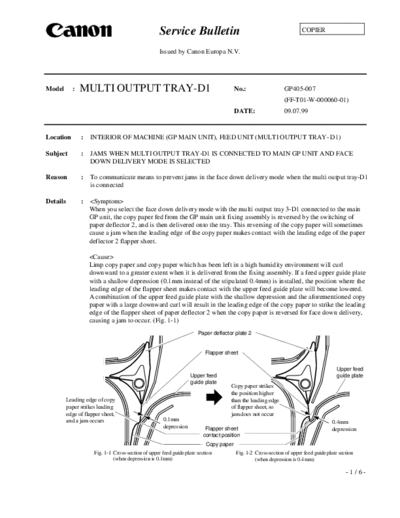
                    Limp copy paper and copy paper which has been left in a high humidity environment will curl
                    downward to a greater extent when it is delivered from the fixing assembly. If a feed upper guide plate
                    with a shallow depression (0.1mm instead of the stipulated 0.4mm) is installed, the position where the
                    leading edge of the flapper sheet makes contact with the upper feed guide plate will become lowered.
                    A combination of the upper feed guide plate with the shallow depression and the aforementioned copy
                    paper with a large downward curl will result in the leading edge of the copy paper to strike the leading
                    edge of the flapper sheet of paper deflector 2 when the copy paper is reversed for face down delivery,
                    causing a jam to occur. (Fig. 1-1)
                                                                       Paper deflector plate 2


                                                                          Flapper sheet


                                                                                                                                        Upper feed
                                                                   Upper feed                                                           guide plate
                                                                   guide plate
                                                                                     Copy paper strikes
                                                                                     the position higher
          Leading edge of copy                                                       than the leading edge
          paper strikes leading                                                      of flapper sheet, so
          edge of flapper sheet,                                                     jam does not occur
          and a jam occurs                            0.1mm                                                                          0.4mm
                                                      depression          Flapper sheet                                              depression
                                                                         contact position
                                                                           Copy paper
                      Fig. 1-1 Cross-section of upper feed guide plate section          Fig. 1-2 Cross-section of upper feed guide plate section
                               (when depression is 0.1mm)                                        (when depression is 0.4mm)

                                                                                                                                            -1/6-
                                                                                                                             GP405-007

             
             There will be strict supervision over the adherence to 0.4mm deepness for the upper feed guide plate
             depression. This is to avoid leading edge of the copy paper with a large downward curl to strike the
             leading edge of the flapper sheet when the copy paper is reversed. (Fig. 1-2) Also in order to make
             the tolerance less tight for the copy paper with large downward curl, the shape of the stay for the multi
             output tray-D1 and the angle in sticking the flapper sheet of the paper deflector have been changed.
             With these changes the position where the flapper sheet of the paper deflector plate 2 will make
             contact with the upper feed guide plate 2 shifts further upward. This will allow the leading edge of
             the paper with a large downward curl to avoid striking the leading edge of the flapper sheet by a more
             comfortable margin. (Fig. 2-1, 2-2)
                                                                   Change in shape of leading edge section
                                                                   of upper feed guide (Tip cut off)
               Upper stay
                                                                                     Upper stay
                                                         Paper deflector 2

                                                Change in the angle in sticking
                                                the sheet to shift the contact
                                                position with the guide further
                                                       d
                                                           Flapper sheet


                                           Deepness of
                                           0.1mm here for the                                                        Deepness of 0.4mm
                                           upper feed guide                                                          here for the upper feed
                                                                 Flapper sheet
                                                                                                                     guide
                                                                contact position
               Fig. 2-1 Cross-section of the former upper feed guide                 Fig 2-2 Cross-section of the new upper feed guide


Servicing   : When a jam occurs with the aforementioned symptoms, replace the GP main unit's upper feed guide
              by following the upper feed guide replacement procedures outlined below. However, the installation
              of the upper feed guide with insufficient deepness for the depression may be confined to the machines
              bearing the serial number in following ranges.

             GP405          ITA            PNY00001              PNY00200
                            UK             QNY00001              QNY00702
                            FRA            SNY00001              SNY00746
                            GER            TNY00001              TNY00266
                            AMS            UNY00130              UNY01879
             GP355          ITA            PNZ00001              PNZ00210
                            UK             QNZ00001              QNZ00810
                            FRA            SNZ00001              SNZ00750
                            GER            TNZ00001              TNZ00370
                            AMS            UNZ00001              UNZ01905


                                                                                                                                 -2/6-
                                                                                                                  GP405-007


1) Unplug the power supply
2) Remove the three copy trays (Fig. 3).
   Note: Take note of the location in which each
         copy tray was attached.


                                                                                 Fig. 3   Copy trays
                                                                                          (multi output tray-D1)

3) After releasing the bottom external cover
   hooks, release the top external cover hooks
   and remove the external cover (Fig. 4).


                                                                Top hooks

                                                        External cover

                                                             Bottom hooks

                                                                             Fig. 4       External Cover
                                                                                          (Multi output tray-D1


4) Remove the connector cover.
                                                                Hooks
i) Open the front cover of the main copier unit.
ii) Open the multi output tray-D1.
iii) Remove 1 screw and remove the connector
     cover (Fig. 5).


                                                                                                            Screw
                                                                                               Connector cover
                                                                   Fig. 5        Connector cover (Interior of the main unit
                                                                                 fixing assembly)

                                                                                 Multi output tray-D1 connectors
5) Remove the connector (Fig. 6)
i) 3 fixing assembly connectors
ii) 2 multi output tray- D1 connectors
iii) Disengage the multi output tray- D1
     cable from the wire clip.

                                                   Multi output tray-
                                                      D1 cable
                                                                                          Fixing assembly connectors
                                                                        Fig. 6     Connector assembly (Left side of the
                                                                                   main unit fixing assembly)

                                                                                                                    -3/6-
                                                                                                             GP405-007

                                                                        Stop plate                            Screw
 6) Remove 1 screw and remove the stop plate
    (Fig. 7).


                                                                        Fig. 7     Stop plate (Upper interior of the
                                                                                   multi output tray D1)

 7) Holding the delivery assembly latch in the left hand
    and the lower part of the multi output tray- D1 with
    the right hand, remove the multi output tray-D1 from
    the main unit (Fig. 8).
    Note: When placing the multi output tray-D1 (which
            was removed from the main unit) on the floor,
            orient the tray to bring the delivery tray to the
            bottom.

                                                                     Fig. 8      Multi output tray-D1 delivery assembly


 8) Remove 1 screw, and remove the sensor connector                                                              Screw
    cover on the right side of the fixing assembly (Fig.
    9).


                                                                   Sensor connector cover
                                                                    Fig. 9    Sensor connector cover (Right side of the
                                                                              main unit fixing assembly)


 9) Remove the connector on the right side of the
    fixing assembly (Fig. 10).


                                                                                                               Connector


                                                                    Fig. 10 Connector (Right side of the main unit
                                                                            fixing assembly


10) Remove the fixing assembly.                                 Fixing assembly
  i) Remove 1 screw, and remove the fixing assembly
      handle.
  ii) Remove 2 screws, and remove the fixing assembly
      (Fig. 11).


                                                                                            Screws
                                                                        Fig. 11 Fixing assembly (Main unit
                                                                                delivery assembly)
                                                                                                                  -4/6-
                                                                                                               GP405-007

                                                                                                 Connector
 11)Unplug the upper feed guide photointerrupter
    connector (Fig. 12).


                                                                            Fig. 12 Photointerrupter connector (nearer to
                                                                                    main unit delivery area)


 12) Open the upper feed guide until it is vertical, and
     hold in that position while removing it (Fig. 13).


                                                                  Upper feed
                                                                  guide


                                                                         Fig. 13 Upper feed guide (Main unit delivery area)


                                                                                                      Upper feed guide
13) Attach the photointerrupter connector which was
    attached to the old upper feed guide to the new upper
    feed guide.

14) Set the new upper feed guide to upright position (Fig.
    14-1), stick the upper feed guide shaft hole onto the
    feed inlet bushing, and close to the front (Fig. 14-2).
    Note: After attaching the upper feed guide, check that
            the upper feed guide shaft holes are properly
            inserted onto the feed inlet bushing (Fig. 14-2).                     Fig. 14-1   Main unit delivery area


                                                Feed inlet shaft bushing

                                                    Upper feed guide


                               Fig. 14-2   Upper feed guide (main unit delivery area)


                                                                                                                    -5/6-
                                                                                                                       GP405-007

               15)Start assembly in reverse order from step 11) and take a precaution to route the red cable at the top of
                  two other cables in inserting the three cable connectors. (See a magnified view on Fig. 15.)


                            Red cable                                              Fixing assembly connectors


                                         Fig. 15 Connector cover (Left side of main unit fixing assembly)

Service Parts :Because feed guides with deepness of 0.1mm have not been shipped to the field as service parts, it is
               possible to receive a feed guide with a deepness of 0.4mm for the depression by indicating part number
               FF5-6955-000 as usual in requesting the parts for your requirement. The service parts kept in stock in
               the field are good quality parts with the deepness of 0.4mm for the depression.
               Multi output tray-D1
                                                                                                             Inter-            P.C.
                                                                                                            change-    -- -- -- -- -- -- -- -- -
                 No.                    Description                         Part number         Q'ty
                                                                                                             ability
                  1    Old DEFLECTOR, 1                                     FF5-7209-00          
                                                                                                1 0                    Q30A-18
                                                                                                01
                                                                                                            No Yes
                       New DEFLECTOR, 1                                    FF5-7209-030
                  2    Old PLATE, UPPER                                    FF5-7211-000         10                     Q30A-22
                                                                                                01
                                                                                                            No Yes
                       New PLATE, UPPER                                    FF5-7211-040
               The above two parts make the tolerance even less tight to handle copy paper with a large downward
               curl. Replacing them at the same time the upper feed guide is replaced is not a requirement.

Affected machines:
              GP405         ITA           PNY00201         and later
                            UK            QNY00703         and later
                            FRA           SNY00747         and later
                            GER           TNY00267         and later
                            AMS           UNY01880         and later
               GP355        ITA           PNZ00211         and later
                            UK            QNZ00811         and later
                            FRA           SNZ00751         and later
                            GER           TNZ00371         and later
                            AMS           UNZ01906         and later


               Multi output tray- D1: Will communicate as soon as the information is made available.


                                                                                                                              -6/6-


◦ Jabse Service Manual Search 2026 ◦ Jabse PravopisonTap.bg ◦ Other service manual resources online : FixyaeServiceinfo