Service Manuals, User Guides, Schematic Diagrams or docs for : CANON Copiers GP 605 ServBull Jp_gen gpgen
<< Back | HomeMost service manuals and schematics are PDF files, so You will need Adobre Acrobat Reader to view : Acrobat Download Some of the files are DjVu format. Readers and resources available here : DjVu Resources
For the compressed files, most common are zip and rar. Please, extract files with Your favorite compression software ( WinZip, WinRAR ... ) before viewing. If a document has multiple parts, You should download all, before extracting.
Good luck. Repair on Your own risk. Make sure You know what You are doing.
Image preview - the first page of the document
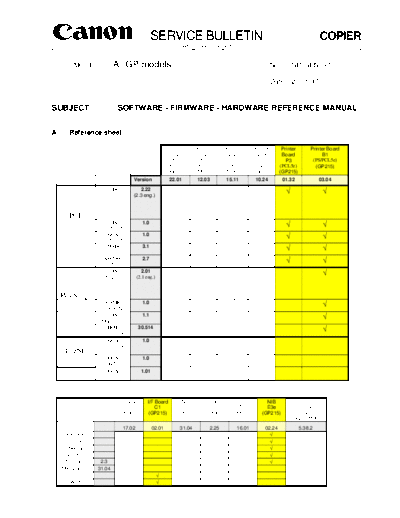
>> Download gpgen documenatation <<
Text preview - extract from the document
SERVICE BULLETIN COPIER
Issued by Canon Europa N.V.
MODEL: All GP models No.: GP-GEN-001
Date: 21.11.97
SUBJECT: SOFTWARE - FIRMWARE - HARDWARE REFERENCE MANUAL
A. Reference sheet
Printer Printer Printer Printer Printer Printer Board
Board Board Board Board Board B1
P1 P2 A1 C1 P3 (PS/PCL5e)
(PCL5) (PCL5e) (PS/PCL5e) (CaPSL) (PCL5e) (GP215)
(MDC) (MDC) (MDC) (MDC) (GP215)
Version 22.01 12.03 15.11 10.24 01.32 03.04
CIS
Win311, 95
2.22
(2.3 eng.)
PCL
CIS
WinNT3.51
1.0
GCA
WinNT3.51
1.0
MMS
Win3.11,95
3.1
SW2000
WinNT4.0
2.7
CIS
Win3.11
2.01
(2.1 eng.)
PostScript
CSME
Win95,NT4.0
1.0
CIS
Macintosh
1.1
IBM
OS/2 Warp
30.514
GCA
Win3.11,95
1.0
CaPSL
GCA
WinNT3.51
1.0
GCA
OS/2 Warp
1.01
I/F Board I/F Board NIB NIB NIB NIB Axis
B1 C1 E2 E2e TR1 E3e 540+/542+
(MDC) (GP215) (MDC) (MDC) (MDC) (GP215) /640
(GP215/MDC)
17.02 02.01 31.04 2.25 16.01 02.24 5.38.2
IPX/SPX
TCP/IP
EtherTalk
NetBIOS
NetSpot 2.3
MPConsole 31.04
ISIS
TWAIN
COPIER -2- GP-GEN-001
B. Software - Printer/Fax Drivers
M F O G G
u a v P P
Platform PDL Developer Driver l x e 2
Version t r 1 M
i l 5 D
l a C
i y
n
g
u
a
l
PCL5e
MMS 3.1
Windows 3.11
PostScript CIS 2.01
(2.1 eng.)
Windows 3.11 / 95
PCL5e
CIS 2.22
(2.3 eng.)
CaPSL GCA 1.0
PCL5e MMS 3.1
Windows 95
PostScript
CSME 1.0
PortManager CSME 1.0
Windows NT3.51 PCL5e
GCA 1.0
CIS 1.0
CaPSL GCA 1.0
Windows NT4.0
PCL5e SW2000 2.7
PostScript CSME 1.0
Apple Macintosh PostScript CIS/CSME 1.1
OS/2 PostScript IBM 30.514
CaPSL GCA 1.01
C. Software - NetSpot 2.3
(FGP-0801000)
Win3.1/3.11& Windows 95 Windows NT Macintosh SunSolaris 2.5
WFW 3.51 / 4.0 System 7 or or higher,
higher SunOS 4.1 or
higher
IPX/SPX
TCP/IP
AppleTalk
NetBIOS
COPIER -3- GP-GEN-001
D. Software - GP Series Scannerkit
(FGP-0601000)
ISIS PixView TWAIN ScanWorks
Driver Application Driver Application
(ISIS) (TWAIN)
Windows Windows Windows Windows
3.x/95/NT3.51/4. 3.x/95/NT3.51/4.0 3.x/95/NT4.0 3.x/95/NT4.0
0
GP MDC (30/55)
GP215
COPIER -4- GP-GEN-001
E. Firmware
Upgrade method
GP MDC Firmware version Specifications
board name
product number
Change EPROMs
GP30F DCContr: 03.01
IP: 20.01
F13-2296001
IP flash: 36.03 Flash RAM via download utility
(Ger, Fin, Swe, Nor, UK)
IP flash: 37.01
(Dan, Dut, Frn, Ita, Por, Flash RAM via download utility
Spa, Cru)
Change EPROMs
GP55II DC Contr: 22.01
IP: 43.01 (42.01) Change EPROMs
F12-8795001
Local Lang available
Firmware upgrade is done from
MDC A1/B1 90.01 PC with special RS232C cable to
New Core II the RC232C connector on the
Core Board.
F23-7241702 (A1)
F23-8641000 (B1)
To Upgrade the firmware cahange
Printer Board P1 22.01 Discontinued the ROMs on the board.
(PCL5)
F61-5622700
Connectors: Firmware upgrade is done from
Printer Board P2 12.03 RS323C, Centronics PC with normal Centronics cable
(PCL5e) straight to the Centronics port.
F61-5672700
Connectors: Change EPROM
Printer Board C1 10.24 RS323C, Centronics
(CaPSL)
F61-5642000
Connectors: Firmware upgrade is done from
Multi PDL Board A1 15.11 RS323C, Centronics, PC with normal Centronics cable
LocalTalk, straight to the boards connector.
F61-5662700 SCSI (for fonts HD)
(PostScript, PCL5e)
Supported protocols: Firmware upgrade is done via
NIB E2 31.04 TCP/IP, IPX/SPX, network. Using MPFLASHET
EtherTalk.
F61-5633706
Protocols: Firmware upgrade is done via
NIB E2e 2.25 TCP/IP, IPX/SPX, network. Using NetSpot 2.3
EthetTalk, NetBEUI
F61-5617000
Supported protocol: Firmware upgrade is done via
NIB TR1 16.01 IPX/SPX network. Using MPFLASHTR
F61-5663700
To Upgrade the firmware change
G3 Fax Board A1 31.05 (Dut,Fin,Swe) the ROMs on the board.
F61-5671000 (EC) 31.06 (Aus) G3 TIFF format
F61-5681000 (Swiss)
31.07 (Swi, Dan, Ita)
31.09 (Belg, Nor)
To Upgrade the firmware change
I/F Board B1 17.02 SCSI the ROMs on the board.
F61-5693700
COPIER -5- GP-GEN-001
E. Firmware (continued)
GP 215/210 Firmware Specifications Upgrade method
version
GP215 DC Contr 36.02 Change the EPROMs
F13-2991001 IP: 49.03 Use the Flash download utility
(Dut, Dan, Ita, from PC using the special RC232C
Fin, Ger, Frn, connector under the front cover.
Nor, Spa, Swe,
UK, Pol, Por)
Firmware upgrade is done from
Protocol Controller 07.01 PC with special RS232C cable to
the RC232C connector under the
front cover.
Connectors: Firmware upgrade is done from
Printer Board P3 01.32 RS323C, Centronics PC with normal Centronics cable
(PCL5e) straight to the board's Parallel
F61-6512-700 connector.
Connectors: Firmware upgrade is done from
Multi PDL B1 03.04 RS323C, Centronics, LocalTalk, PC with normal Centronics cable
SCSI (for fonts HD) straight to the board's Parallel
F61-6502-700 (PostScript, PCL5e) connector.
Protocols: Firmware upgrade is done via
NIB E3e 02.24 TCP/IP, IPX/SPX, EthetTalk, network.
NetBEUI
F61-6527-000
There is no actual firmware for Firmware upgrade is done from
G3 Fax Board C1 Uses the Image the Fax board. The information it
Processor PC with special RS232C cable to
needs is on the IP firmware. the RC232C connector under the
F61-6541-000 Firmware
front cover.
Uses G3 TIF format
Change the EPROM
I/F Board C1 02.01
F61-6552-000
F. Other GP related Software and Hardware
Software / Specifications Upgrade method G G
Firmware P P
versions 2
1 M
5 D
C
Axis 540+ / 542+ /560 NetPilot 1.7 Axis 540+ is PrintServer with
the10BaseT Connection (RJ45)
The PrintServer
Firmware is upgraded
Pserver and Axis 542+ is the PrintServer via Network with the
FGP-540EUR / FGP-540UK 5.38.2 with 10Base2 Connection (BNC). NetPilot Software.
FGP-542EUR / FGP-542UK Supported protocols:
FGP-640EUR / FGP-640UK TCP/IP, IPS/SPX,
NetBEUI/BIOS, EtherTalk.
Axis 640 is PrintServer with
the10BaseT Connection (RJ45)
and 10Base2
Canon SERVICE BULLETIN COPIER
Issued by Canon Europa N.V.
Model: GP55-30/GP200/GP215 Windows3.1/95 PCL5e No.: GP-GEN-002
Printer Driver v2.3 (97QAB-0028)
DATE: 21.11.97
LOCATION: GP55-30/GP200/GP215 Windows3.1/
95 PCL5e Printer Driver v2.3
SUBJECT: Version 2.3 Released
1. Outline
GP55-30/GP200/GP215 Windows3.1/95 PCL5e Printer Driver v2.3 (GP PCL5e Driver v2.3) was released.
2. Details
Here are the modifications in the GP PCL5e Driver v2.3 as compared with v2.22.
1) Support for the Network Interface Board-E2e/E3e
2) "All Pages" in [Media Source] on Media tab is changed to "Other Pages"
3) Corrections for the field claims from v2.22
Descriptions are as follows;
3-1) Apply button is grayed out
3-2) Application error on PowerPoint
3-3) In Page Maker5.0, color filled pattern prints as blank
3-4) The envelope unit not indicated on the bitmap when selected
3-5) Changing permanent fonts on the other ports does not update win.ini
3-6) Envelope Unit off, auto prompts for envelopes in cassette1
3-7) PowerPoint send fax, fax dialog minimize
3-8) PowerPoint does not fax correctly at 600dpi
3-9) Tray selection may be confusing
3-10) Multi Orientation
3-11) Multi Orientation job does not print correctly in MS Word
3-12) Separated page with GP Driver 2.0
3-13) Over printing characters with GP Driver 2.0
3-14) Missing line with GP Driver 2.0
3-15) Unknown characters - GP30F Driver 2.0
3-16) Reinstallation of GP55 PCL5a driver, cancel button does not work
3-17) Selecting connect button in Control Panel / Printer enables envelope unit
3-18) Alt + tab will not return FAX UI Dialog
3-19) Installation PCL5a Printer Driver - Cancel button does not work
3-20) GP55 PCL5a/5e settings lost for Media Source if Auto Configuration = ON
3-21) GP55 Paper Deck selection in GUI is incorrect in Transparency Interleaving
3-22) Bitmap distortion -1/4-
3-23) Outgoing FAX is double - spaced GP-GEN-002
3-24) 10+2 bin Sorter is not recognized by Auto Configuration (GP55/30)
3-25) Orientation is 1 page behind in MS Word
3-26) Incorrect underlining and strike-out in Word Perfect 6.1
3-27) IBM ThinkPad lock up in Windows95 applications
3-28) White text on black background does not print or prints incorrectly
3-29) Too many permanently downloadable fonts error with PageMaker6.0
3-30) Bar graph in PowerPoint not printed right
3-31) When printing an underline with the use of the TAB key after text there appears a gap
in the underline (GP55-30 only)
3-32) The vertical text does not print correctly (PowerPoint)
3. Remaining Problems and Restrictions
1) Does not print out arc image on Designer 4.1
[Problem]
When Arc/Circle pattern is printed in the Raster mode from Designer 4.1, circle of small dots is
printed out. However, printing in the HP-GL/2 mode is conducted normally.
[Cause and Countermeasure]
Printing result with the Raster mode is the correct output according to the specifications. The
same result appears with HP printer.
2) Warning message should inform user that resolution has been reset with Reduce/Enlarge
[Problem]
Resolution is changed from 600dpi to 300dpi automatically when Reduce/Enlarge function is used,
but the warning message is not indicated.
[Cause and Countermeasure]
Limitation as designed
3) HP-GL/2 mode and Medium look the same as HP/GL2 and High
[Problem]
Quality of Graphics does not change when "Graphics Quality" is changed while HP-GL/2 is set in
"Graphic Mode"
[Cause and Countermeasure]
The operation according to the specifications. Quality of Graphics does not change in the HP-GL/2
mode.
4) Send FAX UI displays incorrect values in Option tab
[Problem]
As for FAX transmission, the paper size and print orientation on the fax cover page become the size
and orientation specified in the fax driver, on the other hand, the paper size and print orientation
in the text become the paper size and orientation specified in the printer driver. As the paper size
and print orientation of the printer driver differ from those of the fax driver, the printing result on
the cover page differs from that in the text.
[Cause and Countermeasure]
Designed as specification
5) PowerPoint Graphing Dropout
[Problem]
When printing from PowerPoint in Raster mode of the driver setting, printing imported graphics
fails. Printing in HP-GL/2 mode is conducted normally.
[Cause and Countermeasure]
Limitation
-2/4-
6) Adobe Acrobat black backgrounds do not print well in HP-GL/2 GP-GEN-002
[Problem]
When the data with black background is printed in the HP-GL/2 mode, the black background is
printed on the text and the graphic image.
[Cause and Countermeasure]
This problem lies in the application. The same problem occurs when HP printer is used. Printing in
the Raster mode is conducted normally.
7) Adobe Acrobat prints landscape slides upside down
[Problem]
When the landscape data is printed using Acrobat, it is printed upside down.
[Cause and Countermeasure]
This problem lies in the application. The same problem occurs when HP printer is used.
8) Copy option in driver not match application(PowerPoint)
[Problem]
When the number of copies on the driver UI is changed using PowerPoint 7.0, the number of copy
on print dialog in PowerPoint does not change.
[Cause and Countermeasure]
This problem lies in the application, since the problem occurs only with PowerPoint. The same
problem occurs when HP printer is used.
9) Reinstallation does not change port assignment
[Problem]
The driver re-installed after set up program is executed while GP driver is already installed. In
this situation, when the port assignment is changed, the previous port is used after Windows is
restarted. This problem occurs only in Windows95.
[Cause and Countermeasure]
Limitation. This problem occurs because this driver runs the installer for Windows3.1 on
Windows95. The new port assignment should be executed after installing the driver.
10) Corel DRAW print job is not printed correctly in HP-GL/2 mode
[Problem]
Printing result is not correct when the Corel DRAW data is printed in the HP-GL/2 mode.
[Cause and Countermeasure]
Limitation. When printing in the Raster mode, normal printing result appears.
11) Windows3.11 machine running Access2.0 print tremendously slow
[Problem]
The data created with Access 2.0 is printed slower than it is printed with HP printer.
[Cause and Countermeasure]
Deferred
12) Unable to use port name more than 32 characters
[Problem]
If the port name that the driver is redirected to is greater than 32 characters, the entry in the
GPDRV.INI file will be truncated to 32 characters.
[Cause and Countermeasure]
Limitation as design. The port name on GP driver has a maximum limit of "31character +NULL"
13) Microsoft Works v4.0 not able to sort
[Cause and Countermeasure]
This problem lies in the application. This is because the 3 pages 3 copies data is treated as 9 pages
1 copy data when MS Works is used.
-3/4-
GP-GEN-002
14) The Network Interface Board-E3e/E2e cannot operate with the Automatic Configuration
mode when it is using NDS mode.
[Cause and Countermeasure]
Limitation as NIB board specification. The users should use Bindery mode or disable the Automatic
Configuration.
4. Combinations of ROMs and Software Versions
1) GP200/215 Series
GP200/215 IP Ver.45.02 and later
D-CON Ver.35.04 and later
PRCON Ver.7.01
PS/PCL Ver.3.04
PCL5e Ver.1.32
2) GP55/30 Series
GP55F MMI Ver.50.18 MDC NCORE Ver.90.01
IP Ver.43.01 NIB-E2 Ver.31.04
D-Con Ver.22.01 NIB-E2e Ver.2.25
PSPCL Ver.15.11
GP30F ICORE Ver.32.01 and later PCL5e Ver.12.03
IP Ver.17.01 and later
D-Con Ver.3.01
-4/4-
Canon SERVICE BULLETIN COPIER
Issued by Canon Europa N.V.
No.: GP-GEN-003
Model: Printer Board-P2 (97QAB-0039)
DATE: 19.12.97
LOCATION: Printer Board-P2
SUBJECT: Firmware Version Up (ver. 15.12)
1. Outline
Printer Board-P2 ( PCL5e Printer Board for GP55-30) Ver.15.12 was released.
2. Details
As Printer Board-P2 ver.15.12 was released, the modification from ver.12.03 fixes the following problem:
- The data transferring via NIB-E2/E2e has some difficulty and the printing job fails.
3. Combinations of ROMs
GP55F MMI Ver.50.18 MDC NCORE Ver.84.02 and later
IP Ver.43.01 NIB-E2 Ver.31.04
D-Con Ver.22.01 NIB-E2e Ver.2.25
PCL5e Ver.15.12
GP30F ICORE Ver.32.01 and later
IP Ver.17.01 and later
D-Con Ver.3.01
-1/1-
Canon SERVICE BULLETIN
Issued by Canon Europa N.V.
COPIER
No.: GP-GEN-004
Model: Multi PDL Board-B1 (97QAB-0040)
Printer Board-P3 DATE: 19.12.97
LOCATION: Multi PDL Board-B1 / Printer Board-P3
SUBJECT: Firmware Version Up (ver. 4.01)
1. Outline
Multi PDL Board-B1 and Printer Board-P3 ver.4.01 were released.
2. Details
As Multi PDL Board-B1 and Printer Board-P3 ver.4.01 were released., the modification from ver.3.04 fixes
the following problem:
When "Multi Size/Orientation Job" is selected by the GP PCL Printer Driver and printing is executed with
"GP Envelope Feeder Attachment" installed, printing on an envelope turns upside down.
3. Combinations of ROMs
GP200/215 IP Ver.42.05 and later
D-Con Ver.35.04 and later
PRCON Ver.7.01
PS/PCL Ver.4.01
PCL5e Ver.4.01
NIB-E3 Ver.30.06
NIB-E3e Ver.2.24
4. Remarks
When printing is executed on an envelope using Post Script Printer Driver, it is necessary to execute print
after "Rotated Landscape" is selected with User Interface of the PS Driver.
-1/1-
Canon SERVICE BULLETIN COPIER
Issued by Canon Europa N.V.
No.: GP-GEN-005
Model: GP55-30/GP200/GP215 (97QAB-0030)
DATE: 30.01.98
SUBJECT: Windows3.1 Post Script Printer Driver v2.1
1. Outline
GP55-30/GP200/GP215 Windows3.1 Post Script Printer Driver v2.1 (GP Windows3.1 PS Driver v2.1) was
released in English, French, German, Italian and Spanish.
2. Details
Here are the modifications in the GP Windows3.1 PS Driver v2.1 as compared with v2.01.
1) Support for the Network Interface Board-E2e/E3e
2) For GP55-30 series, 10+2 bin sorter can be configured using Auto Configuration
3) Support of a function "Multi Size/Orientation Job"
4) Support of a function "Additional Paper Source"
This function allows you to define a different source (such as a Cassette or Paper Deck) for the first page of a
printed document. This feature is useful when you have preprinted stationery (such as a letterhead) that you want
to use for the first page of a document, while using plain paper for the remaining pages of the document.
3. Remaining Problems and Restrictions
1) The last settings used in Word are the default settings used in Excel 5.0a
[Problem] GPPostW31V2.1Mu#012
If working within a Word Document and then closing the application to work in Excel. The last options are
defaulted into the Excel driver settings. For example the last Word document was set for 3 copies, then the
application default setting would be set at 3 copies. Changing the settings within the driver does not change
the settings, and always defaults back to the settings last used in Word.
[Cause and Countermeasure]
The countermeasure is to manually clarify the driver settings before printing.
2) Will not duplex in Excel 5.0a
[Problem] GPPostW31V2.1Mu#014
When printing from Excel although the options for duplexing are available they do not activate when
selected. A three page document was printed with duplex set to short edge binding, and the output was
3 separate pages.
[Cause and Countermeasure]
Limitation.
-1/3-
GP-GEN-005
3) Will not print from the Paper Deck with Excel 5.0a
[Problem] GPPostW31V2.1Mu#015
When selecting paper source to paper deck, the paper is selected from the Auto tray which was tray 1. This
does not occur if using Word.
[Cause and Countermeasure]
Limitation.
4) Will not print multiple copies on first attempt
[Problem] GPPostW31V2.1Mu#009
When increasing the amount of copies from 1 to say 4, only 1 copy is produced. When attempting to print
again then the 4 copies will print.
[Cause and Countermeasure]
Limitation.
5) Auto Configuration does not work with NDS queues
[Problem] GPPostW31V2.1Mu#010
The NIB E3e and E2e can not operate the Auto Configuration of the printer driver when they are attached
to a Novell NDS queue.
[Cause and Countermeasure]
Limitation of NIB specification. Will only work in the NIB's are connected to a Bindery Queue. Otherwise
manual configuration must be used.
6) Auto Configure does not see Duplex A1
[Problem] GPPostW31V2.1Mu#016
The Auto Configuration does not report that the pedestal A1 is attached when it is.
[Cause and Countermeasure]
The cause is in the firmware of the GP. To work around this problem this pedestal must be manually con-
figured.
7) French driver ONLY - There are no Hot Keys for Scaling and Copies
[Problem]
There are no Hot Keys marked for Scaling (Echelle) or Copies (Copies). They do show in the help file as
ALT+H (Echelle) and ALT+I (Copies) but not in the driver.
[Cause and Countermeasure]
Limitation.
-2/3-
GP-GEN-005
4. Combinations of ROMs and Software Versions tested
1) GP200/215 Series
GP200/215 IP Ver.45.02 and later
D-CON Ver.35.04 and later
PRCON Ver.7.01
PS/PCL Ver.3.04
PCL5e Ver.1.32
2) GP55/30 Series
GP55F MMI Ver.50.18
IP Ver.43.01
D-Con Ver.22.01
GP30F ICORE Ver.32.01 and later
IP Ver.17.01 and later
D-Con Ver.3.01
MDC NCORE Ver.90.01
NIB-E2 Ver.31.04
NIB-E2e Ver.2.25
PSPCL Ver.15.11
PCL5e Ver.12.03
-3/3-
Canon SERVICE BULLETIN COPIER
Issued by Canon Europa N.V.
No.: GP-GEN-006
Model: GP55-30/GP200/GP215
(98SQE-B0004)
DATE: 30.01.98
LOCATION: Windows95 PostScript Printer Driver v1.0
SUBJECT: New Release (English)
1. Outline
GP55-30/GP200/GP215 Windows95 PostScript Printer Driver v1.0 was released.
This printer driver is a customized driver for GP series based on Adobe PS 4.1.1.
2. Main Remaining Problems and Restrictions
For more detailed information, please refer to the README file that comes up with the driver.
1) Operations of On and Off in the "Installable Options/Refine" settings on the [Device
Options]Tab are opposite of the selected setting.
[Problem]
When Refine is set to On, the data of when Refine is set to Off is transmitted by the MDC
Command. Conversely, when Refine is set to Off, the data of when Refine is set to On is
transmitted by the MDC Command.
[Countermeasure]
To be deferred
2) Driver Setup - the backward button does not appear to cancel the setting of the driver's
name
[Problem]
Selecting the appropriate driver and the Next button during installation, then using the Back button
to go back and change the selection (i.e. from GP PostScript to GP200/215 PostScript) and again
selecting the Next button, the Setup does not appear to retain the new driver settings (the driver's
name). In the other words, the previous selection remains in the Setup box.
When you continue the installation, it is possible to end up with the driver name not matching the
driver actually installed.
[Cause and Countermeasure]
To be deferred, since the user can change a printer name after installing the driver.
3) The Network Interface Board-E3e/E2e cannot operate with the Automatic Configuration
mode when it is using NDS mode.
[Cause and Countermeasure]
Limitation as per the NIB board specification. The users should use Bindery mode or disable the
Automatic Configuration.
-1/2-
GP-GEN-006
3. Combinations of ROMs
1) GP200/215 Series
GP200/215 IP Ver.45.02 and later
D-CON Ver.35.04 and later
PRCON Ver.7.01
PS/PCL Ver.4.01
PCL5e Ver.4.01
NIB-E3e Ver.2.24
2) GP55/30 Series
GP55F MMI Ver.50.18 MDC NCORE Ver.90.01
IP Ver.43.01 NIB-E2 Ver.31.04
D-Con Ver.22.01 NIB-E2e Ver.2.25
PSPCL Ver.15.11
GP30F ICORE Ver.32.01 and later PCL5e Ver.15.12
IP Ver.17.01 and later
D-Con Ver.3.01
-2/2-
Canon SERVICE BULLETIN COPIER
Issued by Canon Europa N.V.
Model: GP Scan for Windows No.: GP-GEN-007
(98SQE-B0006)
DATE: 30.01.98
LOCATION: Canon GP Scan for Windows Ver.1.0
SUBJECT: New Release
1. Outline
Canon GP Scan for Windows Ver.1.0 was released. The GP Scan driver is a 32-bit TWAIN-compliant scan-
ner driver which allows the Canon GP30F/55 and GP200/215 series to serve as scanner. When this driver
is selected from within a TWAIN-compliant software program, these copiers can be used to scan image
data.
2. Details
As GP Scan for Windows 1.0 was released, the system requirements are informed as follows;
2-1) Required Hardware
- ASPI -compliant SCSI host adapter card (Adaptec recommended)
The following host adapter cards have been tested with GP Scan Driver.
AHA-2940 and AHA-1542CP
- SCSI Interface Board - B1 for the GP30F/55
- SCSI Interface Board - C1 for the GP215/200
2-2) Required Software
Operating Systems supported by the Canon GP Scan areas follows;
- Microsoft Windows 95
- Microsoft Windows NT3.51
- Microsoft Windows NT4.0
2-3) Applications which can employ the GP Scan Driver
- Adobe PhotoShop 4.0
- Corel Draw 7
- Symantec WinFax PRO v8.0
- Watermark Client Release 3.0
- Xerox Pagis Pro 97
- Caere OmniPage Pro Ver.7.0
- Wang Imaging Ver.4.00
- Canon CanoBureau V1.01
Please view the ReadMe file accompanying the scan driver for a description of any restrictions
associated with the applications above. -1/2-
GP-GEN-007
3. Main Remaining Problems and Restrictions
1) The image margin width achieved is currently a function of the scan resolution chosen.
When Scan is executed with low resolution such as 150dpi in the GP215/200 series, the
margin on the image is enlarged relative to the same image scanned at a higher resolution.
The two examples here show the relation between scan resolution and margin width.
Scan Resolution Margin Width
150dpi 10mm
600dpi 2.5mm
[Countermeasure]
GP Firmware limitation. This problem will be addressed by a future update to GP215 IP
firmware (Ver. 54.xx or higher). The margin will be set to 2.5mm independent of the choosen
scan resolution.
4. Combinations of ROMs
1) GP200/215 Series
GP200/215 IP Ver.45.02 and later
D-CON Ver.35.04 and later
RDF-G1 Ver.6.01
ADF-F1 Ver.6.02
SCSI-C1 Ver.2.01
2) GP55/30 Series
GP55F MMI Ver.50.18 MDC NCORE Ver.90.01
IP Ver.43.01 SCSI-B1 Ver.17.02
D-Con Ver.22.01
GP30F ICORE Ver.32.01 and later
IP Ver.17.01 and later
D-Con Ver.3.01
-2/2-
6(59,&(%8//(7,1 &23,(5
,VVXHGE\&DQRQ(XURSD19
02'(/ 1HWZRUN0XOWL3'/3ULQWHU%RDUG' 1R *3*(1
1HWZRUN3ULQWHU%RDUG( 64(%
'DWH
/2&$7,21 6<67(062)7:$5(9
68%-(&7 1(:5(/($6(
2XWOLQH
&RQWUROOHUVIRU*3◦ Jabse Service Manual Search 2026 ◦ Jabse Pravopis ◦ onTap.bg ◦ Other service manual resources online : Fixya ◦ eServiceinfo