Service Manuals, User Guides, Schematic Diagrams or docs for : CANON Copiers GP 605 ServBull ServBullGP605 gp605-06
<< Back | HomeMost service manuals and schematics are PDF files, so You will need Adobre Acrobat Reader to view : Acrobat Download Some of the files are DjVu format. Readers and resources available here : DjVu Resources
For the compressed files, most common are zip and rar. Please, extract files with Your favorite compression software ( WinZip, WinRAR ... ) before viewing. If a document has multiple parts, You should download all, before extracting.
Good luck. Repair on Your own risk. Make sure You know what You are doing.
Image preview - the first page of the document
>> Download gp605-06 documenatation <<
Text preview - extract from the document
                                              Service Bulletin                                      COPIER


                                              Issued by Canon Europa N.V.


Model      :   GP605                                                      No.:                  GP605-006
                                                                                                (FF-T01-K1-000014-01)
                                                                          DATE:                 07.05.99


Location       :    DEVELOPER

Subject        :    DEVELOPER CAUSING LIGHT OR COMPLETELY BLANK IMAGE


Reason         :    To communicate procedures for countermeasures regarding the possibility of light or completely blank
                    image occurring due to scraping of the developer washer which causes electrical leaks.

Details        :
                    Light or completely blank image sometimes occur depending on the workload in terms of the copy
                    volume achieved to date.

                    A washer which has been added (to the space between the electrode positioning plate and the
                    developer sleeve) as a countermeasure for preventing noise may scrape off over a period of time, and
                    then the broken fragments falling into the die-cast section of the main unit could result in electrical
                    leaks.

                    Temporary countermeasure: Remove the washer which has been used to prevent noise.
                    * If there is a space of 0.2mm between the electrode positioning plate and the developer sleeve,
                    noise will not occur even upon removing the washer.

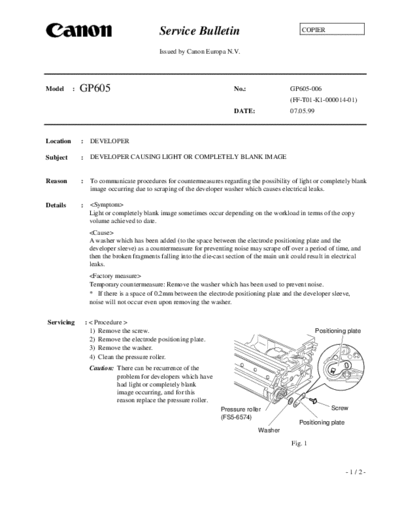
Servicing          : < Procedure >
                     1) Remove the screw.                                                                  Positioning plate
                     2) Remove the electrode positioning plate.
                     3) Remove the washer.
                     4) Clean the pressure roller.
                    Caution: There can be recurrence of the
                             problem for developers which have
                             had light or completely blank
                             image occurring, and for this
                             reason replace the pressure roller.
                                                                     Pressure roller                            Screw
                                                                     (FS5-6574)
                                                                                                   Positioning plate
                                                                                    Washer

                                                                                                Fig. 1


                                                                                                                       -1/2-
                                                                                                               GP605-006


               5) Insert the 0.2mm spacer (for
                  example, OHP sheets of about
                  0.2mm thickness) and place the
                  electrode positioning plate.
               6) Tighten the screw.
                  * Since there is a magnet in the
                     developer sleeve roller, tighten
                     the screw at the natural position
                     without going against the effect
                     of the magnet.                                                                            Screw
                                                                     Spacer              Positioning plate
                                                                     (0.2mm)

                                                                                       Fig. 2
                   Caution: In attaching the electrode positioning plate, exercise caution not to raise it up or bend it.

                                  OK                                                NG


                                                 Positioning plate                                   Positioning plate


                                                                                                Be careful not to raise
                                                               Fig. 3                           it up or bend it.


Affected machines:
              Affected machines
                 PLE00027  PLE00102
                 NLE00848  NLE01858
                 PLP00007  PLP00048
                 QLE0052  QLE00245
                 RLE00017  RLE00039
                 SLE00235  SLE00371
                 TLE00082  TLE00139
                 ULE00362  ULE00536
              A round yellow label has been attached to the outside of boxes for modified machines.


                                                                                                                  -2/2-
◦ Jabse Service Manual Search 2026 ◦ Jabse Pravopis ◦ onTap.bg ◦ Other service manual resources online : Fixya ◦ eServiceinfo