Service Manuals, User Guides, Schematic Diagrams or docs for : DENON Home Theatre System Home Theatre System Denon - S-301 Service Bulletin OST-F1346
<< Back | HomeMost service manuals and schematics are PDF files, so You will need Adobre Acrobat Reader to view : Acrobat Download Some of the files are DjVu format. Readers and resources available here : DjVu Resources
For the compressed files, most common are zip and rar. Please, extract files with Your favorite compression software ( WinZip, WinRAR ... ) before viewing. If a document has multiple parts, You should download all, before extracting.
Good luck. Repair on Your own risk. Make sure You know what You are doing.
Image preview - the first page of the document
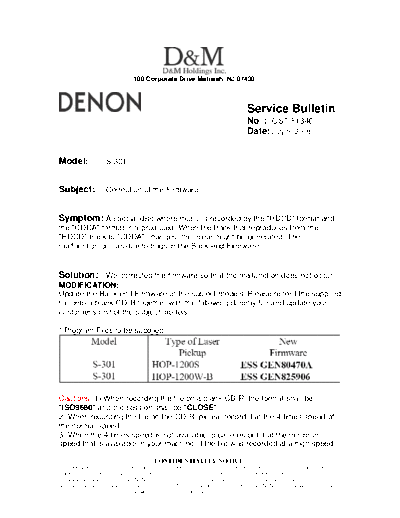
>> Download Service Bulletin OST-F1346 documenatation <<
Text preview - extract from the document
                                  100 Corporate Drive Mahwah, NJ 07430


                                                                                       Service Bulletin
                                         No. : OST-F1346
                                         Date: July 9, 2008
_____________________________________________________________

Model:               S-301


Subject:             Correction of the Firmware.


Symptom: A special disc where music is recorded by the "HDCD" format and
the "CDDA" format is reproduced. When the track that reproduces from the
"HDCD" track to "CDDA" changes, the noise might be generated. The
malfunction occurs due to bugs in the Back-end Firmware.


Solution: We corrected the firmware so that the malfunction does not occur.
MODIFICATION:
Update the Back-end Firmware of the subject models. Please record the supplied
file onto a blank CD-R together with the following dummy file and update your
customer's unit of the subject models.

* Program Files to be supplied:


Cautions: 1) When recording the file on a blank CD-R, the format shall be
"ISO9660" and the session shall be "CLOSE".
2) When recording the file on the CD-R, please record it at the 4-times speed of
the normal speed.
3) When the 4-times speed is not available, please record it at the minimum
speed that is available in your machine. If the file was recorded at a high speed,
______________________________________________________________________________________
                             CONFIDENTIALITY NOTICE:
The information contained in this document is intended for the exclusive use by DENON Authorized Service Centers and their
employees. This document may contain information that is privileged, confidential and may be protected from disclosure under
applicable laws and terms of the DENON Service Agreement. Any distribution, disclosure, dissemination or copying of this
document and the information it contains is prohibited. No responsibility will be accepted by DENON for any damage, injury or loss
resulting from the misuse of the information contained in this document.
such as 32 or 48 times speed of the normal speed, the upgrading may fail due to
the data incorrectly recorded on the CD-R.

Procedure to update the Back-end Firmware:
(1) Turn on the Power of the unit, and open the Disc Tray.
(2) Put the Disc for updating the Back-end Firmware on the Tray and close the
Tray.
(3) The update starts automatically. After completion of the update, the Tray
opens automatically. Take out the Disc from the Tray.
(4) Under the above condition, the unit will not accept any buttons operation.
Therefore, unplug the AC Power Cord from the AC outlet once. Then, initialize
the unit.

Note: During the rewriting operation, do not turn off the Power Supply of the unit
or do not switch the functions of the unit, by any means.

Initialization Procedures:
(1) Press the "ON/STANDBY" switch to set the standby mode, then unplug the
set's power supply cord from the wall power outlet.
(2) Hold the following "EJECT" button and "FUNCTION" button after 30 second,
and plug the power supply cord into the outlet.
(3) Check that the "INITIALIZE" is flashing with an interval of about 1 second,
and release your fingers from the 2 buttons. The micro processor will be
initialized.

Confirmation of the Version of Firmware:
(1) During the STANDBY mode, while holding the "STOP" and ">>l" buttons on
the unit down simultaneously, press "ON/STANDBY" button.
(2) Press "STATUS" button on the back of the Remote Control, so that each
version appears on the display.
(3) Confirm that the Back-end Version is displayed as follows.

Note: If the rewriting operation fails, replace IC102 on the 1U-3692 with the
following IC and update the unit again according to this Service Information.


Serial Number Range:
(Last 5-digits)


______________________________________________________________________________________
                             CONFIDENTIALITY NOTICE:
The information contained in this document is intended for the exclusive use by DENON Authorized Service Centers and their
employees. This document may contain information that is privileged, confidential and may be protected from disclosure under
applicable laws and terms of the DENON Service Agreement. Any distribution, disclosure, dissemination or copying of this
document and the information it contains is prohibited. No responsibility will be accepted by DENON for any damage, injury or loss
resulting from the misuse of the information contained in this document.
◦ Jabse Service Manual Search 2026 ◦ Jabse Pravopis ◦ onTap.bg ◦ Other service manual resources online : Fixya ◦ eServiceinfo