Service Manuals, User Guides, Schematic Diagrams or docs for : Harman Kardon AVR AVR-139 & 141 & 142 AVR-139 & 141 & 142 Rev 0
<< Back | HomeMost service manuals and schematics are PDF files, so You will need Adobre Acrobat Reader to view : Acrobat Download Some of the files are DjVu format. Readers and resources available here : DjVu Resources
For the compressed files, most common are zip and rar. Please, extract files with Your favorite compression software ( WinZip, WinRAR ... ) before viewing. If a document has multiple parts, You should download all, before extracting.
Good luck. Repair on Your own risk. Make sure You know what You are doing.
Image preview - the first page of the document
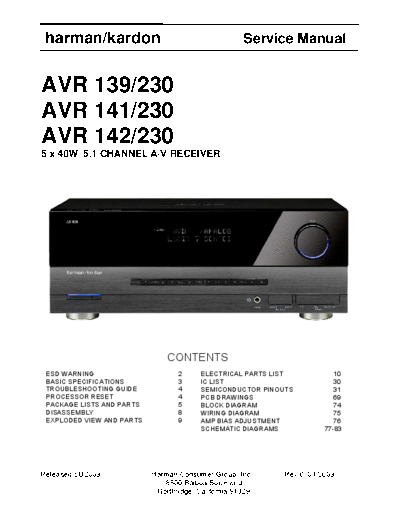
>> Download AVR-139 & 141 & 142 Rev 0 documenatation <<
Text preview - extract from the document
harman/kardon                                        Service Manual


AVR 139/230
AVR 141/230
AVR 142/230
5 x 40W 5.1 CHANNEL A/V RECEIVER


                               CONTENTS
 ESD WARNING                      2      ELECTRICAL PARTS LIST            10
 BASIC SPECIFICATIONS             3      IC LIST                          30
 TROUBLESHOOTING GUIDE            4      SEMICONDUCTOR PINOUTS            31
 PROCESSOR RESET                  4      PCB DRAWINGS                     69
 PACKAGE LISTS AND PARTS          5      BLOCK DIAGRAM                    74
 DISASSEMBLY                      8      WIRING DIAGRAM                   75
 EXPLODED VIEW AND PARTS          9      AMP BIAS ADJUSTMENT              76
                                         SCHEMATIC DIAGRAMS            77-83


Released EU2009            Harman Consumer Group, Inc.      Rev 0, 04/2009
                              8500 Balboa Boulevard
                            Northridge, California 91329
harman/kardon                                                                                                 AVR 139-141-142/230 Service Manual


 Some semiconductor (solid state) devices can be damaged easily by static electricity. Such components commonly are called

 Electrostatically Sensitive (ES) Devices. Examples of typical ES devices are integrated circuits and some field effect transistors and

 semiconductor "chip" components.

 The following techniques should be used to help reduce the incidence of component damage caused by static electricity.

 1. Immediately before handling any semiconductor component or semiconductor-equipped assembly, drain off any electrostatic charge on

   your body by touching a known earth ground. Alternatively, obtain and wear a commercially available discharging wrist strap device,

   which should be removed for potential shock reasons prior to applying power to the unit under test.

 2. After removing an electrical assembly equipped with ES devices, place the assembly on a conductive surface such as aluminum foil, to

   prevent electrostatic charge build-up or exposure of the assembly.

 3. Use only a grounded-tip soldering iron to solder or unsolder ES devices.

 4. Use only an anti-static solder removal device. Some solder removal devices not classified as "anti-static" can generate electrical charges

   sufficient to damage ES devices.

 5. Do not use freon-propelled chemicals. These can generate electrical change sufficient to damage ES devices.

 6. Do not remove a replacement ES device from its protective package until immediately before you are ready to install it. (Most replacement

   ES devices are packaged with leads electrically shorted together by conductive foam, aluminum foil or comparable conductive material.)

 7. Immediately before removing the protective material from the leads of a replacement ES device, touch the protective material to the

   chassis or circuit assembly into which the device will be installed.

   CAUTION : Be sure no power is applied to the chassis or circuit, and observe all other safety precautions.

 8. Minimize bodily motions when handling unpackaged replacement ES devices. (Otherwise harmless motion such as the brushing together

   or your clothes fabric or the lifting of your foot from a carpeted floor can generate static electricity sufficient to damage an ES devices.


 Each precaution in this manual should be followed during servicing.

 Components identified with the IEC symbol        in the parts list are special significance to safety. When replacing a component identified with

     , use only the replacement parts designated, or parts with the same ratings or resistance, wattage, or voltage that are designated in the

 parts list in this manual. Leakage-current or resistance measurements must be made to determine that exposed parts are acceptably

 insulated from the supply circuit before retuming the product to the customer.


                                                                                                                                                  2
                                                                                                                                         Page 2 of 83
   harman/kardon                                                                                     AVR 139-141-142/230 Service Manual


Technical Specifications for AVR Surround Receiver

Audio Section                                                      FM Tuner Section
stereo Mode                                                              frequency Range                          87.5
◦ Jabse Service Manual Search 2026 ◦ Jabse Pravopis ◦ onTap.bg ◦ Other service manual resources online : Fixya ◦ eServiceinfo