Service Manuals, User Guides, Schematic Diagrams or docs for : Kyocera Printer FS-6025-6030MFP SERVICEBULLETINS 2K3-002
<< Back | HomeMost service manuals and schematics are PDF files, so You will need Adobre Acrobat Reader to view : Acrobat Download Some of the files are DjVu format. Readers and resources available here : DjVu Resources
For the compressed files, most common are zip and rar. Please, extract files with Your favorite compression software ( WinZip, WinRAR ... ) before viewing. If a document has multiple parts, You should download all, before extracting.
Good luck. Repair on Your own risk. Make sure You know what You are doing.
Image preview - the first page of the document
>> Download 2K3-002 documenatation <<
Text preview - extract from the document
                                   Service Bulletin
 SB Number: SB 2K3-002                                                  Creation Date: 04/03/2011
 Subject:            The LVU main PWB has been changed
 Model:              FS-6025MFP/6025MFP(B)/6030MFP


Contents of changes
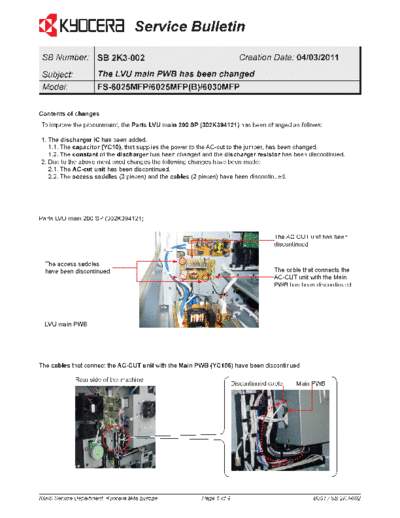
To improve the procurement, the Parts LVU main 200 SP (302K394121) has been changed as follows:

1. The discharger IC has been added.
   1.1. The capacitor (YC10), that supplies the power to the AC-cut to the jumper, has been changed.
   1.2. The constant of the discharger has been changed and the discharger resistor has been discontinued.
2. Due to the above mentioned changes the following changes have been made:
   2.1. The AC-cut unit has been discontinued.
   2.2. The access saddles (3 pieces) and the cables (2 pieces) have been discontinued.


Parts LVU main 200 SP (302K394121)

                                                                                     The AC-CUT unit has been
                                                                                     discontinued


  The access saddles
  have been discontinued                                                             The cable that connects the
                                                                                     AC-CUT unit with the Main
                                                                                     PWB has been discontinued


  LVU main PWB


The cables that connect the AC-CUT unit with the Main PWB (YC106) have been discontinued

             Rear side of the machine
                                                                      Discontinued cable    Main PWB


KMIS Service Department, Kyocera Mita Europe            Page 1 of 4                               B031 / SB 2K3-002
                                      Service Bulletin

Parts
No. Old Parts        New Parts            Description                                          Q'TY           Interchange-
    No.              No.                                                                                      ability
                                                                                               Old    New Old         New
1       302K394120 302K394121             PARTS LVU MAIN 200 SP                                1      1       X       O
        2K394120   2K394121


Classification      Entire stock rework                             X In-field modification by case No modification necessary
                                               In-field modification at next visit
Field measure     When replacing the Parts LVU main 200 SP, please use the latest type. When the old type of the
                  LVU main PWB is installed in the machine, both the old and latest type of the LVU main 200 SP
                  can be used. Please note that the AC-cut unit, access saddles (3 pieces) and cables (2 pieces)
                  have to be removed when using the latest type of the Parts LVU main 200 SP (302K394121).


Serial numbers of affected machines
Type                                                                  Serial number
 FS-6025MFP/6025MFP/B/6030MFP                         February 2011 production.
The above mentioned changes have been applied to machines produced after the above mentioned production date.


                              Recognizing the latest type of the LVU Main PWB


                                   LABEL

                                   Old LVU main PWB: 302K3****0(<--Last digit is "0")
                                   New LVU main PWB: 302K3****1(<--Last digit is "1")


KMIS Service Department, Kyocera Mita Europe                          Page 2 of 4                         B031 / SB 2K3-002
                                       Service Bulletin

No. Figure                                                      Procedure
1                                                               Remove the controller box
                                                                cover at the lower right side of
                                                                the rear side of the machine.


                           Controller box cover


2                                                               Remove the rear cover.
                                                                (When refitting it, please fit the
                                                                hooks to the sections that are
                                                                circled in red in the left figure.)


3                                                               Remove the left lower cover.


KMIS Service Department, Kyocera Mita Europe      Page 3 of 4                   B031 / SB 2K3-002
                                   Service Bulletin

4                                                                Remove the front upper cover
                                                                 at the machine front side.
                                                                 (When refitting it, please fit the
                                                                 lower hook of the cover to the
                                                                 sections that are indicated by
                                                                 the red arrows and then fit the
                                                                 other hooks.)


5                                                                Remove the inner tray.
                                                                 (When refitting it, please fit the
                                               X                 hook (X) at the machine inner
                                                                 side and the hook (Y) at the
                                                                 machine left side.)


                                                     Y


KMIS Service Department, Kyocera Mita Europe       Page 4 of 4                   B031 / SB 2K3-002
◦ Jabse Service Manual Search 2026 ◦ Jabse Pravopis ◦ onTap.bg ◦ Other service manual resources online : Fixya ◦ eServiceinfo