Service Manuals, User Guides, Schematic Diagrams or docs for : Kyocera Printer FS-6025-6030MFP SERVICEBULLETINS 2K3-015
<< Back | HomeMost service manuals and schematics are PDF files, so You will need Adobre Acrobat Reader to view : Acrobat Download Some of the files are DjVu format. Readers and resources available here : DjVu Resources
For the compressed files, most common are zip and rar. Please, extract files with Your favorite compression software ( WinZip, WinRAR ... ) before viewing. If a document has multiple parts, You should download all, before extracting.
Good luck. Repair on Your own risk. Make sure You know what You are doing.
Image preview - the first page of the document
>> Download 2K3-015 documenatation <<
Text preview - extract from the document
                                    Service Bulletin
 SB Number: SB 2K3-015                                                        Creation Date: 16/02/2012
 Subject:             Difficult to pull the Paper cassette outside the Main body
 Model:               FS-6025MFP/6025MFP(B)/6030MFP, FS-C8020MFP/8025MFP


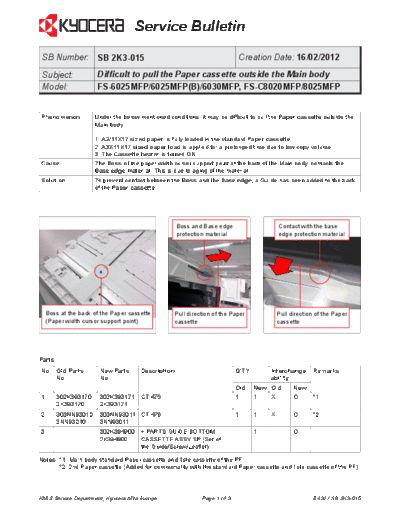
Phenomenon           Under the below mentioned conditions, it may be difficult to pull the Paper cassette outside the
                     Main body.

                     1. A3/11X17 sized paper is fully loaded in the standard Paper cassette.
                     2. A3X11X17 sized paper load is applied for a prolonged time due to low copy volume.
                     3. The Cassette heater is turned ON.
Cause                The Boss of the paper width cursor support point at the back of the Main body, contacts the
                     Base edge material. This is due to aging of the material.
Solution             To prevent contact between the Boss and the Base edge, a Guide has been added to the back
                     of the Paper cassette.


                                                    Boss and Base edge                    Contact with the base
                                                    protection material                   edge protection material


    Boss at the back of the Paper cassette        Pull direction of the Paper             Pull direction of the Paper
    (Paper width cursor support point)            cassette                                cassette


Parts
No. Old Parts          New Parts      Description                         Q'TY        Interchange- Remarks
    No.                No.                                                            ability
                                                                          Old    New Old        New
1       302K393170     302K393171     CT-475                              1      1    X         O       *1
        2K393170       2K393171
2       303NN93010     303NN93011 CT-476                                  1      1    X         O       *2
        3NN93010       3NN93011
3       ----------     302K394900     + PARTS GUIDE BOTTOM                -      1    -         O
                       2K394900       CASSETTE ASSY SP (Set of
                                      the Guide/Screw/Leaflet)

Notes: *1. Main body standard Paper cassette and 1ste cassette of the PF.
       *2. 2nd Paper cassette (Added for commonality with the standard Paper cassette and 1ste cassette of the PF)


KMIS Service Department, Kyocera Mita Europe                Page 1 of 3                                 B432 / SB 2K3-015
                                      Service Bulletin

Classification      Entire stock rework                       X In-field modification by case No modification necessary
                                            In-field modification at next visit
Field measure     When the above mentioned phenomenon occurs, please add the Guide to the back of the Paper
                  cassette.

Serial numbers of affected machines
Type                                                                         Serial number
FS-6025MFP/6025MFP(B)/6030MFP, FS-C8020MFP/8025MFP                           November 2011 production


 Installing the Guide


                                                                                                A
                                                                                  Screw


                          A


   1. Clean the surface below the position, where the
      Guide (A) will be affixed with cleaning alcohol.
   2. Peel off the release paper from the Guide (A). Align
      the Guide to the Boss and hole for the Screw. Fix it
      with the Screw. (Refer to the bundled leaflet on
      page 3 for further details)


                                 Guide at the Back of the Paper                           Paper cassette with the Guide
                                 cassette                                                 installed, inside the Main body


KMIS Service Department, Kyocera Mita Europe                       Page 2 of 3                                  B432 / SB 2K3-015
                                   Service Bulletin


                    A
                            B


         1                                         2


         3                                         5
                                                                     A
                                                                 B


         4


                                               A


                                                                               2011.11
                                                                         302K356850-01


KMIS Service Department, Kyocera Mita Europe           Page 3 of 3         B432 / SB 2K3-015
◦ Jabse Service Manual Search 2026 ◦ Jabse Pravopis ◦ onTap.bg ◦ Other service manual resources online : Fixya ◦ eServiceinfo