Service Manuals, User Guides, Schematic Diagrams or docs for : Kyocera Printer FS-6025-6030MFP SERVICEBULLETINS 2K3-017
<< Back | HomeMost service manuals and schematics are PDF files, so You will need Adobre Acrobat Reader to view : Acrobat Download Some of the files are DjVu format. Readers and resources available here : DjVu Resources
For the compressed files, most common are zip and rar. Please, extract files with Your favorite compression software ( WinZip, WinRAR ... ) before viewing. If a document has multiple parts, You should download all, before extracting.
Good luck. Repair on Your own risk. Make sure You know what You are doing.
Image preview - the first page of the document
>> Download 2K3-017 documenatation <<
Text preview - extract from the document
                                   Service Bulletin
 SB Number: SB 2K3-017                                                      Creation Date: 28/02/2012
 Subject:            Improper page order when printing in duplex
 Model:              FS-6025MFP/6025MFP(B)/6030MFP


Phenomenon          The page order may not be correct, when ejecting a large volume of duplex print-outs (With the
                    bridge unit attached).
Cause               Depending on the curled paper in duplex mode, it may push out the page ejecting before it.
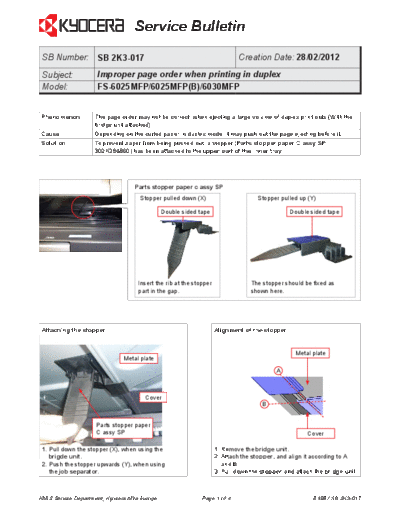
Solution            To prevent paper from being pushed out, a stopper (Parts stopper paper C assy SP_
                    302K394860) has been attached to the upper part of the inner tray.


                                   Parts stopper paper c assy SP
                                     Stopper pulled down (X)                       Stopper pulled up (Y)

                                               Double sided tape                               Double sided tape


                                    Insert the rib at the stopper                The stopper should be fixed as
                                    part in the gap.                             shown here.


 Attaching the stopper                                              Alignment of the stopper


                                                                                                 Metal plate
                               Metal plate

                                                                                          A


                                       Cover
                                                                                     B


                     Parts stopper paper
                     C assy SP                                                                       Cover

 1. Pull down the stopper (X), when using the                       1. Remove the bridge unit.
    brigde unit.                                                    2. Attach the stopper, and align it according to A
 2. Push the stopper upwards (Y), when using                           and B.
    the job separator.                                              3. Pull down the stopper and attach the bridge unit.


KMIS Service Department, Kyocera Mita Europe                 Page 1 of 4                               B185 / SB 2K3-017
                                        Service Bulletin


Parts
No. Old Parts          New Parts            Description                                                  Q'TY            Interchange-
    No.                No.                                                                                               ability
                                                                                                         Old    New Old         New
1       ----------     302K394860           PARTS STOPPER PAPER C ASSY SP                                -      1        -      O
                       2K394860


Classification        Entire stock rework                         x In-field modification by case No modification necessary
                                                 In-field modification at next visit
Field measure        When the above mentioned phenomenon occurs, please attach the stopper (Parts stopper
                     paper C assy SP_302K394860) to the upper part of the inner tray. Refer to the bundled leaflet
                     further information. (See page 3 and 4)


Serial numbers of affected machines
Type                                                                    Serial number
FS-6025MFP/6025MFP(B)/6030MFP                                           Not available, the part is not for production.


KMIS Service Department, Kyocera Mita Europe                            Page 2 of 4                                 B185 / SB 2K3-017
                                     Service Bulletin


          STOPPER PAPER
               A
                                               1             2


               3                 4                 5                 c
                                                                         2


                                                                     1
                   a                      b


               6        d                      7                     8
           d

                                      d


                            d

                                                         e
                                                                                  f


               9                          10
               A
                                                   A


                                                                                 2011.5
                                                                             302K356830


KMIS Service Department, Kyocera Mita Europe           Page 3 of 4           B185 / SB 2K3-017
                                   Service Bulletin


             11                                 12    e

              f


             13                                 14
              d


                                                c


             15   b                             16        a


             17                                18


                                                              1
                                                                   2

                                                                        2011.5
                                                                    302K356830


KMIS Service Department, Kyocera Mita Europe   Page 4 of 4        B185 / SB 2K3-017
◦ Jabse Service Manual Search 2026 ◦ Jabse Pravopis ◦ onTap.bg ◦ Other service manual resources online : Fixya ◦ eServiceinfo