Service Manuals, User Guides, Schematic Diagrams or docs for : Kyocera Printer FS-6025-6030MFP SERVICEBULLETINS 2K3-019
<< Back | HomeMost service manuals and schematics are PDF files, so You will need Adobre Acrobat Reader to view : Acrobat Download Some of the files are DjVu format. Readers and resources available here : DjVu Resources
For the compressed files, most common are zip and rar. Please, extract files with Your favorite compression software ( WinZip, WinRAR ... ) before viewing. If a document has multiple parts, You should download all, before extracting.
Good luck. Repair on Your own risk. Make sure You know what You are doing.
Image preview - the first page of the document
>> Download 2K3-019 documenatation <<
Text preview - extract from the document
                                   Service Bulletin
 SB Number: SB 2K3-019                                                      Creation Date: 29/03/2012
 Subject:             Paper jam J9000 when aligning Paper stack on the DP cover
 Model:               FS-6025MFP/6025MFP(B)/6030MFP, FS-C8020MFP/8025MFP

Contents
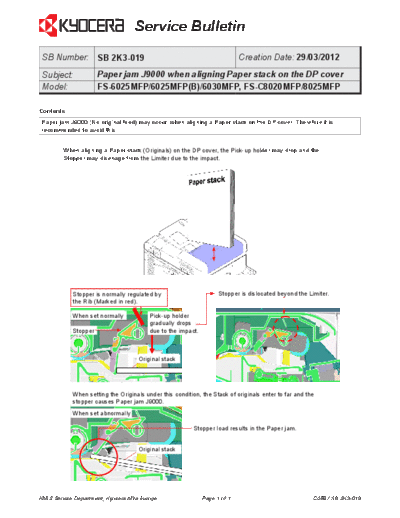
Paper jam J9000 (No original feed) may occur, when aligning a Paper stack on the DP cover. Therefore it is
recommended to avoid this.


         When aligning a Paper stack (Originals) on the DP cover, the Pick-up holder may drop and the
         Stopper may disenage from the Limiter due to the impact.


            Stopper is normally regulated by                        Stopper is dislocated beyond the Limiter.
            the Rib (Marked in red).

            When set normally            Pick-up holder
                                         gradually drops
            Stopper                      due to the impact.


                                     Original stack


            When setting the Originals under this condition, the Stack of originals enter to far and the
            stopper causes Paper jam J9000.
            When set abnormally

                                                          Stopper load results in the Paper jam.


                                     Original stack


KMIS Service Department, Kyocera Mita Europe                  Page 1 of 1                              C058 / SB 2K3-019
◦ Jabse Service Manual Search 2026 ◦ Jabse Pravopis ◦ onTap.bg ◦ Other service manual resources online : Fixya ◦ eServiceinfo