Service Manuals, User Guides, Schematic Diagrams or docs for : Kyocera Printer FS-6025-6030MFP SERVICEBULLETINS SB-2K3-0017-B275
<< Back | HomeMost service manuals and schematics are PDF files, so You will need Adobre Acrobat Reader to view : Acrobat Download Some of the files are DjVu format. Readers and resources available here : DjVu Resources
For the compressed files, most common are zip and rar. Please, extract files with Your favorite compression software ( WinZip, WinRAR ... ) before viewing. If a document has multiple parts, You should download all, before extracting.
Good luck. Repair on Your own risk. Make sure You know what You are doing.
Image preview - the first page of the document
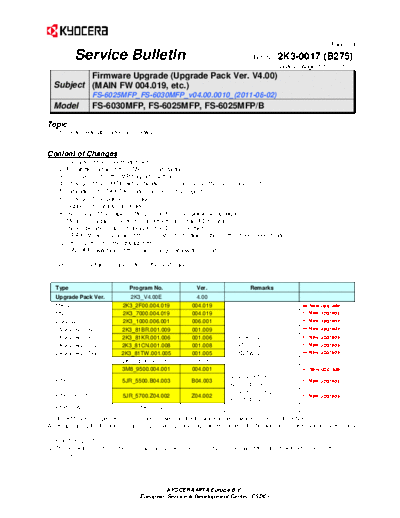
>> Download SB-2K3-0017-B275 documenatation <<
Text preview - extract from the document
(Page.1/4)
Service Bulletin Ref. No. 2K3-0017 (B275)
August 20, 2011
Firmware Upgrade (Upgrade Pack Ver. V4.00)
Subject (MAIN FW 004.019, etc.)
FS-6025MFP_FS-6030MFP_v04.00.0010_(2011-08-02)
Model FS-6030MFP, FS-6025MFP, FS-6025MFP/B
Topic
The firmware was upgraded as follows.
Content of Changes
1. Upgrade of the SheetExtension
2. Prohibition against the SMB error at startup
3. Improvement of the MP tray size setting
4. Change of the SMTP authentication error number in the Command Center
5. Indication of UTAX/TA model names on the reports
6. Change of the pause message
7. Support of Catalan language
8. Removal of the paper setting menu from the Quick Setup wizard
9. Measures against the font dropout with a certain PDF data
10. New operation panel display for the DF connection error
11. [FAX] Measures against the error at remote diagnostics in the deep sleep mode
12. Improvement of the startup time
13. ON/OFF switching of the main charger at low temperature
Type Program No. Ver. Remarks
Upgrade Pack Ver. 2K3_V4.00E 4.00
MAIN 2K3_2F00.004.019 004.019 New upgrade
MMI 2K3_7000.004.019 004.019 New upgrade
ENGINE 2K3_1000.006.001 006.001 New upgrade
LANGUAGE BR 2K3_81BR.001.009 001.009 New upgrade
LANGUAGE KR 2K3_81KR.001.006 001.006 For KMKR *2 New upgrade
LANGUAGE CN 2K3_81CN.001.008 001.008 For KTST *2 New upgrade
LANGUAGE TW 2K3_81TW.001.005 001.005 For KMTW *2 New upgrade
IO 2K3_1E00.001.010 001.010
DP 3M8_9500.004.001 004.001 New upgrade
Except KTST *1
FAX BOOT/APL 5JR_5500.B04.003 B04.003 New upgrade
(APL B04.003)
For KTST *1*2
FAX BOOT/APL 5JR_5700.Z04.002 Z04.002 New upgrade
(APL Z04.002)
ESPECIAL ES_SKIP.ON ----------
For the KM sales companies, it is possible to download the firmware at the download center on the ESDC.net.
When upgrading the firmware or replacing a board, please upgrade each kind of the firmware to the latest version at the same
time.
*1: BOOT (B02.001)
*2: This firmware is not included in the upgrade pack. Please individually download it from the download center on the
ESDC.net.
KYOCERA MITA Europe B.V.
European Service & Development Center (ESDC)
(Page.2/4)
Service Bulletin Ref. No. 2K3-0017 (B275)
August 20, 2011
KMC's Classification Entire Stock Rework In-Field modification at next visit
In-Field modification by case No modification necessary
Field Measure: Please upgrade the firmware when the problem described above arises.
Serial Nos. of the Affected Machines: Planned from the August 2011 production
Content of Changes
No. Item Details CTL
1 Upgrade of the FMU2.0 (File Management Utility) is now supported.
SheetExtension
2 Prohibition against the The start key is now disabled while showing the network startup until the 561164
SMB error at startup network was established.
- [Please wait. Network starting] appears in the upper line of the operation
display panel while waiting until the network is stable.
3 Improvement of the MP tray The MP tray size and media type can be now changed after the MP tray
size setting was selected from the Paper Selection display which was only available
from the system menu before.
4 Measures against the The Video Memory shortage might occur if originals are with the poor TP-11-027
KMHG-SQ-11-
memory overflow during SRLE compression rate. Therefore, the Video Memory can be now 0428
increased. 563016
copying
The conventional memory allocation is also available. 557696
- Scan Page Priority (SortMemory: 222.00MB / VideoMemory: 200.25MB)
Conventional selection
- Scan Size Priority (SortMemory: 118.25MB / VideoMemory: 304.00MB)
Default
The Scan Page Priority is conventionally selected after firmware update.
The setting will be changed after the system is restarted.
This can be set from both the operation panel system menu and the
command center.
Operation panel: System menu System Main Memory
Command Center: Top display Basic Device Defaults
Main Memory
5 Change of the SMTP The error number was different between the Command Center and the
authentication error number operation panel when a mail was sent out without setting the authentication
in the Command Center to the SMTP authentication server. They are now unified.
Command Center: Error 0x8009
Operation Panel: Send Error 3101
Change: Command Center Error No. was changed to 3101.
6 Indication of UTAX/TA The UTAX/TA model names are now indicated on the reports when the 564747
TO-11-031
model names on the destination is set to UTAX/TA. VOC20110525
reports
7 Change of the pause "Press [Resume All Print Jobs]" appears on the upper part of the main
message display for copy when [Pause All Print Job] key was pressed in the status
display. The message was changed to show the location of the key to
resume.
New message: "Press [Resume All Print Jobs] in the Status display"
KYOCERA MITA Europe B.V.
European Service & Development Center (ESDC)
(Page.3/4)
Service Bulletin Ref. No. 2K3-0017 (B275)
August 20, 2011
No. Item Details CTL
8 Support of Catalan The main firmware was upgraded to support Catalan as a new optional 568184
language European language.
9 Removal of the paper It is one of the specifications that an error occurs at the FAX output if all NP-Z11033
565608
setting menu from the cassette sizes were manually set. Therefore, the Paper Setup was TP-11-121
Quick Setup wizard removed from the Quick Setup Wizard and the unnecessary cassette
paper size setting is now disabled. (It is available from the system menu as
before.)
10 New operation panel The attachment shall be fitted to the bridge before they are attached to the
display for the DF main unit when installing the DF. However, the bridge might be attached
connection error without the attachment. Then, the C8990 of Document finisher
communication error occurs. Therefore, the text with the illustration was
added to the operation panel display so that the user can be notified that
attachment might be missing.
11 [FAX] Measures against The communication error may appear if the remote diagnostics is 568914
the error at remote conducted in the deep sleep mode while the inbound ringer is set to once.
diagnostics in the deep Therefore, this is corrected.
sleep mode
12 Improvement of the startup The drum refresh control will be disabled for 60 minutes after last print job. 567134
time The change was made so that the regular drum refresh can be disabled if
the time after last print job is 60 minutes or less at power-up and restart
from the sleep mode.
13 ON/OFF switching of the - The low temperature main charger adjustment will be disabled in order to 566847
improve the startup time at low temperature. 566650
main charger at low
- [Set Low Temp] was added to the U100 [Main HV Output] to switch ON
temperature
and OFF the main charger adjustment at low temperature.
(Turn the main charger adjustment at low temperature ON if image failure
such as foggy background appears.)
KYOCERA MITA Europe B.V.
European Service & Development Center (ESDC)
(Page.4/4)
Service Bulletin Ref. No. 2K3-0017 (B275)
August 20, 2011
Improvement of the MP tray size setting
New display transition
The display jumps to the screen Jump to this setting was
to set size and media when not possible before.
the MP tray is selected.
Paper size selection display
Media type selection display
This setting is not to change the default setting of the MP tray, but to change size and media for a copy job.
The setting will be back to the default when the setting above is reset.
This setting is for copying, and it is not reflected to print output.
The default setting can be changed in the system menu as before.
KYOCERA MITA Europe B.V.
European Service & Development Center (ESDC)
◦ Jabse Service Manual Search 2026 ◦ Jabse Pravopis ◦ onTap.bg ◦ Other service manual resources online : Fixya ◦ eServiceinfo