Service Manuals, User Guides, Schematic Diagrams or docs for : Kyocera Printer FS-6970 ServiceBulletins SB-5H2-0001-B386
<< Back | HomeMost service manuals and schematics are PDF files, so You will need Adobre Acrobat Reader to view : Acrobat Download Some of the files are DjVu format. Readers and resources available here : DjVu Resources
For the compressed files, most common are zip and rar. Please, extract files with Your favorite compression software ( WinZip, WinRAR ... ) before viewing. If a document has multiple parts, You should download all, before extracting.
Good luck. Repair on Your own risk. Make sure You know what You are doing.
Image preview - the first page of the document
>> Download SB-5H2-0001-B386 documenatation <<
Text preview - extract from the document
                                                                                                                 (Page.1/1)

          Service Bulletin                                                     Ref. No.   5H2-0001 (B386)
               [Service information]                                                       October 28, 2011
          Measures against the Paper Jam on the Optional Paper
  Subject
          Feeder
  Model   PF-430
(Installation target modes of PF-430: FS-6950DN and FS-6970DN)

Topic
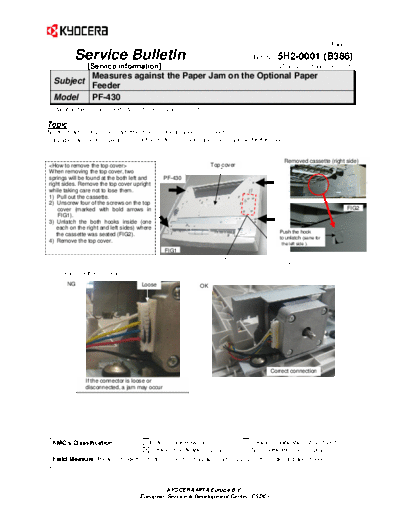
No-feed jam or accordion jam might occur due to a loose connector.
If a paper jam occurs, please check the motor connector and securely insert it if it is loose.


                                                                                            Removed cassette (right side)
                                  Top cover
When removing the top cover, two
springs will be found at the both left and     PF-430
right sides. Remove the top cover upright
while taking care not to lose them.
1) Pull out the cassette.
2) Unscrew four of the screws on the top
    cover (marked with bold arrows in                                                                                  FIG2
    FIG1).
3) Unlatch the both hooks inside (one
   each on the right and left sides) where
                                                                                          Push the hook
   the cassette was seated (FIG2).
                                                                                          to unlatch (same for
4) Remove the top cover.
                                                                                           the left side ).
                                               FIG1


       NG                            Loose                OK


                                                                                     Correct connection
               If the connector is loose or
               disconnected, a jam may occur


 KMC's Classification              Entire Stock Rework                 In-Field modification at next visit
                                   In-Field modification by case        No modification necessary
  Field Measure: Please check the motor connector if a paper jam occurs on the optional paper feeder.


                                              KYOCERA MITA Europe B.V.
                                     European Service & Development Center (ESDC)
◦ Jabse Service Manual Search 2026 ◦ Jabse Pravopis ◦ onTap.bg ◦ Other service manual resources online : Fixya ◦ eServiceinfo