Service Manuals, User Guides, Schematic Diagrams or docs for : Kyocera Printer FS-1040-1060DN SERVICEBULLETIN SB-2M2-0013-D142
<< Back | HomeMost service manuals and schematics are PDF files, so You will need Adobre Acrobat Reader to view : Acrobat Download Some of the files are DjVu format. Readers and resources available here : DjVu Resources
For the compressed files, most common are zip and rar. Please, extract files with Your favorite compression software ( WinZip, WinRAR ... ) before viewing. If a document has multiple parts, You should download all, before extracting.
Good luck. Repair on Your own risk. Make sure You know what You are doing.
Image preview - the first page of the document
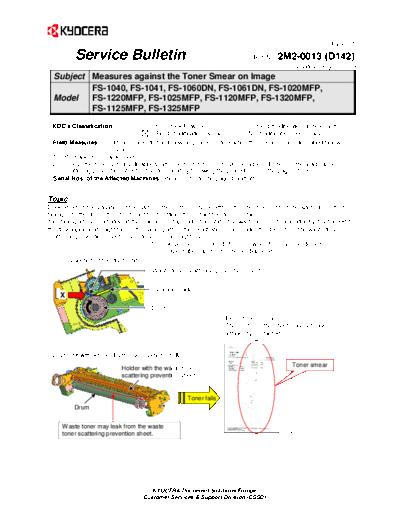
>> Download SB-2M2-0013-D142 documenatation <<
Text preview - extract from the document
                                                                                                          (Page.1/5)

          Service Bulletin                                                   Ref. No.   2M2-0013 (D142)
                                                                                              July 10, 2013
  Subject Measures against the Toner Smear on Image
          FS-1040, FS-1041, FS-1060DN, FS-1061DN, FS-1020MFP,
  Model   FS-1220MFP, FS-1025MFP, FS-1120MFP, FS-1320MFP,
          FS-1125MFP, FS-1325MFP
 KDC's Classification                 Entire Stock Rework                  In-Field modification at next visit
                                      In-Field modification by case        No modification necessary
  Field Measures:       Please execute the following process 1 to 3 when the phenomenon described below
                        occurs.
  1) Print about 10 blank sheets.
  2) Unless the toner smears disappear after performing 1), remove the adhered toner on the waste toner
      scattering prevention sheet in the drum unit by following the procedures on the page 2 to 3.
  Serial Nos. of the Affected Machines: Please refer to the page 4 and after.


Topic
Depending on the variation of the parts or the compressive length of the sheet preventing the waste toner from
falling onto the drum, the sheet might not sufficiently contact the drum surface.
If installing a toner cartridge at the machine setup under this state, the waste toner (*1) abundantly discharged from
the developing unit might fall on the paper path or the registration roller under the drum from the waste toner
scattering prevention sheet. Then, toner smear might occur.
                                         (*1) This phenomenon tends to occur when the machine detects
                                              condensation as much toner is disposed.
    [Cross section of the drum unit]
                                       Waste toner scattering prevention sheet


                                       Cleaning blade
    X
                                       Drum
                                                                  [Ex. of toner smear]
                                                                  (The center of the sheet may not have
                                                                  sufficiently contacted.)]


 [Drum unit without the drum cover (View from X)]
                                                                                            Toner smear
                            Holder with the waste toner
                            scattering prevention sheet


                                                    Toner falls
          Drum


     Waste toner may leak from the waste
     toner scattering prevention sheet.


                                       KYOCERA Document Solutions Europe
                                    Customer Services & Support Division (CSSD)
                                                                                                       (Page.2/5)

         Service Bulletin                                                Ref. No.   2M2-0013 (D142)
                                                                                            July 10, 2013

Content of changes
The compressive length of the waste toner scattering prevention sheet toward the drum surface was increased by
affixing a thickening sheet under the waste toner scattering prevention sheet.
                                                                                      Cleaning blade


                                   Thickening sheet added
                                   (Thickness of 0.25 mm)
             Water toner scattering prevention sheet:
                                                                                    Drum
             Compressive length to the drum surface increased


[How to remove the toner on the waste toner scattering prevention sheet]
  Step   Procedure                                          Figures


         Prepare a sheet of paper or a plastic bag on the
   1     table to receive toner.
         (Execute the Step 4 and 5 on this.)


   2     Open the rear cover.


                                                                                                    Rear
                                                                                                    cover


                                     KYOCERA Document Solutions Europe
                                  Customer Services & Support Division (CSSD)
                                                                                                     (Page.3/5)

       Service Bulletin                                                 Ref. No.   2M2-0013 (D142)
                                                                                            July 10, 2013
Step   Procedure                                            Figures

                                                                               Drum unit


                                                                                                   Handle
                                                               Handle
       Detach the drum unit from the main unit while
 3
       holding the handles at the both sides.


       Place the drum unit on the paper or the plastic
 4     bag prepared in the Step 1 so that the handles
       will face down.

                                                              Handle                               Handle


                                                               A
       Pat the both sides (A and B in the figure) of the                                             B
       drum unit three times using a screwdriver, etc. to
 5                                                           3 times                               3 times
       remove the toner clogged between the drum and
       the waste toner scattering prevention sheet.


       Reassemble the drum unit and the rear cover in
 6
       the reverse order of disassembly.


                                    KYOCERA Document Solutions Europe
                                 Customer Services & Support Division (CSSD)
                                                                                                                  (Page.4/5)

          Service Bulletin                                                         Ref. No.   2M2-0013 (D142)
                                                                                                      July 10, 2013
Serial Nos. of the Affected Machines
(Notes) The machine with 0 as the last digit was manufactured in China; the one with 1 was manufactured in Vietnam.
      Since this change (July 2013), the production of the main unit and MK kit for all specs. except KDCN is not
      manufactured in China. (For the products not manufactured in China after this change, "N/A" is input in the following
      tables.


FS-1040/1041
   KDE (EU)            KDIS
 1102M23NL0       1102M23NX0
 N/A (NZF)        N/A (NSD)
      KDE            KDE (EU)
 1102M23NXV       1102M23NLV
 L6Z3602436       Next (L6P)


FS-1060/1061
   KDE (EU)             KDE
 1102M33NL0       1102M33NX0
 N/A (NZG)        N/A (NSH)
   KDE (EU)             KDE
 1102M33NLV       1102M33NXV
 Next (L72)       Next (L73)


FS-1020MFP/1220MFP
   KDE (EU)             KDE
 1102M43NL0       1102M43NX0
 N/A (NZH)        N/A (NSM)
   KDE (EU)             KDE
 1102M43NLV       1102M43NXV
 Next (LBW)       Next (LD7)


FS-1120MFP/1320MFP
   KDE (EU)             KDE
 1102M53NL0       1102M53NX0
 N/A (NZJ)        N/A (NSR)
   KDE (EU)             KDE
 1102M53NLV       1102M53NXV
 Next (LBX)       LD83601940~


                                         KYOCERA Document Solutions Europe
                                      Customer Services & Support Division (CSSD)
                                                                                                         (Page.5/5)

          Service Bulletin                                                      Ref. No.   2M2-0013 (D142)
                                                                                                July 10, 2013
FS-1025MFP
      KDE
 1102M63NX0
 N/A (NSV)
      KDE
 1102M63NXV
 LBY3600353~


FS-1125MFP/1325MFP
   KDE (EU)            KDE
 1102M73NL0       1102M73NX0
 N/A (NZK)        N/A (NSZ)
   KDE (EU)            KDE
 1102M73NLV       1102M73NXV
 Next (LBZ)       Next (LD9)


   220V-240V         220-240V
 1702M75NX0       1702M75NXV
                  1st production
 N/A (NT1)
                   (LEC)


From MB9033600001
(This change was applied to all units with 3 or after as the 5th digit of the product code.)


                                        KYOCERA Document Solutions Europe
                                     Customer Services & Support Division (CSSD)
◦ Jabse Service Manual Search 2026 ◦ Jabse Pravopis ◦ onTap.bg ◦ Other service manual resources online : Fixya ◦ eServiceinfo