Service Manuals, User Guides, Schematic Diagrams or docs for : Kyocera Printer FS-2100-4100-4200-4300 ServiceBulletin 2LV-003
<< Back | HomeMost service manuals and schematics are PDF files, so You will need Adobre Acrobat Reader to view : Acrobat Download Some of the files are DjVu format. Readers and resources available here : DjVu Resources
For the compressed files, most common are zip and rar. Please, extract files with Your favorite compression software ( WinZip, WinRAR ... ) before viewing. If a document has multiple parts, You should download all, before extracting.
Good luck. Repair on Your own risk. Make sure You know what You are doing.
Image preview - the first page of the document
>> Download 2LV-003 documenatation <<
Text preview - extract from the document
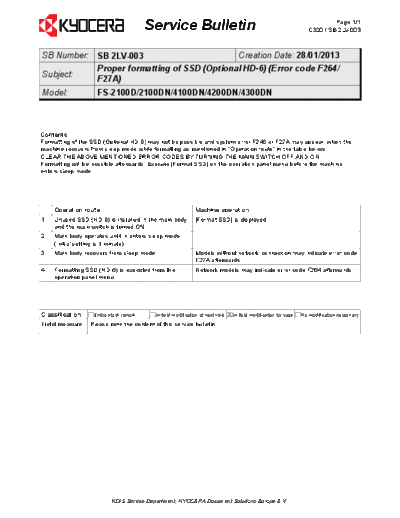
                                        Service Bulletin                                                                      Page 1/1
                                                                                                                     C320 / SB 2LV-003


SB Number: SB 2LV-003                       Creation Date: 28/01/2013
           Proper formatting of SSD (Optional HD-6) (Error code F264/
Subject:
           F27A)
Model:             FS-2100D/2100DN/4100DN/4200DN/4300DN


Contents
Formatting of the SSD (Optional HD-6) may not be possible and system error F246 or F27A may appear, when the
machine recovers from sleep mode while formatting as mentioned in "Operation route" in the table below.
CLEAR THE ABOVE MENTIONED ERROR CODES BY TURNING THE MAIN SWITCH OFF AND ON.
Formatting will be possible afterwards. Execute [Format SSD] on the operation panel menu before the machine
enters sleep mode.


    Operation route                                           Machine operation
1   Unused SSD (HD-6) is installed in the main body           [Format SSD] is displayed.
    and the main switch is turned ON.
2   Main body operates until in enters sleep mode
    (Initial setting is 1 minute).
3   Main body recovers from sleep mode.                       Models without network connection may indicate error code
                                                              F27A afterwards.
4   Formatting SSD (HD-6) is executed from the                Network models may indicate error code F264 afterwards.
    operation panel menu.


Classification    Entire stock rework     In-field modification at next visit   X In-field modification by case   No modification necessary
Field measure    Please note the content of this service bulletin.


                          KDIS Service Department, KYOCERA Document Solutions Europe B.V.
◦ Jabse Service Manual Search 2026 ◦ Jabse Pravopis ◦ onTap.bg ◦ Other service manual resources online : Fixya ◦ eServiceinfo