Service Manuals, User Guides, Schematic Diagrams or docs for : Kyocera Printer FS-3040-3140MFP SERVICEBULLETIN 2LW-015
<< Back | HomeMost service manuals and schematics are PDF files, so You will need Adobre Acrobat Reader to view : Acrobat Download Some of the files are DjVu format. Readers and resources available here : DjVu Resources
For the compressed files, most common are zip and rar. Please, extract files with Your favorite compression software ( WinZip, WinRAR ... ) before viewing. If a document has multiple parts, You should download all, before extracting.
Good luck. Repair on Your own risk. Make sure You know what You are doing.
Image preview - the first page of the document
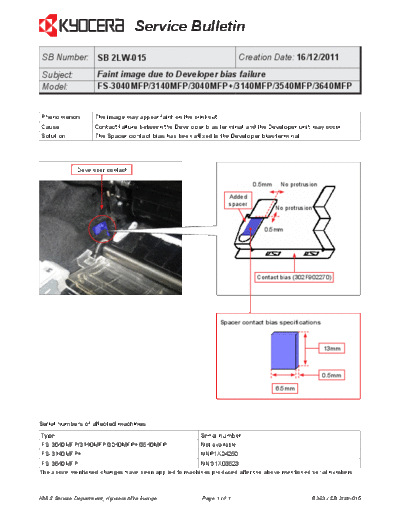
>> Download 2LW-015 documenatation <<
Text preview - extract from the document
                                   Service Bulletin
 SB Number: SB 2LW-015                                                   Creation Date: 16/12/2011
 Subject:            Faint image due to Developer bias failure
 Model:              FS-3040MFP/3140MFP/3040MFP+/3140MFP/3540MFP/3640MFP


Phenomenon          The image may appear faint on the print-out.
Cause               Contact failure between the Developer bias terminal and the Developer unit may occur.
Solution            The Spacer contact bias has been affixed to the Developer bias terminal.


              Developer contact

                                                                              0.5mm    No protrusion

                                                                     Added
                                                                     spacer
                                                                                      No protrusion


                                                                                 0.5mm


                                                                               Contact bias (302F902270)


                                                                   Spacer contact bias specifications


                                                                                                        13mm


                                                                                                        0.5mm

                                                                                      6.5mm


Serial numbers of affected machines
Type                                                     Serial number
FS-3040MFP/3140MFP/3040MFP+/3540MFP                      Not available
FS-3140MFP+                                              NNP1X04250
 FS-3640MFP                                           NNG1X03523
The above mentioned changes have been applied to machines produced after the above mentioned serial numbers.


KMIS Service Department, Kyocera Mita Europe              Page 1 of 1                             B363 / SB 2LW-015
◦ Jabse Service Manual Search 2026 ◦ Jabse Pravopis ◦ onTap.bg ◦ Other service manual resources online : Fixya ◦ eServiceinfo