Service Manuals, User Guides, Schematic Diagrams or docs for : Kyocera Printer FS-3540_3640MFP SERVICEBULLETIN SB-2MC-0004-B465
<< Back | HomeMost service manuals and schematics are PDF files, so You will need Adobre Acrobat Reader to view : Acrobat Download Some of the files are DjVu format. Readers and resources available here : DjVu Resources
For the compressed files, most common are zip and rar. Please, extract files with Your favorite compression software ( WinZip, WinRAR ... ) before viewing. If a document has multiple parts, You should download all, before extracting.
Good luck. Repair on Your own risk. Make sure You know what You are doing.
Image preview - the first page of the document
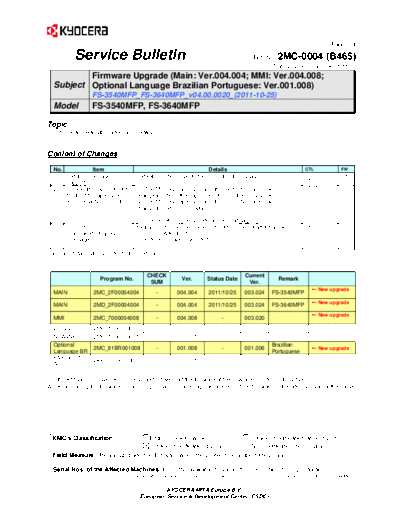
>> Download SB-2MC-0004-B465 documenatation <<
Text preview - extract from the document
(Page.1/4)
Service Bulletin Ref. No. 2MC-0004 (B465)
December 28, 2011
Firmware Upgrade (Main: Ver.004.004; MMI: Ver.004.008;
Subject Optional Language Brazilian Portuguese: Ver.001.008)
FS-3540MFP_FS-3640MFP_v04.00.0020_(2011-10-25)
Model FS-3540MFP, FS-3640MFP
Topic
The firmware was upgraded as follows.
Content of Changes
No. Item Details CTL FW
1 Catalan language Catalan is now supported as an optional language. 608655 MAIN
576620 MMI
support
2 Operability improvement (1) The MP tray paper size and the media type are now 573675 MMI
for the MP paper size changeable from the paper selection on the Copy screen.
and media type selection (2) The MP tray paper size and the media type are now
changeable at paper empty.
[For more details, please refer to the next pages.]
3 Correction of the Example) The message which should be "No. of attention" was 580239 LANG
BR
Brazilian Portuguese "Attention1".
messages Therefore, this was corrected.
For more details, please refer to the next pages.
CHECK Current
Program No. Ver. Status Date Remark
SUM Ver.
New upgrade
MAIN 2MC_2F00004004 - 004.004 2011/10/25 003.024 FS-3540MFP
New upgrade
MAIN 2MD_2F00004004 - 004.004 2011/10/25 003.024 FS-3640MFP
New upgrade
MMI 2MC_7000004008 - 004.008 - 003.020
ENGINE 2MC_1000003002 - 003.002 - -
SCANNER 2MC_1200003001 - 003.001 - -
Optional Brazilian
2MC_81BR001008 - 001.008 - 001.006 New upgrade
Language BR Portuguese
FAX BOOT
2KX_5500007001 - 007.001 - -
APL
For the KM sales companies, it is possible to download the firmware at the download center on the ESDC.net.
When upgrading the firmware or replacing a board, please upgrade all kinds of the firmware to the latest version at the same
time.
KMC's Classification Entire Stock Rework In-Field modification at next visit
In-Field modification by case No modification necessary
Field Measure: Please upgrade the firmware when the problem described above arises.
Serial Nos. of the Affected Machines: From the available timing in the December 2011* production
*The above is the plan at the present moment. Please note that this information is subject to change.
KYOCERA MITA Europe B.V.
European Service & Development Center (ESDC)
(Page.2/4)
Service Bulletin Ref. No. 2MC-0004 (B465)
December 28, 2011
No. Item Details CTL FW
4 Measures against the The system error might appear when print job was performed while 605874 MAIN
TO-11-026
system error storing about 4,000 of PCL macro data. Therefore, this was KMA-D-1105-03
corrected.
5 Measures against the Scanning of a large number of originals might fail after starting up 604771 MAIN
TO-11-048
scanning failure the PC. Therefore, this was corrected. KMA-D-1107-03
6 Measures against the Copy counter information acquisition might fail with the HyPAS 604782 MAIN
TO-11-038
counter acquisition application (Pcounter). Therefore, this was corrected. KMA-D-1106-11
failure with the HyPAS
application (Pcounter)
7 Measures against the 575018 MAIN
Hangul fonts in Korean Command Center seemed to be corrupted.
TO-11-051
illegible Korean Therefore, the magnification of the browser was set to 120% for
Command Center view
Korean only.
8 Measure against the 574912 MAIN
A message "Cannot recognize the ID card reader" was displayed
TP-10-201
error message in as sub message even if ID Card Reader was not connected when KMAUS10-S07
Equitrac environment Call#1061179
executing Equitrac application activation. Therefore, this was
(without ID Card
Reader) corrected so that the message above will not be displayed.
9 Measures against the 572189 MAIN
The sender information was not printed on the recipient's output
TO-11-045
sender information data when sending FAX if the Job Account setting was ON, but KME110728-2
failure Job Account name was not defined at the extensible
authentication. Therefore, this was corrected.
10 Measures against the The CF264 error might appear when printing the PCL macro data 605872 MAIN
TP-11-160
system error (CF264) using a CF card. Therefore, this was corrected. UT-S11-025-1
11 Measures against the LF code might be ignored in the SMB protocol printing. Therefore, 608320 MAIN
TP-11-109
SMB protocol printing this was corrected. NP-Z1103
failure
12 Daylight saving time Weekly Timer might not function with the directed time when the 606351 MAIN
TO-11-053
support for the Weekly summer time (daylight saving time) mode was set. Therefore, this UT-S11-027
Timer was corrected.
13 "admin00" password ---------- 608334 MAIN
TO-11-003
support #1160788
#1160792
14 Preventive measure ---------- 608336 MAIN
TO-11-007
against overwriting of #1160788
the Command Center
settings
KYOCERA MITA Europe B.V.
European Service & Development Center (ESDC)
(Page.3/4)
Service Bulletin Ref. No.2MC-0004 (B465)
December 28, 2011
[4. Operability improvement for the MP paper size and the media type selection]
[Old]
The paper size and the media type for the MP tray could be changed only by changing the default settings from the
system menu.
[New]
The change was made so that the MP tray paper size and the media type can be selected when copying.
-1) How to change the MP tray paper size and the media type from the Copy screen
(1) Select [Paper Selection] on the Copy screen.
(2) Select [MP tray].
(3) Change [Paper Size] and [Media Type].
KYOCERA MITA Europe B.V.
European Service & Development Center (ESDC)
(Page.4/4)
Service Bulletin Ref. No. 2MC-0004 (B465)
December 28, 2011
-2) When paper is empty:
(1) Select [Paper Selection].
(2) Select [MP tray].
(3) Change [Paper Size] and [Media Type].
KYOCERA MITA Europe B.V.
European Service & Development Center (ESDC)
◦ Jabse Service Manual Search 2026 ◦ Jabse Pravopis ◦ onTap.bg ◦ Other service manual resources online : Fixya ◦ eServiceinfo