Service Manuals, User Guides, Schematic Diagrams or docs for : Philips Symptom Cure 2001-02 SymptomCure references AS2000-01
<< Back | HomeMost service manuals and schematics are PDF files, so You will need Adobre Acrobat Reader to view : Acrobat Download Some of the files are DjVu format. Readers and resources available here : DjVu Resources
For the compressed files, most common are zip and rar. Please, extract files with Your favorite compression software ( WinZip, WinRAR ... ) before viewing. If a document has multiple parts, You should download all, before extracting.
Good luck. Repair on Your own risk. Make sure You know what You are doing.
Image preview - the first page of the document
>> Download AS2000-01 documenatation <<
Text preview - extract from the document
For internal use only                                                                  PHILIPS

                                                                      ISSUE AS2000.01 (00-01-21)
Published by:
Service Department Audio Systems

                   LINE OF BUSINESS AUDIO SYSTEMS

      SERVICE NEWSLETTER
01.01 TYPENUMBER(S): CDR570, CDR930, CDR770

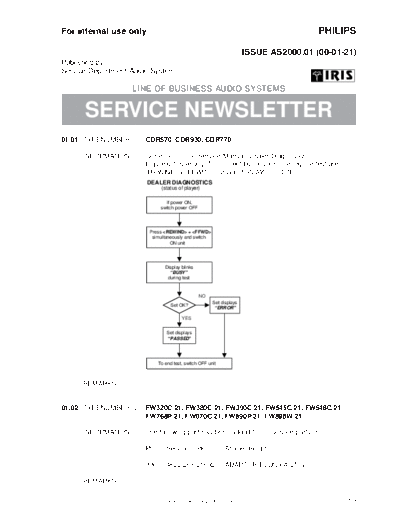
     INFORMATION     : Correction to the Service Manual, Dealer Diagnostics
                       Figure 6.1 is wrong. The correct buttons for entering the test are
                       "REWIND" + "FFWD" (instead of "PLAY" + "STOP").
                         DEALER DIAGNOSTICS
                              (status of player)

                                If power ON,
                              switch power OFF


                          Press  +
                           simultaneously and switch
                                   ON unit


                                Display blinks
                                  "BUSY"
                                 during test


                                                 NO
                                                       Set displays
                                   Set OK?
                                                        "ERROR"

                                        YES


                                 Set displays
                                 "PASSED"


                             To end test, switch OFF unit


     REMARKS         :


01.02 TYPENUMBER(S): FW320C/21, FW380C/21, FW390C/21, FW545C/21, FW548C/21,
                     FW768P/21, FW870C/21, FW890P/21, FW898W/21

     INFORMATION     : The following part has been added to the service parts list:

                         Pos Service code     Article decription
◦ Jabse Service Manual Search 2026 ◦ Jabse Pravopis ◦ onTap.bg ◦ Other service manual resources online : Fixya ◦ eServiceinfo