Service Manuals, User Guides, Schematic Diagrams or docs for : Samsung DVD DVD-VR320 DVD-VR320 05_Operation Instruction & Installation

<< Back | Home

Most service manuals and schematics are PDF files, so You will need Adobre Acrobat Reader to view : Acrobat Download Some of the files are DjVu format. Readers and resources available here : DjVu Resources
For the compressed files, most common are zip and rar. Please, extract files with Your favorite compression software ( WinZip, WinRAR ... ) before viewing. If a document has multiple parts, You should download all, before extracting.
Good luck. Repair on Your own risk. Make sure You know what You are doing.


Image preview - the first page of the document
05_Operation Instruction & Installation


>> Download 05_Operation Instruction & Installation documenatation <<

Text preview - extract from the document
13. Operating Instructions


                     Description
  Getting Started


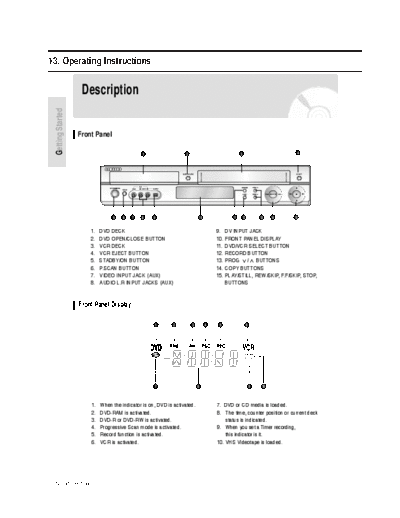
                    Front Panel

                                                1                  2                              3                        4


                                  5    6   7   8     9                     10                11   12           13    14   15


                        1.   DVD DECK                                               9.    DV INPUT JACK
                        2.   DVD OPEN/CLOSE BUTTON                                  10.   FRONT PANEL DISPLAY
                        3.   VCR DECK                                               11.   DVD/VCR SELECT BUTTON
                        4.   VCR EJECT BUTTON                                       12.   RECORD BUTTON
                        5.   STADBY/ON BUTTON                                       13.   PROG / BUTTONS
                        6.   P.SCAN BUTTON                                          14.   COPY BUTTONS
                        7.   VIDEO INPUT JACK (AUX)                                 15.   PLAY/STILL, REW/SKIP, F.F/SKIP, STOP,
                        8.   AUDIO L.R INPUT JACKS (AUX)                                  BUTTONS


                    Front Panel Display

                                                     1       2         3        4    5                 6


                                                     7                     8                               9    10


                        1.   When the indicator is on, DVD is activated.            7. DVD or CD media is loaded.
                        2.   DVD-RAM is activated.                                  8. The time, counter position or current deck
                        3.   DVD-R or DVD-RW is activated.                              status is indicated.
                        4.   Progressive Scan mode is activated.                    9. When you set a Timer recording,
                        5.   Record function is activated.                              this indicator is it.
                        6.   VCR is activated.                                      10. VHS Videotape is loaded.


Samsung Electronics                                                                                                                 13-1
Operating Instructions


               Rear Panel


                                                                                                                                        Getting Started
                                                                               1 2   3   4   5    6      7   8   9    10
                                            Fan
                                            The fan always revolves when the power is on.
                                            Ensure a minimum of 4" clear space on all sides of the fan
                                            when installing the product.


                     1.   S-VIDEO OUT JACK                               6.    AV1(EURO AV) IN/OUT SCART
                     2.   AUDIO L, R OUT JACKS                           7.    AV2 (DEC./EXT.)SCART
                     3.   DIGITAL AUDIO OUT JACK                         8.    VIDEO OUT JACKS(COMPONENT OUT)
                          (OPTICAL/COAXIAL)                              9.    ANT OUT(TO TV) JACK
                     4.   AUDIO L, R OUT JACKS(AV OUT)                   10.   ANT IN JACK
                     5.   VIDEO OUT JACK(AV OUT)


                                                                                                                     English - 13

13-2                                                                                                                       Samsung Electronics
                                                                                                                            Operating Instructions


                      Tour of the Remote Control                         12. RETURN Button
                                                                         13. TV/VCR Button
                                                                         14. INFO. Button
                                                                             This will display current setting or disc status.
                            1                                   18       15. REC Button
  Getting Started


                                                                             Use to make a recording on DVD-RAM/-RW/-R
                                                                             discs and VHS Video tape.
                             2
                                                                         16. TO DVD copy Button
                                                                             Press this when you copy VCR to DVD.
                             3                                  19
                                                                         17. REC SPEED Button
                             4                                  20           Use this to set the desired recording time and
                             5                                  21
                                                                             picture quality
                                                                22       18. TV STANDBY/ON Button
                             6
                                                                23       19. AUDIO/TV MUTE Button
                             7                                  24           Use this to access various audio functions.
                                                                             This operates as sound mute. (TV mode)
                             8                                  25
                                                                         20. TV Button
                                                                             Press this to operate TV.
                             9                                  25
                            10                                  26
                                                                         21. INPUT SEL Button
                                                                             Select input signal in external input mode(Tuner or
                                                                             AV1, AV2, Aux or DV input)
                            11
                                                                         22. OPEN/CLOSE Button
                            12                                  27           To open and close the disc and Video cassettes.
                            13                                  28
                            14                                  29       23. TIMER REC Button
                            15                                  30
                                                                             Press this when you use Timer Recording of a
                                                                             programme.
                            16                                  31
                            17                                  32       24. MARKER Button
                                                                             Use this to bookmark or mark a position while
                                                                             playing a disc.
                                                                         25. PLAY LIST/TITLE MENU Button
                                                                             Press this to enter the Edit playlist/Title menu..
                    1. STANDBY/ON Button                                 26. ANYKEY Button
                    2. NUMBER Button                                         Use this to view the status of the disc that is being
                                                                             played.
                    3. IPC Button
                                                                         27. CLEAR Button
                    4. VCR Button
                       Press this when you use a VCR.                    28. SUBTITLE Button
                                                                             Press this to switch the DVD's subtitle language.
                    5. DVD Button
                       Press this when you use a DVD.                    29. ANGLE Button
                                                                             Use to access various camera angles on a disc
                    6. TV Control Buttons                                    (if the disc contains multiple camera angles).


◦ Jabse Service Manual Search 2026 ◦ Jabse PravopisonTap.bg ◦ Other service manual resources online : FixyaeServiceinfo