Service Manuals, User Guides, Schematic Diagrams or docs for : Samsung LCD Proj LE32T51 20050921103757437_11_assembly_168
<< Back | HomeMost service manuals and schematics are PDF files, so You will need Adobre Acrobat Reader to view : Acrobat Download Some of the files are DjVu format. Readers and resources available here : DjVu Resources
For the compressed files, most common are zip and rar. Please, extract files with Your favorite compression software ( WinZip, WinRAR ... ) before viewing. If a document has multiple parts, You should download all, before extracting.
Good luck. Repair on Your own risk. Make sure You know what You are doing.
Image preview - the first page of the document
>> Download 20050921103757437_11_assembly_168 documenatation <<
Text preview - extract from the document
                                                                               11 Disassembly and Reassembly


11 Disassembly and Reassembly
This section of the service manual describes the disassembly and reassembly procedures for the
LE23T51B/LE27T51B/LE32T51B TFT-LCD monitors.

   WARNING: This monitor contains electrostatically sensitive devices. Use caution when handling
            these components.
            (ONLY LE32T51B) Check the connector of POWER BOARD which are CNM 802, 803.
            IF Panel MARK is A(AUO), The wire which is from PANEL INVERTER Must be
            connected into CNM 803.
            IF Panel MARK is S(Sec), The wire which is from PANEL INVERTER Must be
            connected into CNM 802.

11-1 Disassembly
   Cautions:     1. Disconnect the monitor from the power source before disassembly.


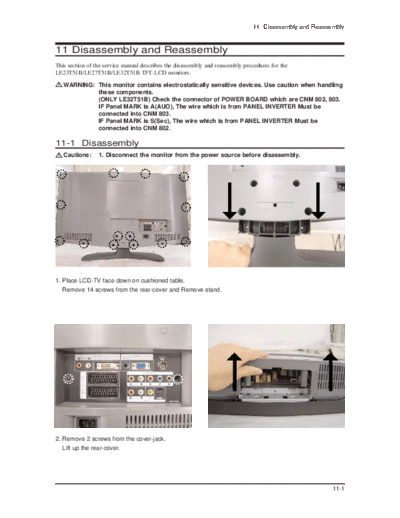
1. Place LCD-TV face down on cushioned table.
   Remove 14 screws from the rear-cover and Remove stand.


2. Remove 2 screws from the cover-jack.
   Lift up the rear-cover.


                                                                                                        11-1
11 Disassembly and Reassembly


                                                      23"(AM-LCD Panel)
                                                      27"(CMO Panel)
                                                      32"(AM-LCD Panel)

                                                      32" (AUO Panel)


3. Disconnect cables and remove 6 screws from the power board.


4. Remove 4 screws from the main board.
   Lift up the power board.


5. Lift up the main board and remove 10 secews from the BRKT.


11-2
                                                                            11 Disassembly and Reassembly


6. Remove 4 screws and Lift up the Lcd panel.


7. Remove 4 screws


11-2 Reassembly
Reassembly procedures are in the reverse order of disassembly procedures.


                                                                                                     11-3
11 Disassembly and Reassembly

Memo


11-4
◦ Jabse Service Manual Search 2026 ◦ Jabse Pravopis ◦ onTap.bg ◦ Other service manual resources online : Fixya ◦ eServiceinfo