Service Manuals, User Guides, Schematic Diagrams or docs for : Samsung LCD TV GPL15KE CHASSIS LW15M23CP LCD TV samsung_gpl15ke_chassis_lw15m23cp_lcd_tv_sm_142
<< Back | HomeMost service manuals and schematics are PDF files, so You will need Adobre Acrobat Reader to view : Acrobat Download Some of the files are DjVu format. Readers and resources available here : DjVu Resources
For the compressed files, most common are zip and rar. Please, extract files with Your favorite compression software ( WinZip, WinRAR ... ) before viewing. If a document has multiple parts, You should download all, before extracting.
Good luck. Repair on Your own risk. Make sure You know what You are doing.
Image preview - the first page of the document
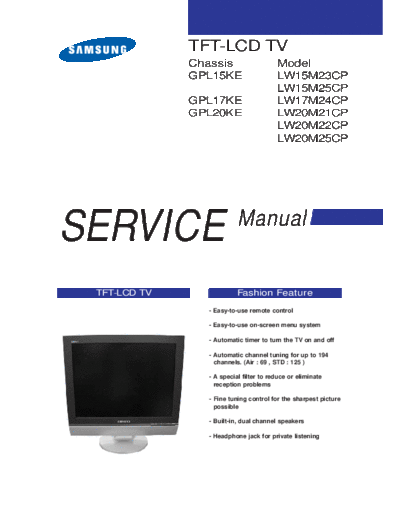
>> Download samsung_gpl15ke_chassis_lw15m23cp_lcd_tv_sm_142 documenatation <<
Text preview - extract from the document
              TFT-LCD TV
              Chassis                   Model
              GPL15KE                   LW15M23CP
                                        LW15M25CP
              GPL17KE                   LW17M24CP
              GPL20KE                   LW20M21CP
                                        LW20M22CP
                                        LW20M25CP


SERVICE                   Manual


 TFT-LCD TV               Fashion Feature
                - Easy-to-use remote control

                - Easy-to-use on-screen menu system

                - Automatic timer to turn the TV on and off

                - Automatic channel tuning for up to 194
                  channels. (Air : 69 , STD : 125 )

                - A special filter to reduce or eliminate
                  reception problems

                - Fine tuning control for the sharpest picture
                  possible

                - Built-in, dual channel speakers

                - Headphone jack for private listening
                                            Samsung Electronics Co.,Ltd.
- This Service Manual is a property of      416, Maetan-3Dong, Yeongtong-Gu, Suwon City,
  Samsung Electronics Co., Ltd.             Gyeonggi-Do, Korea, 443-742
  Any unauthorized use of Manual can be     Printed in Korea
  punished under applicable International   P/N : BN82-00131H-01
  and/or domestic law.                      URL : http://itself.sec.samsung.co.kr/
                  7 Block Diagrams


7 Block Diagram


                               7-1
7 Block Diagrams

Memo


7-2
                               13 Circuit Descriptions


13 Circuit Descriptions
13-1 Overall Block Structure


                                                 13-1
13 Circuit Descriptions

13-2 Partial Block Description
13-2-1 MAIN BOARD POWER TREE


13-2
                                      13 Circuit Descriptions

13-2-2 WIRING DIAGRAM


CN100(9P) : To IP Board
CN401(30P) : To 15",17" Panel
CN402(50P) : To 20" Panel
CN905(5P) : To Program Download Jig
CN906(20P) : To Scart
CN600(3P) : To Left Speaker
CN601(2P) : To Right Speaker
CN907(12P) : To Function Board


                                                        13-3
13 Circuit Descriptions


13-4
                                                                        3 Alignments and Adjustments


3 Alignments and Adjustments

3-1 Service Instruction
1. Usually, a color TV-VCR needs only slight touch-up adjustment upon installation.
   Check the basic characteristics such as height, horizontal and vertical sync.
2. Use the specified test equipment or its equivalent.
3. Correct impedance matching is essential.
4. Avoid overload. Excessive signal from a sweep generator might overload the front-end
   of the TV. When inserting signal markers, do not allow the marker generator to distort
   test result.
5. Connect the TV only to an AC power source with voltage and frequency as specified on
   the backcover nameplate.
6. Do not attempt to connect or disconnect any wire while the TV is turned on. Make sure
   that the power cord is disconnected before replacing any parts.
7. To protect aganist shock hazard, use an isolation transform.


                                                                                                 3-1
3 Alignments and Adjustments

3-2 How to Access Service Mode
3-2-1 Entering Factory Mode
1. To enter "Service Mode" Press the remote -control keys in this sequence :
   - If you do not have Factory remote - control


      - If you have Factory remote - control


3-3 Factory Data
                                                   -. OSD which the basic adjustment is added.
 Service
                                                   PC Auto Color
 PC Auto Color
◦ Jabse Service Manual Search 2026 ◦ Jabse Pravopis ◦ onTap.bg ◦ Other service manual resources online : Fixya ◦ eServiceinfo