Service Manuals, User Guides, Schematic Diagrams or docs for : Samsung LCD TV LE26M51B, LE32M51B, LE32M61B, LE40M51B, LE40M61B, LE66M51B LE40M61BX Operation Instruction & Installation
<< Back | HomeMost service manuals and schematics are PDF files, so You will need Adobre Acrobat Reader to view : Acrobat Download Some of the files are DjVu format. Readers and resources available here : DjVu Resources
For the compressed files, most common are zip and rar. Please, extract files with Your favorite compression software ( WinZip, WinRAR ... ) before viewing. If a document has multiple parts, You should download all, before extracting.
Good luck. Repair on Your own risk. Make sure You know what You are doing.
Image preview - the first page of the document
>> Download Operation Instruction & Installation documenatation <<
Text preview - extract from the document
                                                            10 Operating Installations and Installation


10 Operating Installations and Installation
10-1 Product Features
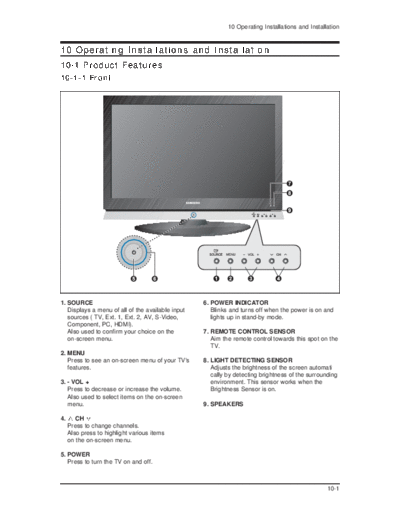
10-1-1 Front


1. SOURCE                                          6. POWER INDICATOR
   Displays a menu of all of the available input      Blinks and turns off when the power is on and
   sources ( TV, Ext. 1, Ext. 2, AV, S-Video,         lights up in stand-by mode.
   Component, PC, HDMI).
   Also used to confirm your choice on the         7. REMOTE CONTROL SENSOR
   on-screen menu.                                    Aim the remote control towards this spot on the
                                                      TV.
2. MENU
   Press to see an on-screen menu of your TV's     8. LIGHT DETECTING SENSOR
   features.                                          Adjusts the brightness of the screen automati
                                                      cally by detecting brightness of the surrounding
3. - VOL +                                            environment. This sensor works when the
   Press to decrease or increase the volume.          Brightness Sensor is on.
   Also used to select items on the on-screen
   menu.                                           9. SPEAKERS

4.      CH
     Press to change channels.
     Also press to highlight various items
     on the on-screen menu.

5. POWER
   Press to turn the TV on and off.


                                                                                                  10-1
10 Operating Installations and Installation

10-1-2 Back(LE26M51B)


10-2
                                         10 Operating Installations and Installation

10-1-3 Back(LE32M51B / LE32M61B / LE40M51B / LE40M61B/ LE46M51B)


                                                                               10-3
10 Operating Installations and Installation

1. Connecting an Aerial or Cable Television Network
To view television channels correctly, a signal must be received by the set from one of the following
sources:
 - An outdoor aerial
 - A cable television network
 - A satellite network

2. Connecting Component Devices (DTV/DVD)
 - Connect component video cables to component connector ("PR", "PB", "Y") on the rear of your set
   and the other ends to corresponding component video out connectors on the DTV or DVD.
 - If you wish to connect both the Set-Top Box and DTV (or DVD), you should connect the Set-Top
   Box to the DTV (or DVD) and connect the DTV (or DVD) to component connector ("PR", "PB", "Y")
   on your set.
 - The Y, Pb and Pr connectors on your component devices (DTV or DVD) are sometimes labeled Y,
   B-Y and R-Y or Y, Cb and Cr.
 - Connect RCA audio cables to
◦ Jabse Service Manual Search 2026 ◦ Jabse Pravopis ◦ onTap.bg ◦ Other service manual resources online : Fixya ◦ eServiceinfo