Service Manuals, User Guides, Schematic Diagrams or docs for : Samsung Laptop NP-R40 Схема и сервис мануал на Samsung NP-R40 06_Disassembly & Reassembly

<< Back | Home

Most service manuals and schematics are PDF files, so You will need Adobre Acrobat Reader to view : Acrobat Download Some of the files are DjVu format. Readers and resources available here : DjVu Resources
For the compressed files, most common are zip and rar. Please, extract files with Your favorite compression software ( WinZip, WinRAR ... ) before viewing. If a document has multiple parts, You should download all, before extracting.
Good luck. Repair on Your own risk. Make sure You know what You are doing.


Image preview - the first page of the document
06_Disassembly & Reassembly


>> Download 06_Disassembly & Reassembly documenatation <<

Text preview - extract from the document
- This Document can not be used without Samsung's authorization -


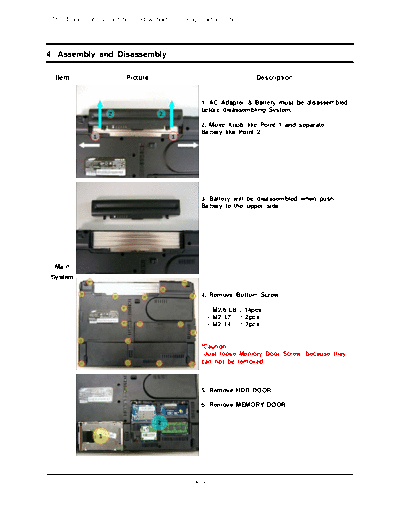
4. Assembly and Disassembly

  Item                    Picture                                    Description


                                                  1. AC Adapter & Battery must be disassembled
                                                  before disassembling System.

                                                  2. Move Knob like Point 1 and separate
                                                  Battery like Point 2.


                                                  3. Battery will be disassembled when push
                                                  Battery to the upper side.


  Main
 System

                                                  4. Remove Bottom Screw

                                                      - M2.6 L8 : 14pcs
                                                      - M2 L7 : 2pcs
                                                      - M2 L4 : 2pcs


                                                  *Caution
                                                   Just loose Memory Door Screw, because they
                                                  can not be removed.


                                                  5. Remove HDD DOOR

                                                  6. Remove MEMORY DOOR


                                                4-1
- This Document can not be used without Samsung's authorization -


4. Assembly and Disassembly

  Item                  Picture                                  Description


                                               7. Push HDD to Arrow mark side gripping
                                               handle to remove HDD.


                                               *Caution
                                               Be careful when push the HDD to the rear
                                               side.
                                               HDD must be removed before turning upside
                                               down the system.


                                               8. Remove Wireless LAN Card after
                                               disassembling Wireless LAN Antenna


                                               *Caution
                                               Firenze2 have just one Wireless LAN Antenna


  Main
 System

                                               9. Lift up Memory by doing like Point 1, and
                                               pull out the Memory from Socket.


                                               10. Lift up DMB module from Point 1 after
                                               remove 2 DMB Screws.

                                                - M2 L4 : 2pcs

                                               *Caution
                                               Just turn upside down the DMB Module to
                                               disassemble Antenna. Don't lift up highly.


                                             4-2
- This Document can not be used without Samsung's authorization -


4. Assembly and Disassembly

  Item                  Picture                                  Description


                                               11. Disassemble DMB Antenna and remove
                                               DMB Module completely.


                                               12. Bottom view after remove HDD, Wireless
                                               LAN, Memory, DMB Module.


  Main
 System

                                               13. Lift up Top cover from right side.


                                               *Caution
                                               Lift up Top cover after fully openning the lid.


                                               15. Disassemble 3 Hooks by sequence of 1, 2,
                                               3 in the picture to remove KEYBOARD


                                             4-3
- This Document can not be used without Samsung's authorization -


4. Assembly and Disassembly

  Item                  Picture                                  Description


                                               16. Use tweezers, wooden cutter, '-' driver to
                                               disassemble Keyboard.


                                               *Caution
                                               1. Be careful of injury and scratch of Top
                                               surface when use instruments.
                                               2. Don't lift up Keyboard highly.


                                               17. Lift up FPC Connector cover like a picture
                                               and disassemble Keyboard FPC.


                                               *Caution
                                                Don't lift up FPC Connector cover highly.
                                                That may cause Connector crash.
  Main
 System

                                               18. Remove 3 screws to disassemble Top.

                                                - M2 L4 : 1pcs
                                                - M2 L6 : 2pcs


                                               19. Disassemble Touchpad FFC after lifting up
                                               FPC Connector cover.


                                               *Caution
                                                Don't lift up FPC Connector cover highly.
                                                That may cause Connector crash.


                                             4-4
- This Document can not be used without Samsung's authorization -


4. Assembly and Disassembly

  Item                  Picture                                 Description


                                               20. Disassemble Speaker Cable by pulling out
                                               the connector like a picture.


                                               21. Disassemble LCD Cable by lifting up
                                               transparent handle.


                                               *Caution
                                                If lift up Top without disconnection of LCD
                                               Cable, that may cause LCD connector crash.


  Main
 System
                                               22. Pull out the Wireless LAN Antenna from
                                               bottom side carefully.


                                               23. Pull out the Wireless LAN Antenna like a
                                               picture carefully.


                                             4-5
- This Document can not be used without Samsung's authorization -


4. Assembly and Disassembly

  Item                  Picture                                  Description


                                               25. Disassembly LCD Ass'y from System after
                                               remove 2 screws.

                                                - M2 L6 : 2pcs


                                               26. After disassembly LCD Ass'y.


  Main
 System

                                               27. Turn upside down the System and pull out
                                               the ODD like a picture.


                                               28. Remove 1 screw after pulling out the ODD
                                               for disassemble Top.

                                                - M2 L3 : 1pcs


                                             4-6
- This Document can not be used without Samsung's authorization -


4. Assembly and Disassembly

  Item                  Picture                                  Description


                                               29. Lift up Top from right side.


                                               30. Remove 2 screws to disassemble Main
                                               Board from Bottom.
                                               Disconnect RJ11 Cable and Bluetooth Cable.

                                                - M2 L4 : 2pcs


  Main
 System

                                               31. Lift up the Main board from right side.


                                               *Caution
                                                If lift up from left side, that may cause crash
                                               of some ports.


                                               32. Bottom after removing the Main Board.


                                             4-7
- This Document can not be used without Samsung's authorization -


4. Assembly and Disassembly

  Item                  Picture                                  Description


                                               33. Disassemble Bluetooth with Cable after
                                               removing 1 screw.

                                                - M2 L4 : 1pcs


                                               *Caution
                                                Be careful not to crash the Bluetooth Module,
                                               when disassemble from hook.


                                               34. Lift up RJ11 Connector like a Point 1 and
                                               pull out the Cable like a Point 2.


  Main
 System
                                               35. Disassemble DMB Antenna after removing
                                               2 screws.

                                                - M2 L4 : 2pcs


                                               36. Bottom after removing Main Board,
                                               Bluetooth, RJ11 Cable and DMB Antenna.


                                             4-8
- This Document can not be used without Samsung's authorization -


4. Assembly and Disassembly

  Item                  Picture                                  Description


                                               37. Remove 6 screws and pull out the FAN
                                               Cable to the arrow mark side.
                                               Lift up the Thermal Duct.

                                                - M2 L4 : 6pcs

                                               *Caution
                                               Be care of not to crash some other part on
                                               Main Board when lift up the Thermal Duct.


                                               38. Remove Heatsink after loosing 4 Screws.


                                               *Caution
                                               - Screws can not be seperated from Heatsink.
                                               - Be care of not to distort Main Board when
                                               loose 4 screws.


  Main
 System

                                               39. Turn screw like a picture and lift up the
                                               CPU.


                                               *Caution
                                                Be care of not to bend CPU Pin.


                                               40. Remove 4 screws to disassemble PCMCIA
                                               Frame after detaching the insulator.

                                                - M2 L6 : 4pcs


                                             4-9
- This Document can not be used without Samsung's authorization -


4. Assembly and Disassembly

  Item                  Picture                                  Description


                                               41. Lift up the PCMCIA Frame like a picture.


                                               *Caution
                                                Be care of not to bend PCMCIA Pin.


                                               42. Disconnect the MDC with Cable like a
                                               picture after removing 2 screws.

  Main                                          - M2 L4 : 2pcs

 System


                                               43. The Main Board after removing the Thermal
                                               Duct, Heatsink, CPU, PCMCIA Frame, and MDC.


                                               1. Remove 2 screws to disassemble Speaker.

                                                - M2 L4 : 2pcs
  Top
  Ass'y


                                            4-10
- This Document can not be used without Samsung's authorization -


4. Assembly and Disassembly

  Item                  Picture                                  Description


                                               2. Remove 2 screws to disassemble Speaker.

                                                - M2 L4 : 2pcs


                                               3. Remove Speaker after detach 2 adhesives.


                                               *Caution
                                                - Be care of not to crash Speaker Cable.
                                                - Be care of not to damage Speaker
                                               diaphragm.


  Top
  Ass'y
                                               4. Remove Touchpad FFC after detaching 2
                                               adhesives and lifting up the FFC Connector
                                               cover.


                                               5.
                                                1) Remove 2 screws.
                                                2) Push the Touchpad Bracket like a Point 2.
                                                3) Lift up the Touchpad Bracket like a Point 3.

                                                - M2 L3 : 2pcs


                                               *Caution
                                                Lift up the Bracket carefully to protect from
                                               damage of Touchpad Module.


                                            4-11
- This Document can not be used without Samsung's authorization -


4. Assembly and Disassembly

  Item                  Picture                                  Description


                                               6. Top Ass'y after removing Speaker and
                                               Touchpad Bracket

  TOP
  Ass'y
                                               *Caution
                                                Do not detach Touchpad Module, because
                                               that is attached with Top by double adhesive.


                                               1. Remove 5 screws after detaching the 5
                                               Rubber.

                                                - M2 L6 : 5pcs


                                               2. Use tweezers, wooden cutter or '-' driver
                                               when remove rubbers.

  LCD
  Ass'y                                        *Caution
                                                Be careful of injury and scratch of LCD Front
                                               surface when use instruments.


                                               3. Disassemble the LCD Front like a picture.


                                               *Caution
                                                Be care of not distort the LCD Front.


                                            4-12
- This Document can not be used without Samsung's authorization -


4. Assembly and Disassembly

  Item                  Picture                                  Description


                                               4. Disassemble the LCD Module and Inverter
                                               from LCD Back after removing 6 screws.

                                                - M2 L6 6pcs


                                               5. Disassemble the Bracket Upper after
                                               removing 3 screws.

                                                - M2 L4 : 3pcs


                                               *Caution
                                                Do not detach the Wireless LAN Antenna
                                               because that is attached with LCD Back by
                                               double adhesive.
  LCD
  Ass'y
                                               6. Lift up the Knob latch after removing the
                                               Spring like a picture.


                                               7. LCD Back after removing the LCD Module,
                                               Bracket Upper and Knob Latch.


                                            4-13
- This Document can not be used without Samsung's authorization -


4. Assembly and Disassembly

4-2. P50  Assembly and Disassembly
   Item                 Picture                                  Description


                                               8. Disconnect the LCD Cable from Inverter like
                                               a picture.


                                               9. Disconnect the LCD Module from Inverter
                                               like a picture.


   LCD
  Ass'y

                                               10. The picture after detaching inverter from
                                               LCD Module.


                                               11. Disconnect the LCD Cable from LCD
                                               Module like a picture after detaching the silver
                                               adhesive.


                                               *Caution
                                                Do not lift up the LCD Cable because LCD
                                               panel board is very fragile.


                                            4-14
- This Document can not be used without Samsung's authorization -


4. Assembly and Disassembly

  Item                  Picture                                  Description


                                               12. Disassemble the LCD L, R Bracket after
                                               removing 8 screws.

                                                - M2 L3 : 8pcs

                                               *Caution
                                                Be care of not scratch the LCD surface when
                                               remove screws.
  LCD
  Ass'y


                                               13. LCD Module after removing LCD Cable, L,
                                               R Bracket and Inverter


                                            4-15


◦ Jabse Service Manual Search 2026 ◦ Jabse PravopisonTap.bg ◦ Other service manual resources online : FixyaeServiceinfo