Service Manuals, User Guides, Schematic Diagrams or docs for : Samsung Laptop NP-R560 Схема и сервис мануал на Samsung NP-R560 Precaution
<< Back | HomeMost service manuals and schematics are PDF files, so You will need Adobre Acrobat Reader to view : Acrobat Download Some of the files are DjVu format. Readers and resources available here : DjVu Resources
For the compressed files, most common are zip and rar. Please, extract files with Your favorite compression software ( WinZip, WinRAR ... ) before viewing. If a document has multiple parts, You should download all, before extracting.
Good luck. Repair on Your own risk. Make sure You know what You are doing.
Image preview - the first page of the document
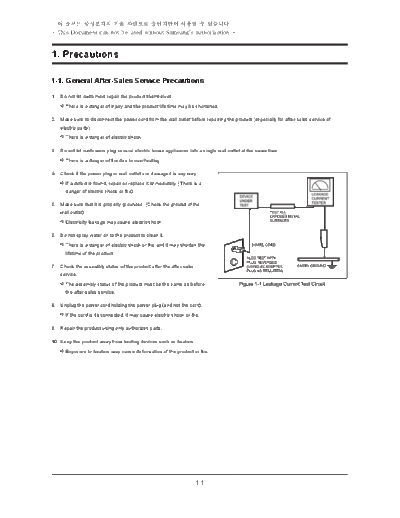
>> Download Precaution documenatation <<
Text preview - extract from the document
-          -
- This Document can not be used without Samsung's authorization -


1. Precautions

1-1. General After-Sales Service Precautions

1. Donotletcustomersrepairtheproductthemselves.
    Thereisadangerofinjuryandtheproductlifetimemaybeshortened.

2. Makesuretodisconnectthepowercordfromthewalloutletbeforerepairingtheproduct(especiallyforafter-salesserviceof
   electricparts).
    Thereisadangerofelectricshock.

3. Donotletcustomersplugseveralelectrichomeappliancesintoasinglewalloutletatthesametime
    There is a danger of fire due to overheating.

4. Checkifthepowerplugorwalloutletaredamagedinanyway.
    fadefectisfound,repairorreplaceitimmediately.(Thereisa
    I
     danger of electric shock or fire)

5. Makesurethatitisproperlygrounded.(Checkthegroundofthe
   walloutlet)
    Electricityleakagemaycauseelectricshock.

6. Donotspraywaterontotheproducttocleanit.
    There is a danger of electric shock or fire and it may shorten the
     lifetimeoftheproduct.

7. Checktheassemblystatusoftheproductaftertheafter-sales
   service.
    Theassemblystatusoftheproductmustbethesameasbefore
     theafter-salesservice.

8. Unplugthepowercordholdingthepowerplug(andnotthecord).
    If the cord is disconnected, it may cause electric shock or fire.

9. Repairtheproductusingonlyauthorizedparts.

10. Keeptheproductawayfromheatingdevicessuchasheaters.
    Exposure to heaters may cause deformation of the product or fire.


                                                                   1-1
-          -
- This Document can not be used without Samsung's authorization -


1. Precautions

1-2. Safety Precautions
(1) EMI
ThisdevicehasbeenregisteredregardingEMIforresidentialuse.Itcanbeusedinallareas.

(2) Circuit Test (Logic Test) Precautions
TheLSIandMSIusedinthisproductaresemiconductorintegratedcircuitsbasedonMOS-FETorCMOS.Sincethesetypesof
devicesarehighlysusceptibletostaticelectricityorcurrentleakage,anisolationbreakmaybecaused.Thereforereadandfollowthe
instructionsbelow.
   1) henhandlinganLSIorMSI,makesureyourbodyisgroundedthroughafewmega-ohmsofresistance.Inaddition,weargloves
     W
     and a jacket made of cotton and not of synthetic fibers that easily generate static electricity.
   2)Whenrepairingtheproduct,placeaconductivematerial(e.g.aluminumfoil)groundedtotheearthontheworktable.
   3)Youmustuseasolderingironwithoutaleakagecurrent.
   4)DonottouchthepinofanICandcarefullyinserttheICintotheblackplasticpackage.
   5) heninsertinganICintoaPCB,becarefulwiththedirectionoftheIC.WheninstallinganICinthewrongdirection,itmight
     W
     becomedamaged.
   6) hencarryinganIC,packagetheICwithconductingmaterialsuchasaluminumfoilorconductingspongesoastokeepthe
     W
     voltagelevelofeachoftheterminalsthesame.
   7)SincethestoragetemperatureofanICisbetween-20~+70degrees,keepitatroomtemperature,ifpossible.
   8)SincethestoragetemperatureofanICisbetween-20~+70degrees,keepitatroomtemperature,ifpossible.
   9)WhensolderinganIC,solderitinasshortatimeaspossiblesothatunnecessaryheatisnotappliedtothedevice.
   10) Avoid leaving excessive amounts of flux within a custom IC or between the pins when soldering a custom IC.
   11)TakecaretonotdamagetheboardwheninstallingorseparatinganOptionBoard.
   12)TakecaretonotbreaktheprintedcircuitpatternonthePCBwhenseparateanIC.


1-3. Ground
Theproductmustbegroundedtoprotectitfromstaticelectricityandotherdangers.Whenusingamultitap,pleaseuseamultitapwitha
groundterminalonly.
Ifyouusea220Vwalloutletwithagroundterminal,youdonotneedtogrounditadditionally.Avoidusingwalloutletsiftheyarenot
groundedeveniftheyhaveagroundterminal.
Togroundtheproduct,connectthegroundtoanexclusivegroundterminalormetalwaterpipe.Connectthegroundcabletotheground
terminalattherearofthemainbody.Togroundtheproduct,connectthegroundterminaloftheproducttoametalwaterpipe,walloutlet
orexclusivegroundterminalwithanelectricwireequaltoorthickerthan#18.
NevergroundtheproducttoaPVCwaterpipe,phoneline,TV,radioantenna,aluminumwindoworgaspipe,becausethisdoesnot
actuallygroundtheproductandmaybedangerous.


1-4. Static Electricity Precautions
Manypartsofthesystemaresusceptibletostaticelectricity.Usinganelectrostaticdischarge(ESD)deviceisveryimportantforthe
safetyoftheuserandtheuser'ssurroundings.UsinganESDdeviceincreasestheprobabilityofasuccessfulrepairandlowersthe
expensesfordamagedparts.

Topreventstaticelectricity,followtheinstructionsbelow.
   1)Performtherepairinalocationwithoutstaticelectricity.
   2) ouchyourhandstoametalwaterpipeorsomemetalobjectconnectedtothegroundtodischargeanystaticelectricity
     T
     fromyourbodybeforehandlingtheparts.
   3)Touchonlytheedgesoftheboard,ifpossible.
   4)Donottouchanypartsunlessabsolutelynecessary
   5)Disassemblethepartsontheanti-static-electricitypad.
   6)Whenaboardisnotinstalledinthesystem,packagetheboardwithananti-static-electricitypackaging.


                                                               1-2
◦ Jabse Service Manual Search 2026 ◦ Jabse Pravopis ◦ onTap.bg ◦ Other service manual resources online : Fixya ◦ eServiceinfo