Service Manuals, User Guides, Schematic Diagrams or docs for : Samsung Laptop NP-R60+ Схема и сервис мануал на Samsung NP-R60+ NP-R60FE0A_SER_SM_EN_20080602190217734_05_Disassembly_and_Reassembly

<< Back | Home

Most service manuals and schematics are PDF files, so You will need Adobre Acrobat Reader to view : Acrobat Download Some of the files are DjVu format. Readers and resources available here : DjVu Resources
For the compressed files, most common are zip and rar. Please, extract files with Your favorite compression software ( WinZip, WinRAR ... ) before viewing. If a document has multiple parts, You should download all, before extracting.
Good luck. Repair on Your own risk. Make sure You know what You are doing.


Image preview - the first page of the document
NP-R60FE0A_SER_SM_EN_20080602190217734_05_Disassembly_and_Reassembly


>> Download NP-R60FE0A_SER_SM_EN_20080602190217734_05_Disassembly_and_Reassembly documenatation <<

Text preview - extract from the document
-          -
- This Document can not be used without Samsung's authorization -


3. Disassembling and Reassembling

  Area                  Picture                                    Description


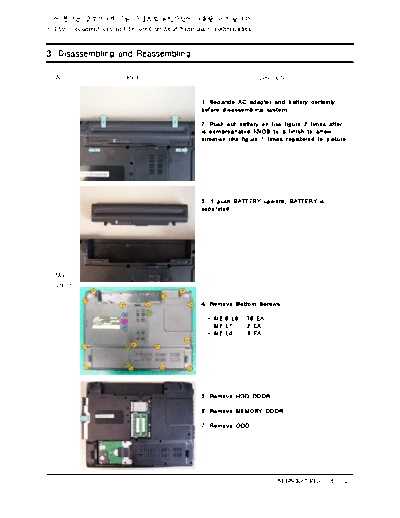
                                               1. Separate AC adaptor and battery certainly
                                               before disassembling system.

                                               2. Push out battery on like figure 2 times after
                                               is compregnated KNOB to a finish to arrow
                                               direction like figure 1 times registered to picture.


                                               3. If push BATTERY upward, BATTERY is
                                               separated.


  Main
 System

                                               4. Remove Bottom Screws.

                                                 - M2.6 L8 : 16 EA
                                                 - M2 L7 : 2 EA
                                                 - M2 L4 : 3 EA


                                               5. Remove HDD DOOR.

                                               6. Remove MEMORY DOOR.

                                               7. Remove ODD.


                                                                          SENS R60 Plus < 3 - 1 >
-          -
- This Document can not be used without Samsung's authorization -


3. Disassembling and Reassembling

  Area                  Picture                                   Description


                                               8. Separate from Connector catches handle with
                                               picture and pushes HDD to arrow direction.

                                               *Caution
                                               When leave out HDD to back, do not inflict
                                               unreasonable force.
                                               Remove from HDD certainly before upset system.


                                               9. Separate first Wireless LAN Antenna, and
                                               after that Wireless LAN CardScrew solves and
                                               lifts and removes .

                                                 - M2 L4 : 1 EA


                                               *Caution
                                               PRAHA model have only one Wireless LAN
  Main                                         Antenna
 System

                                               10. After Memory lifts Memory pulling Socket
                                               with picture to right and left, Memory extracts
                                               forward and separate.


                                               11. Remove ODD side Screw.
                                                 - M2 L3 : 1 EA


                                                                         SENS R60 Plus < 3 - 2 >
-          -
- This Document can not be used without Samsung's authorization -


3. Disassembling and Reassembling

  Area                  Picture                                  Description


                                               12. After remove HDD, Wireless LAN, Memory,
                                               ODD Module image


                                               13. When overturn System, use Hook of where
                                               is registered to picture for Top Cover and
                                               Keyboard separation.


  Main
 System

                                               14. Lift by "-" screw driver using Hole between
                                               "Pause Break" height and "Insert" height to
                                               remove Top Cover.


                                               15. At Keyboard Hook separation tweezers or
                                               tree knifedo to use '-' screw driver.


                                               *Caution
                                               1. Take care so that safety accident and Top
                                               surface at tool use may not rake.
                                               2. Keyboard lifts furtively and uncovers FPC
                                               because was linked by System and FPC.


                                                                        SENS R60 Plus < 3 - 3 >
-          -
- This Document can not be used without Samsung's authorization -


3. Disassembling and Reassembling

  Area                  Picture                                  Description


                                               16. Lifts Keyboard FPC and Linked Connector
                                               Cover with picture and separates Keyboard.


                                               *Caution
                                                Observe because Connector is damaged in
                                               case of lift Connector Cover perforce.


                                               17. Remove Cable plain of your part to disjoint
                                               Top.


  Main
 System

                                               18. Separate Touchpad FFC after lift FFC
                                               Connector's Cover on.


                                               *Caution
                                                Observe because Connector is damaged in
                                               case of lift Connector Cover perforce.


                                               19. Pulls Connector to arrow direction and
                                               separates Speaker Cable.


                                                                        SENS R60 Plus < 3 - 4 >
-          -
- This Document can not be used without Samsung's authorization -


3. Disassembling and Reassembling

  Area                  Picture                                    Description


                                               20. Catches LCD Cable and pulls to left and
                                               separates Cable.


                                               *Caution
                                                Because Main Board's Connector drops easily
                                               in case of lift Top without separating LCD Cable
                                               LCD Cable separation availabilityTop exclusion
                                               certainly confirm.


                                               21. Pull Wireless LAN Antenna carefully vertically.


                                               *Caution
                                                Is expired because Wireless LAN Antenna takes
                                               or work so that may not be damaged with
                                               meticulous care.

  Main
 System

                                               22. Extracts Wireless LAN Antenna to arrow
                                               direction carefully and separates with Top.


                                               *Caution
                                                Is expired because Wireless LAN Antenna takes
                                               or work so that may not be damaged with
                                               meticulous care.


                                               23. Separate LCD Ass' y after remove two
                                               Screws registered to picture.

                                                - M2.6 L8 : 2 EA


                                                                         SENS R60 Plus < 3 - 5 >
-          -
- This Document can not be used without Samsung's authorization -


3. Disassembling and Reassembling

  Area                  Picture                                   Description


                                               24. After separate LCD Ass' y image


                                               25. Lifts on and separates Top from right side
                                               with picture.


  Main
 System
                                               26. Separate Bluetooth Cable at confidential talk
                                               to arrow direction after remove five Screws to
                                               separate Main Board, Fan, Bluetooth.

                                                - M2 L4 : 5 EA


                                               27. Fan separates all Cables at confidential talk
                                               to arrow direction for separation.


                                                                         SENS R60 Plus < 3 - 6 >
-          -
- This Document can not be used without Samsung's authorization -


3. Disassembling and Reassembling

  Area                  Picture                                  Description


                                               28. Lifts Main Board from right side part and
                                               separates from Bottom.


                                               *Caution
                                                Lift from right side certainly because there is
                                               Port damage worry in case of lift perforce from
                                               left side


                                               29. Bottom after Main Board exclusion


  Main
 System


                                                                        SENS R60 Plus < 3 - 7 >
-          -
- This Document can not be used without Samsung's authorization -


3. Disassembling and Reassembling

  Area                  Picture                                   Description


                                               1. Remove Speaker.


   Top                                         *Caution
  Ass'y                                         If Touchpad Module is not all-important
                                               occasion because was fixed by Top and two
                                               faces tape, Module does not separate.
                                                Press resources are not Bunrigadoe because
                                               become anastomosis.


                                               1. Screw exclusion after LCD Front's Rubber 5
                                               exclusion

                                                - M2 L6 : 5 EA


                                               2. Do to use tweezers or tree sword, '-' screw
                                               driver at Rubber removal.


  LCD
  Ass'y


                                               3. Twists hors furtively in inside with picture and
                                               separates Front.


                                               *Caution
                                                Inflict force perforce and take care so that
                                               Front may not bend.


                                                                         SENS R60 Plus < 3 - 8 >
-          -
- This Document can not be used without Samsung's authorization -


3. Disassembling and Reassembling

  Area                  Picture                                  Description


                                               4. Separate + Inverter from LCD Back to LCD
                                               Module removing 7 Screws.

                                                - M2 L6 : 7 EA


                                               5. Removes 2 Screws and separates Bracket
                                               Upper.

                                                - M2 L4 : 2 EA


  LCD
  Ass'y
                                               6. Separate Knob Latch after remove Spring
                                               landing on pulling Spring's right furtively.


                                               7. LCD Back after LCD Module, Bracket Upper,
                                               Knob Latch exclusion


                                               *Caution
                                                Because Wireless LAN Antenna was fixed by
                                               two faces tape to LCD Back, Antenna does not
                                               separate except all-important occasion.


                                                                        SENS R60 Plus < 3 - 9 >
-          -
- This Document can not be used without Samsung's authorization -


3. Disassembling and Reassembling

  Area                  Picture                                  Description


                                               8. Separate Connector 3 places in LCD Module.


                                               9. Has pushed Connector to arrow direction and
                                               separates LCD Module and Inverter.


  LCD
  Ass'y

                                               10. Pulls Connector to arrow direction and
                                               separates LCD Module and Inverter.


                                               11. Separate LCD Module and LCD Cable
                                               pushing LCD Cable to arrow direction after silver
                                               color tape exclusion for protection.


                                                                       SENS R60 Plus < 3 - 10 >
-          -
- This Document can not be used without Samsung's authorization -


3. Disassembling and Reassembling

  Area                  Picture                                     Description


                                               12. Removes 6 side Screws and removes right
                                               and left Bracket.

                                                - M2 L3 : 6 EA

                                               *Caution
                                                Take care so that LCD surface at Screw
                                               exclusion may not rake.


                                               13. LCD Module after LCD Cable, right and left
                                               Bracket, Inverter exclusion


   LCD
  Ass'y


                                                                        SENS R60 Plus < 3 - 11 >
-          -
- This Document can not be used without Samsung's authorization -


3. Disassembling and Reassembling

  Area                  Picture                                     Description


                                               1. Main Board


                                               2. Remove 8 Screws for HeatSink separation.
                                                - Special Screw : 8 EA

                                               *Caution
                                                HeatSink Screws couldn't be disassembled.


   Main
  Board
                                               3. CPU & MDC part


                                               4. Lift CPU by right angle after turn Screw to
                                               direction such as the picture for CPU separation.

                                               *Caution
                                               Take care so that CPU Pin may not bend.


                                                                        SENS R60 Plus < 3 - 12 >
-          -
- This Document can not be used without Samsung's authorization -


3. Disassembling and Reassembling

  Area                  Picture                                     Description


                                               5. Separate relevant Screw to separate MDC.

                                               - M2 L6 : 1 EA


                                               6. Cancel MDC cable and connection between
                                               baud.


   Main
  Board
                                               7. Remove 2 Screws to separate EXPRESS
                                               Frame.

                                                - M2 L6 : 2 EA


                                               8. Lift metal Geolrimbu 2 places vertically to
                                               separate EXPRESS Frame with picture.

                                               *Caution
                                                Take care so that metal Geolrimbu may not
                                               bend forever.


                                                                        SENS R60 Plus < 3 - 13 >
-          -
- This Document can not be used without Samsung's authorization -


3. Disassembling and Reassembling

  Area                  Picture                                     Description


                                               9. EXPRESS Frame with picture separates
                                               confidential talk to right.


                                               10. After remove Thermal Duct, Heatsink, CPU,
                                               EXPRESS Frame, MDC Main Board image


   Main
  Board


                                                                        SENS R60 Plus < 3 - 14 >


◦ Jabse Service Manual Search 2026 ◦ Jabse PravopisonTap.bg ◦ Other service manual resources online : FixyaeServiceinfo