Service Manuals, User Guides, Schematic Diagrams or docs for : Samsung Laptop NP-R710 Схема и сервис мануал на Samsung NP-R710 NP-R710-FS04RU_SM_EN_20080820080531000_6_Disassembly_and_Reassembly
<< Back | HomeMost service manuals and schematics are PDF files, so You will need Adobre Acrobat Reader to view : Acrobat Download Some of the files are DjVu format. Readers and resources available here : DjVu Resources
For the compressed files, most common are zip and rar. Please, extract files with Your favorite compression software ( WinZip, WinRAR ... ) before viewing. If a document has multiple parts, You should download all, before extracting.
Good luck. Repair on Your own risk. Make sure You know what You are doing.
Image preview - the first page of the document
>> Download NP-R710-FS04RU_SM_EN_20080820080531000_6_Disassembly_and_Reassembly documenatation <<
Text preview - extract from the document
- This document cannot be used without Samsung's authorization -


3. Disassembly and Reassembly

3-1. Disassembly and Reassembly of R700
  Part
                        Figure                                     Description
 Name

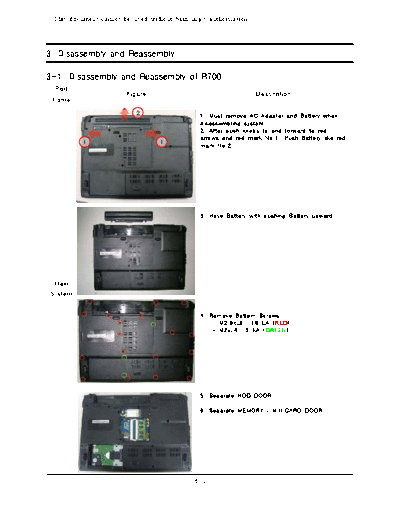
                                               1. Must remove AC Adapter and Battery when
                                               disassembling system.
                                               2. After push knobs to end forward to red
                                               arrows and red mark No.1, Push Battery like red
                                               mark No.2.


                                               3. Have Battery with pushing Battery upward.


  Main
 System


                                               4. Remove Bottom Screws.
                                                   - M2.6xL8 : 18 EA (RED)
                                                   - M2xL4 : 3 EA (GREEN)


                                               5. Separate HDD DOOR

                                               6. Separate MEMORY / MINICARD DOOR.


                                             3-1
- This document cannot be used without the authorization of Samsung -


3. Disassembly and Reassembly

  Part
                        Figure                                    Description
 Name
                                               7. You can see HDD, removing Door-HDD,
                                               And, Pick Insulator and pull it toward to 70
◦ Jabse Service Manual Search 2026 ◦ Jabse Pravopis ◦ onTap.bg ◦ Other service manual resources online : Fixya ◦ eServiceinfo