Service Manuals, User Guides, Schematic Diagrams or docs for : Samsung Laptop NP-R25 Схема и сервис мануал на Samsung NP-R25 NP-R25F001_SER_SM_EN_20070514144417187_05_Disassembly_and_Reassembly
<< Back | HomeMost service manuals and schematics are PDF files, so You will need Adobre Acrobat Reader to view : Acrobat Download Some of the files are DjVu format. Readers and resources available here : DjVu Resources
For the compressed files, most common are zip and rar. Please, extract files with Your favorite compression software ( WinZip, WinRAR ... ) before viewing. If a document has multiple parts, You should download all, before extracting.
Good luck. Repair on Your own risk. Make sure You know what You are doing.
Image preview - the first page of the document
>> Download NP-R25F001_SER_SM_EN_20070514144417187_05_Disassembly_and_Reassembly documenatation <<
Text preview - extract from the document
- This document cannot be used without Samsung's authorization -


3. Disassembly and Assembly

3-1. Disassembly and Assembly of R25
  Part                  Figure                                     Description
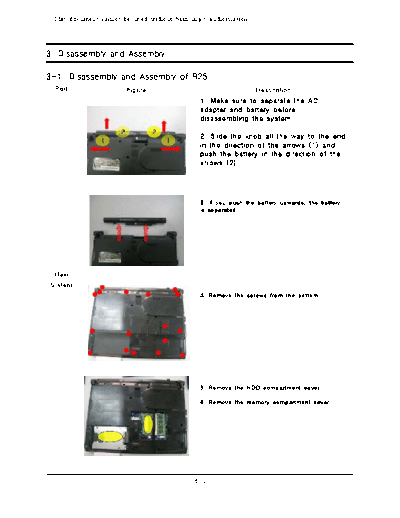
                                               1. Make sure to separate the AC
                                               adapter and battery before
                                               disassembling the system.

                                               2. Slide the knob all the way to the end
                                               in the direction of the arrows (1) and
                                               push the battery in the direction of the
                                               arrows (2).


                                               3. If you push the battery upwards, the battery
                                               is separated.


  Main
 System
                                               4. Remove the screws from the bottom.


                                               5. Remove the HDD compartment cover.

                                               6. Remove the memory compartment cover.


                                             3-1
- This document cannot be used without the authorization of Samsung -


3. Disassembly and Assembly

  Part                  Figure                                    Description
                                               7. When removing the HDD compartment cover,
                                               you will find the HDD. Separate the HDD cable
                                               and lift up the HDD at an angle of 70
◦ Jabse Service Manual Search 2026 ◦ Jabse Pravopis ◦ onTap.bg ◦ Other service manual resources online : Fixya ◦ eServiceinfo