Service Manuals, User Guides, Schematic Diagrams or docs for : Samsung Monitor Monitor GY16CS 04.Disassembly & Reassembly
<< Back | HomeMost service manuals and schematics are PDF files, so You will need Adobre Acrobat Reader to view : Acrobat Download Some of the files are DjVu format. Readers and resources available here : DjVu Resources
For the compressed files, most common are zip and rar. Please, extract files with Your favorite compression software ( WinZip, WinRAR ... ) before viewing. If a document has multiple parts, You should download all, before extracting.
Good luck. Repair on Your own risk. Make sure You know what You are doing.
Image preview - the first page of the document
>> Download 04.Disassembly & Reassembly documenatation <<
Text preview - extract from the document
3 Disassembly and Reassembly
This section of the service manual describes the disassembly and reassembly procedures for the
GY15CS* TFT-LCD monitors.

WARNING: This monitor contains electrostatically sensitive devices. Use caution when handling
         these components.

3-1 Disassembly
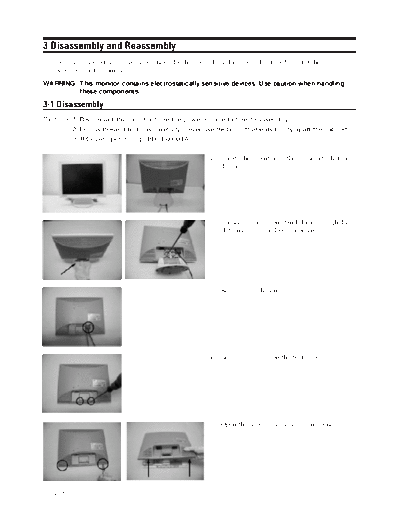
Cautions:1. Disconnect the monitor from the power source before disassembly.
         2. Follow these directions carefully; never use metal instruments to pry apart the cabinet.
         3. R/Cover opening jig : BH81-00001A

                                                        1. Locate the monitor on the cushion table face
                                                           down.


                                                        2. Loosen the snaps on stand door through the
                                                           slot on rear cover. Remove 4 screws.


                                                        3. Remove 2 cable screws.


                                                        4. Remove 2 screws on the rear cover.


                                                        5. Open the rear cover by using an opening jig.


GY15CS*                                                                                               3-1
3 Disassembly and Reassembly

                               6. Remove 2 screws of PCB shield.


                               7. Disconnect the panel(inverter) cable from
                                  IP-board.


                               8. Remove 7 screws of IP-board.


                               9. Separate front assy and panel assy.


                               10 Remove 4 screws on LCD-panel.


3-2                                                                     GY15CS*
◦ Jabse Service Manual Search 2026 ◦ Jabse Pravopis ◦ onTap.bg ◦ Other service manual resources online : Fixya ◦ eServiceinfo