Service Manuals, User Guides, Schematic Diagrams or docs for : Samsung Plasma PL42C450B1 chassis F74A samsung_PL42C450B1_sm_completo f74a-p-c45x-2-spec

<< Back | Home

Most service manuals and schematics are PDF files, so You will need Adobre Acrobat Reader to view : Acrobat Download Some of the files are DjVu format. Readers and resources available here : DjVu Resources
For the compressed files, most common are zip and rar. Please, extract files with Your favorite compression software ( WinZip, WinRAR ... ) before viewing. If a document has multiple parts, You should download all, before extracting.
Good luck. Repair on Your own risk. Make sure You know what You are doing.


Image preview - the first page of the document
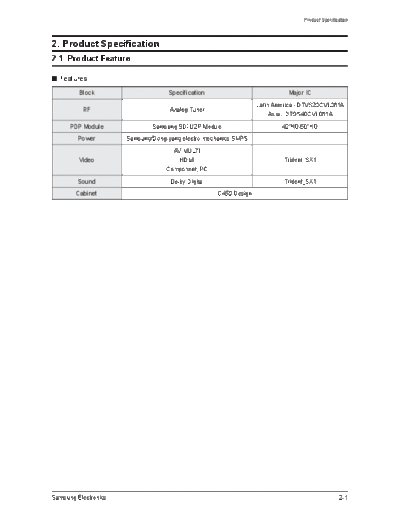
f74a-p-c45x-2-spec


>> Download f74a-p-c45x-2-spec documenatation <<

Text preview - extract from the document
                                                                                 Product Specification


2.ProductSpecification
2-1 ProductFeature

 Features

         Block                      Specification                           MajorIC
                                                                  Latin America - DTVS20CVL081A
          RF                        Analog Tuner
                                                                       Asia - DTOS40CVL081A
      PDPModule               Samsung SDI U2P Module                      42"HD/50"HD
         Power        Samsung/Dong-yang electro mechanics SMPS
                                     AV MULTI
         Video                         HDMI                                Trident_SX1
                                   Component, PC
         Sound                      Dolby Digital                          Trident_SX1
        Cabinet                                     C450 Design


Samsung Electronics                                                                              2-1
Product Specification


 Specification

                                   PL42C45X                                   PL50C45X
            Model
                                   PS42C45X                                   PS50C45X
                        1055 x 660 x 74 mm (without stand)      1220.8 x 748.8 x 74 mm (without stand)
  Dimensions(WxHxD)
                        1055.5 x 721 x 316 mm (with stand)       1220.8 x 810 x 316 mm (with stand)
                              24.1 Kg (without stand)                   31.3 Kg (without stand)
            Weight
                               27.8 Kg (with stand)                      35.0 Kg (with stand)
           Voltage                               AC 100~240V, 60Hz, 550W
       PCResolution            1024 x 768 @ 60Hz                           1360 x 768 @ 60Hz
        ScreenSize               42 inches (16:9)                           50 inches (16:9)
                                                         ANT - AIR IN
      ANTENNAInput
                                                        75 unbalanced
                                                          AV1, AV2
                                     COMPONENT1 - 480i/480p/720p/1080i/1080p
                                     COMPONENT2 - 480i/480p/720p/1080i/1080p
                                                          PC
        VIDEOInput
                                    HDMI1(DVI Compatible) : 480p/720p/1080i/1080p
                                            HDMI2 - 480p/720p/1080i/1080p
                                       HDMI3(SIDE AV) - 480p/720p/1080i/1080p
                          480i can be displayed on HDMI, however it is not contained in EDID data
                                                      AV1, AV2
                                        COMPONENT1 - 480i/480p/720p/1080i/1080p
        AUDIOInput
                                        COMPONENT2 - 480i/480p/720p/1080i/1080p
                                                     PC & DVI
       AudioOutput                                       AUDIO (L/R)
      SpeakerOutput                                 10W+10W (40dB+40dB)
       NewFeatures                                   Anynet+, Media Play


2-2                                                                                 Samsung Electronics
                                                                                                  Product Specification


2-1-1 NewFeaturesexplanation

 MediaPlay
This function enables you to view photo (JPEG) you take more easily , listen to audio files recorded in a USB, and
see a movie or acting screen just by connecting USB device.


   ConnectingaUSBDevice

1. Turn on your TV.

2. Connect a USB device containing photo, music and/or movie files to the USB
   jack on the side of the TV.

3. When USB is connected to the TV, popup window appears. Then you can
   select Media Play.


Samsung Electronics                                                                                               2-3
Product Specification


           ScreenDisplay

Move to the file you desired using the up/down/right/left buttons and then press the ENTERE button.
The file is played.

                       Information:
                        Information:       Videos
                                            Videos       /Movie 01.avi
                                                          /Movie 01.avi                                                         1/1
                                                                                                                                 1/1
     You can ascertain the selected
      You can ascertain the selected
 file name and the number of files
   file name and the number of files
                                                         Movie 01.avi
                                                          Movie 01.avi                             Movie 02.avi
                                                                                                    Movie 02.avi
                         and page.
                          and page.                                       Jan.10.2010                                  Jan.10.2010
                                                                           Jan.10.2010                                  Jan.10.2010

                                                         Movie 03.avi
                                                          Movie 03.avi                             Movie 04.avi
                                                                                                    Movie 04.avi
                                                                          Jan.10.2010
                                                                           Jan.10.2010                                 Jan.10.2010
                                                                                                                        Jan.10.2010                    File List Section:
                                                                                                                                                        File List Section:
                                                         Movie 05.avi
                                                          Movie 05.avi                             Movie 06.avi
                                                                                                    Movie 06.avi
                                                                                                                                                       You can confirm the files
                                                                                                                                                        You can confirm the files
                                                                          Jan.10.2010
                                                                           Jan.10.2010                                 Jan.10.2010
                                                                                                                        Jan.10.2010                    and groups that is sorted by
                                                                                                                                                        and groups that is sorted by
               Sort List Section:
                Sort List Section:                       Movie 07.avi
                                                          Movie 07.avi                             Movie 08.avi
                                                                                                    Movie 08.avi                                       each category.
                                                                                                                                                        each category.
       Displays sorting standard.
        Displays sorting standard.                                        Jan.10.2010
                                                                           Jan.10.2010                                 Jan.10.2010
                                                                                                                        Jan.10.2010


      Sorting standard is
       Sorting standard is
                                                         Movie 09.avi
                                                          Movie 09.avi
                                                                          Jan.10.2010
                                                                           Jan.10.2010
                                                                                                   Movie 10.avi
                                                                                                    Movie 10.avi
                                                                                                                       Jan.10.2010
                                                                                                                        Jan.10.2010
      different depending on the
       different depending on the
      contents.
       contents.                          SUM
                                           SUM                                           Select    Sorting         Tools         Return


                                                   Device                                 Select    Sorting         Tools         Return


                                                    Device


                                                 Operation Buttons
                                                  Operation Buttons
                                                    Red (Device): Selects aaconnected device.
                                                     Red (Device): Selects connected device.
                                                 BB Green (Preference): Sets the file preference. (not supported in Basic view)
                                                     Green (Preference): Sets the file preference. (not supported in Basic view)
                                                    Yellow (Select): Selects multiple files from file list. Selected files are marked with aasymbol.
                                                     Yellow (Select): Selects multiple files from file list. Selected files are marked with symbol.
                                                    Blue (Sorting): Select the sort list
                                                     Blue (Sorting): Select the sort list
                                                     Tools: Displays the option menu.
                                                      Tools: Displays the option menu.
                                                    Return: Moves to previous menu.
                                                     Return: Moves to previous menu.


<< Videos >>

Playing a Video

1. Press the  or  button to select Videos, then press the ENTERE button in the Media Play menu.

2. Press the /// button to select the desired video in the file list.

3. Press the ENTERE button or Play button.
   - The selected file is displayed on the top with its playing time.
   - The playing duration of a movie file may be displayed as "00:00:00" if the playback time information is not
     found at the start of the file.

 In this mode, you can enjoy movie clips contained on a
                                                                                                                              00:04:03 / 00:07:38
                                                                                                                               00:04:03 / 00:07:38                              1/1
                                                                                                                                                                                 1/1
 Game, but you cannot play the Game itself.                                                                   Movie 01.avi
                                                                                                               Movie 01.avi


 Supported Subtitle Formats

                Name                   Fileextension                      Format

      MPEG-4 time-based
                                           .ttxt                           XML
            text

                SAMI                       .smi                           HTML                                                    Play continuously     Pause  Jump
                                                                                                                                                         Pause  Jump   Tools     Return


                                                                                                         SUM                       Play continuously                    Tools     Return


                                                                                                          SUM


               SubRip                       .srt                     string-based

             SubViewer                     .sub                      string-based

             Micro DVD                  .sub or .txt                 string-based


2-4                                                                                                                                                    Samsung Electronics
                                                                                                             Product Specification


 Supported Subtitle Formats
                                                                             Frame rate     Bit rate
     File Extention   Container        Video Codec              Resolution                                  Audio Codec
                                                                                (fps)       (Mbsp)
                                  Divx 3.11 / 4.x / 5.1 / 6.0   1920x1080      6 ~ 30          8

          *.avi         AVI                 XviD                1920x1080      6 ~ 30          8         MP3 / AC3 / LPCM /
         *.mkv          MKV         H.264 BP / MP / HP          1920x1080      6 ~ 30         25          ADPCM / DTS HD

                                     MPEG4 SP / ASP             1920x1080      6 ~ 30          8
                                  Divx 3.11 / 4.x / 5.1 / 6.0   1920x1080      6 ~ 30          8
                                            XviD                1920x1080      6 ~ 30          8         MP3 / AC3 / LPCM /
         *.asf          ASF
                                    H.264 BP / MP / HP          1920x1080      6 ~ 30         25          ADPCM / WMA

                                     MPEG4 SP / ASP             1920x1080      6 ~ 30          8
         *.wmv          ASF       Window Media Video v9         1920x1080      6 ~ 30         25               WMA
                                    H.264 BP / MP / HP          1920x1080      6 ~ 30          8
         *.mp4          MP4          MPEG4 SP / ASP             1920x1080      6 ~ 30          8         MP3 / ADPCM / AAC
                                           XVID                 1920x1080      6 ~ 30          8
                                    H.264 BP / MP / HP          1920x1080      6 ~ 30         25       ADPCM / AAC / HE-AAC /
         *.3gp         3GPP
                                     MPEG4 SP / ASP             1920x1080      6 ~ 30          8        QCELP / AMR NB/WB

                        VRO               MPEG1                 1920x1080    24 / 25 / 30     30
         *.vro                                                                                           AC3 / MPEG / LPCM
                        VOB               MPEG2                 1920x1080    24 / 25 / 30     30
                                          MPEG1                 1920x1080    24 / 25 / 30     30
         *.mpg
                         PS               MPEG2                 1920x1080    24 / 25 / 30     30       AC3 / MPEG / LPCM / AAC
        *.mpeg
                                           H.264                1920x1080      6 ~ 30         25
                                          MPEG2                 1920x1080    24 / 25 / 30     30
         *.ts
         *.tp            TS                H.264                1920x1080      6 ~ 30         25        AC3 / AAC / MP3 / DD+
         *.trp
                                            VC1                 1920x1080      6 ~ 30         25


Playing movie continuously (Resume Play)
If you exit the playing movie function, the movie can be played later from the point where it was stopped.

1. Select the movie file you want to play continuously by pressing the  or  button to select it from the file list
   section.

2. Press the Play/ENTERE button.

3. Select Play Continuously (Resume Play) by pressing the Blue button. The Movie will begin to play from where
   it was stopped.

 The Blue button is available when resuming play.

 If the Cont. movie Play Help function is set to On in the Settings menu, a pop-up message will appear when
 you resume play a movie file.


Samsung Electronics                                                                                                           2-5
Product Specification


<< Music >>

Playing a Music

1. Press the  or  button to select Music, then press the
   ENTERE button in the Media Play menu.                                                                                              Playlist           3/15
                                                                                                I Love You               I Love you
2. Press the /// button to select the desired Music in                                          Jhon                     Jhon
                                                                                                                         Music 1
                                                                                                1st Album                No Singe
                                                                                                                                r
   the file list.                                                                               Pop
                                                                                                2010                     Music 2
                                                                                                4.2MB                    No Singe
                                                                                                                                r
                                                                                                                         Music 3
3. Press the ENTERE button or Play button.                                                                               No Singe
                                                                                                                                r
                                                                                               01:10 / 04:0
                                                                                                          2              Music 4
   - During playing the music, you can explore at intervals of                                                           No Singe
                                                                                                                                r
                                                                                                                         Music 5
     10 seconds using  and  button.                                                                                      No Singe
                                                                                                                                r


   - (REW) and (FF) buttons do not function during play.                                                               Pause  Jump               Tools      Return


                                                                         SUM


 Only displays files with the MP3 file extension. Other file
 extensions are not displayed, even if they are saved on the
 same USB device.

 If the sound is strange when playing MP3 files, adjust the Equalizer in the Sound menu. (An over-modulated
 MP3 file may cause a sound problem.)


<< Photos >>

Viewing a Photo (or Slide Show)

1. Press the  or  button to select Photos, then press the
                                                                               Normal              Image1024.jpg       1024x768        2010/2/1             3/15
   ENTERE button in the Media Play menu.

2. Press the /// button to select the desired photo in
   the file list.

3. Press the ENTERE button or Play button.
   - While a photo list is displayed, press the (Play)/ENTERE
     button on the remote control to start slide show.
   - All files in the file list section will be displayed in the slide                                        Pause  Previous/Next             Tools        Return


                                                                         SUM

     show.
   - During the slide show, files are displayed in order from
     currently being shown.

 Music files can be automatically played during the Slide Show if the Background Music is set to On.
                                                                          Videos         /Movie 01.avi                                                   1/1


                                                                                        Movie 01.avi                            Movie 02.avi
                                                                                                         Jan.10.2010                             Jan.10.2010
                                                                                        Movie 03.avi                            Movie 04.avi
                                                                                                         Jan.10.2010                             Jan.10.2010
                                                                                        Movie 05.avi                            Movie 06.avi
                                                                                                         Jan.10.2010                             Jan.10.2010
                                                                                        Movie 07.avi                            Movie 08.avi
                                                                                                         Jan.10.2010                             Jan.10.2010
                                                                                        Movie 09.avi                            Movie 10.avi
                                                                                                         Jan.10.2010                             Jan.10.2010

                                                                          SUM       Device                             Select      Sorting       Tools       Return


2-6                                                                                                                    Samsung Electronics
                                                                                                                                                           Product Specification


                                                                                                                                         Pause  Previous/Next             Tools      Return


                                                                                                       SUM


    Playingthemultiplefiles

Playing the selected video/music/photo files

1. Press the Yellow button in the file list to select the desired
                                                                                                        Videos      /Movie 01.avi                                                  1/1

   file.
                                                                                                                   Movie 01.avi                            Movie 02.avi
2. Repeat the above operation to select multiple files.                                                                             Jan.10.2010                            Jan.10.2010
                                                                                                                   Movie 03.avi                            Movie 04.avi
   - The () mark appears to the left of the selected files.                                                                         Jan.10.2010                            Jan.10.2010
                                                                                                                   Movie 05.avi                            Movie 06.avi
   - To cancel a selection, press the Yellow button again.                                                                          Jan.10.2010                            Jan.10.2010
                                                                                                                   Movie 07.avi                            Movie 08.avi
   - To deselect all selected files, press the TOOLS button and                                                                     Jan.10.2010                            Jan.10.2010


     select Deselect All.
                                                                                                                   Movie 09.avi                            Movie 10.avi
                                                                                                                                    Jan.10.2010                            Jan.10.2010

                                                                                                        SUM      Device                           Select     Sorting       Tools      Return


3. Press the Play/ENTERE button.


Playing the video/music/photo file group

1. While a file list is displayed, move to the any file in desired group.

2. Press the TOOLS button and select Play Current Group.


  MediaPlayAdditionalFunction

Sorting the file list
Press the Blue button in the file list to sort the files.
               Category                                                    Operations                                                         Videos          Music               Photos
     Basic View               It shows whole folder. You can view the photo by selecting the folder.                                                                               
     Title                    It sorts and displays the file title in Symbol/Number/Alphabet/Special order.                                                                        
     Preference               It sorts and displays the file by preference. You can change the file preference in the file
                                                                                                                                                                                   
                              list section using the Green button.

     Latest Date              It sorts and shows files by latest date.                                                                                                             
     Earliest Date            It sorts and shows files by earliest date.                                                                                                           
     Artist                   It sorts the music file by artist in alphabetical.                                                                                 
     Album                    It sorts the music file by album in alphabetical order.                                                                            
     Genre                    It sorts music files by the genre.                                                                                                 
     Mood                     It sorts music files by the mood. You can change the music mood information.                                                       
     Monthly                  It sorts and shows photo files by month. It sorts only by month (from January to
                                                                                                                                                                                   
                              December) regardless of year.


               Category                                                    Operations                                                         Videos          Music               Photos
 Title                        You can move the other file directly.                                                                               
 Repeat Mode                  You can play movie or music files repeatedly.                                                                                      
 Picture Size                 You can adjust the picture size for preference.
                                                                                                                                                  
 (Mode1 / Mode2 / Original)
 Picture Setting              You can adjust the picture setting.                                                                                                                  
 Sound Setting                You can adjust the sound setting.                                                                                                                    
 Subtitle Setting             You can play the video with Subtitle. This function only works if the subtitles are the
                                                                                                                                                  
                              same file type as the video.
 Stop Slide Show /            You can start or stop a Slide Show.
                                                                                                                                                                                   
 Start Slide Show
 Slide Show Speed             You can select the slide show speed during the slide show.                                                                                           
 Background Music             You can set and select background music when watching a Slide Show.                                                                                  
 Zoom                         You can zoom into images in full screen mode.                                                                                                        
Samsung Electronics
 Rotate                       You can rotate images in full screen mode.                                                                                                                 2-7
 Information                  You can see detailed information about the played file.                                                                                              
      Artist                  It sorts the music file by artist in alphabetical.                                                  
      Album                   It sorts the music file by album in alphabetical order.                                             
Product Specification
    Genre                     It sorts music files by the genre.                                                                  
      Mood                    It sorts music files by the mood. You can change the music mood information.                        
      Monthly                 It sorts and shows photo files by month. It sorts only by month (from January to
                                                                                                                                          
                              December) regardless of year.


Videos/Music/Photos Play Option menu

                Category                                                   Operations                                   Videos   Music   Photos
 Title                        You can move the other file directly.                                                      
 Repeat Mode                  You can play movie or music files repeatedly.                                                       
 Picture Size                 You can adjust the picture size for preference.
                                                                                                                         
 (Mode1 / Mode2 / Original)
 Picture Setting              You can adjust the picture setting.                                                                         
 Sound Setting                You can adjust the sound setting.                                                                           
 Subtitle Setting             You can play the video with Subtitle. This function only works if the subtitles are the
                                                                                                                         
                              same file type as the video.
 Stop Slide Show /            You can start or stop a Slide Show.
                                                                                                                                          
 Start Slide Show
 Slide Show Speed             You can select the slide show speed during the slide show.                                                  
 Background Music             You can set and select background music when watching a Slide Show.                                         
 Zoom                         You can zoom into images in full screen mode.                                                               
 Rotate                       You can rotate images in full screen mode.                                                                  
 Information                  You can see detailed information about the played file.                                                     


<< Settings >>

Using the Setup Menu

 Cont. movie Play (Resume Play) Help (On / Off): Select to display the help pop-up message for continuous
 movie playback.

 Get the DivX


◦ Jabse Service Manual Search 2026 ◦ Jabse PravopisonTap.bg ◦ Other service manual resources online : FixyaeServiceinfo