Service Manuals, User Guides, Schematic Diagrams or docs for : Samsung Plasma PPM-42S3QX chassis D61B PPM-42S3Q ch.D61B_training Handlling
<< Back | HomeMost service manuals and schematics are PDF files, so You will need Adobre Acrobat Reader to view : Acrobat Download Some of the files are DjVu format. Readers and resources available here : DjVu Resources
For the compressed files, most common are zip and rar. Please, extract files with Your favorite compression software ( WinZip, WinRAR ... ) before viewing. If a document has multiple parts, You should download all, before extracting.
Good luck. Repair on Your own risk. Make sure You know what You are doing.
Image preview - the first page of the document
>> Download Handlling documenatation <<
Text preview - extract from the document
                                                                                                            Handling Description


8. Handling Description
8-1 Basic Description
8-1-1 The Name of Each Part
8-1-1(A) PDP(Plasma Disply Panel)


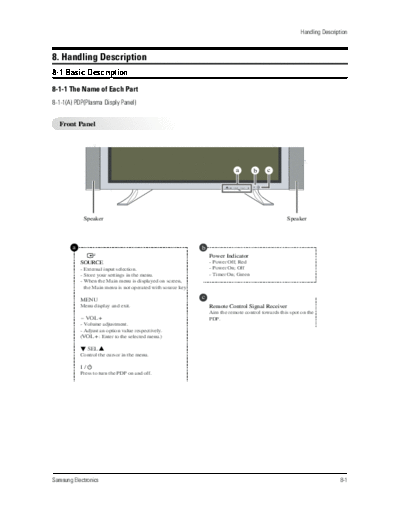
  Front Panel


                                                                               a       b     c


             Speaker                                                                                  Speaker


        a                                                      b
                                                                   Power Indicator
            SOURCE                                                 - Power Off; Red
            - External input selection.                            - Power On; Off
            - Store your settings in the menu.                     - Timer On; Green
            - When the Main menu is displayed on screen,
              the Main menu is not operated with source key.

            MENU                                               c
            Menu display and exit.                                 Remote Control Signal Receiver
                                                                   Aim the remote control towards this spot on the
            - VOL +                                                PDP.
            - Volume adjustment.
            - Adjust an option value respectively.
            (VOL + : Enter to the selected menu.)

             SEL ...
            Control the cursor in the menu.

            I/
            Press to turn the PDP on and off.


Samsung Electronics                                                                                                         8-1
Handling Description


  Rear Panel
◦ Jabse Service Manual Search 2026 ◦ Jabse Pravopis ◦ onTap.bg ◦ Other service manual resources online : Fixya ◦ eServiceinfo