Service Manuals, User Guides, Schematic Diagrams or docs for : Samsung Plasma PS42B430P2W chassis F65A ps42b430p2w Disassembly & Reassembly
<< Back | HomeMost service manuals and schematics are PDF files, so You will need Adobre Acrobat Reader to view : Acrobat Download Some of the files are DjVu format. Readers and resources available here : DjVu Resources
For the compressed files, most common are zip and rar. Please, extract files with Your favorite compression software ( WinZip, WinRAR ... ) before viewing. If a document has multiple parts, You should download all, before extracting.
Good luck. Repair on Your own risk. Make sure You know what You are doing.
Image preview - the first page of the document
>> Download Disassembly & Reassembly documenatation <<
Text preview - extract from the document
                                                                                                         Disassembly & Reassembly


3. Disassembly & Reassembly
3-1 Overall Disassembly & Reassembly


 !   Notice
     - Be sure to separate the power cord before disassembling the unit.
     - Discharge the capacitors first when separating PCB's with high capacity capacitors such as SMPS, X Main Board, Y Main
       Board, etc. (A spark may be generated by the electric charge, and there is danger of electronic shock.)
     - Check that the cables are properly connected referring to the circuit diagram when disassembling or assembling the unit
       taking care not to damage the cables.
     - Take care not to scratch the Glass Filter in the front.
     - Assemble the boards in the reverse order of the disassembly.
     - The plasma must be layed down on a flat padded surface for disassembly and reassembly.


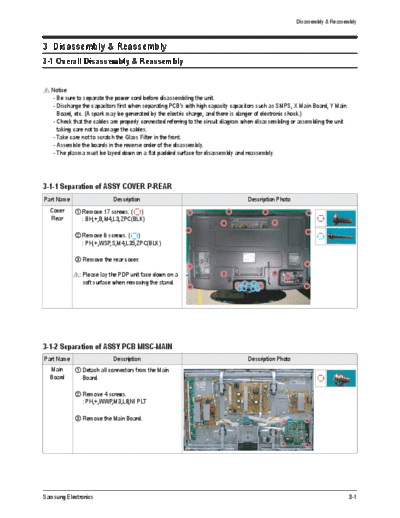
3-1-1 Separation of ASSY COVER P-REAR
Part Name                      Description                                           Description Photo
     Cover     Remove 17 screws. ( )
     Rear      : BH,+,B,M4,L3,ZPC(BLK)

               Remove 6 screws. ( )
               : PH,+,WSP,S,M4,L35,ZPC(BLK)

               Remove the rear cover.

              !   : Please lay the PDP unit face down on a
                    soft surface when removing the stand.


3-1-2 Separation of ASSY PCB MISC-MAIN
Part Name                      Description                                           Description Photo
     Main      Detach all connectors from the Main
     Board     Board.

               Remove 4 screws.
               : PH,+,WWP,M3,L8,NI PLT

               Remove the Main Board.


Samsung Electronics                                                                                                              3-1
Disassembly & Reassembly


3-1-3 Separation of FILTER-EMI AC LINE
Part Name                  Description          Description Photo
 FILTER-     Detach connector from SMPS.
   EMI
 AC LINE     Remove 2 screw. ( )
             : PH,+,WWP,M3,L8,NI PLT

             Remove 1 screws.(    )
             : BH,+,S,M4,L10,ZPC(BLK)

             Separate FILTER-EMI AC LINE from
             bracket.


3-1-4 Separation of BRACKET-PCB
Part Name                  Description          Description Photo
  Bracket    Remove screw.( )
   PCB       : BH,+,B,M4,L3,ZPC(BLK)

             Remove the BRACKET-PCB.


3-1-5 Separation of ASSY BRACKET
Part Name                  Description          Description Photo
  Bracket    Remove 2 screws. ( )
             : BH,+,PT,S Tite,M4,L10,ZPC(BLK)

             Remove 2 screws. ( )
             : BH,+,B,M4,L3,ZPC(BLK)

             Remove Bracket.


3-2                                                                 Samsung Electronics
                                                                                  Disassembly & Reassembly


3-1-6 Separation of ASSY BRACKET P-WALL
Part Name                      Description                    Description Photo
   Wall      Remove 2 screws. ( )
  Bracket    : BH,+,B,M4,L3,ZPC(BLK)

             Remove 4 screws. ( )
             : BH,+,S,M4,L10,ZPC(BLK)

             Remove Wall Bracket.

             !   : Please lay the PDP panel face down
                   on a soft surface when separating front
                   cover.


3-1-7 Separation of ASSY SPEAKER P
Part Name                      Description                    Description Photo
 Speaker     Remove 4 screws.( )
             : BH,+,WP,B,M4.0,L3,ZPC(BLK),
               SWRCH18A

             Remove the Speaker.


3-1-8 Separation of SMPS-PDP TV
Part Name                      Description                    Description Photo
  SMPS       Detach all connectors from the SMPS.

             Remove 6 screws.
             : PH,+,WWP,M3,L8,NI PLT

             Remove the SMPS.

            !    : Wear gloves when handling the power
                   board as there may be some remaining
                   electrical charge in the capacitor.
                   Specifically, avoid touching any part of
                   the capacitor.


Samsung Electronics                                                                                   3-3
Disassembly & Reassembly


3-1-9 Separation of ASSY PDP MODULE P-LOGIC MAIN BOARD
Part Name                  Description                   Description Photo
  Logic      Detach all connectors from the Logic
  Board      Main Board.

             Remove 2 screws.
             : WSP,PH,+,M3,L8,NI PLT

             Remove the Logic Main Board.


3-4                                                                          Samsung Electronics
                                                                                      Disassembly & Reassembly


3-1-10 Separation of ASSY PDP MODULE P-X MAIN BOARD
Part Name                              Description                         Description Photo
 Flat able    Detach all Connectors from the X Main Board.

              To separate the Flat Cable of the X-Board, press the
              upper and the lower sides of the connector.

             !   : Pinch the sides, but then push down in the ribbon, it
                   should slide out after that.


  X-Main      Remove 7 screws.
  Board       : PH,+,WWP,M3,L8,NI PLT

              Remove the X-Main Board.


  X-Main      Remove the X-Main Board.
  Board


Samsung Electronics                                                                                       3-5
Disassembly & Reassembly


3-1-11 Separation of ASSY PDP MODULE P-Y MAIN BOARD
Part Name                            Description                        Description Photo
Flat Cable  Detach the scan board connectors from the panel .


  Y-Scan     Remove 2 screws.
  Board      : PH,+,WWP,M3,L8,NI PLT


3-1-12 Separation of ASSY PDP MODULE P-ADDRESS BUFFER BOARD
Part Name                  Description                          Description Photo
  Buffer     Remove 3 screws.
  board      : PH,+,WWP,M3,L8,NI PLT
  shield
             Remove the still bar.


            Before removing the still bar, you should
            lift up the panel a little.


3-6                                                                                   Samsung Electronics
                                                                   Disassembly & Reassembly


3-1-13 Separation of ASSY PANEL BRACKETS
Part Name                 Description          Description Photo
  Panel      Remove 7 screws. ( )
 Brackets    : BH,+,B,M4,L3,ZPC(BLK)

             Remove the Side Panel Brackets.


Samsung Electronics                                                                    3-7
      MEMO


3-8          Samsung Electronics
◦ Jabse Service Manual Search 2026 ◦ Jabse Pravopis ◦ onTap.bg ◦ Other service manual resources online : Fixya ◦ eServiceinfo