Service Manuals, User Guides, Schematic Diagrams or docs for : Samsung TV CS29Z45 chassis KS7C CS29Z45MQTXXSE__KS7C 20061023162847421_ks7c-p-disas-12
<< Back | HomeMost service manuals and schematics are PDF files, so You will need Adobre Acrobat Reader to view : Acrobat Download Some of the files are DjVu format. Readers and resources available here : DjVu Resources
For the compressed files, most common are zip and rar. Please, extract files with Your favorite compression software ( WinZip, WinRAR ... ) before viewing. If a document has multiple parts, You should download all, before extracting.
Good luck. Repair on Your own risk. Make sure You know what You are doing.
Image preview - the first page of the document
>> Download 20061023162847421_ks7c-p-disas-12 documenatation <<
Text preview - extract from the document
                                                                                          Disassembly & Reassembly


12. Disassembly & Reassembly
12-1 Overhaul Disassembly & Reassembly
12-1-1 Disassembling the Cabinet
Part Name                             Description                             Description Photo
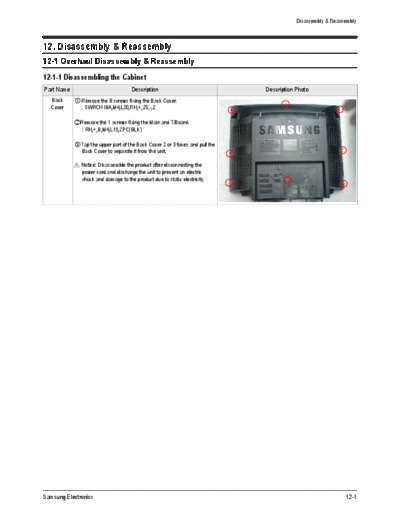
  Back       Remove the 8 screws fixing the Back Cover.
  Cover      : SWRCH18A,M4,L20,RH,+,2S,-,Z

            Remove the 1 screws fixing the Main and T/Board.
             : RH,+,B,M4,L15,ZPC(BLK)

             Tap the upper part of the Back Cover 2 or 3 times and pull the
             Back Cover to separate it from the unit.

               Notice: Disassemble the product after disconnecting the
               power cord and discharge the unit to prevent an electric
               shock and damage to the product due to static electricity.


Samsung Electronics                                                                                          12-1
Disassembly & Reassembly


12-1-2 Disassembling the CRT and Chassis
Part Name                             Description                               Description Photo
  Chassis    Separate the Ass'y Holder chassis from the Front Cabinet.
  Holder
             Pull the Chassis "Stopper-pcb" gently from left to right

               Notice: Pulling the Chassis Holder by force may damage
               "Stopper-pcb".


             Separate the Speakers, the Side AV wire and S-VHS wire,
             TBC wire from the Front Cabinet and the Main Board

               Notice: Since there is a clip to connect the Connector Header
               in the Wire Connector, pulling it by force may damage the clip
               or the connector. Press the clip down completely and pull the
               connector.


             Separate the D-Coil and power cable and the remote control
             sensor cable from the Main Board.

             To separate the Wire, Fixing clip and pressing the Wire.


             Separate the CRT Ass'y from the CRT.

             Separate the TBC wire, GND, VM cables from the CRT Ass'y
             sequentially.


12-2                                                                                            Samsung Electronics
                                                                                           Disassembly & Reassembly


Part Name                            Description                               Description Photo
  Chassis    Separate the Deflection cable from the Main Board.
  Holder
               Notice: Pulling it by force may damage the Deflection cable.
               Press the clip down completely and pull the Deflection cable.


             Separate the cables connecting the FBT and the CRT.

               Notice: Since there may be a remaining high-voltage current
               within th CRT, take care not to touch the CRT hole with metal
               or a part of yourself when separating the cables.


Samsung Electronics                                                                                           12-3
Disassembly & Reassembly


12-1-3 Disassembling the CRT Ass'y
Part Name                             Description                             Description Photo
 CRT Ass'y  Separate the cables from the Main Board and CRT Ass'y.


             Separate the wires from the FBT of the Main Board and the
             CRT Ass'y.
             To separate the thick red wires, pull the wires while pressing
             the push-type clip at the connector.
             To separate the thin red wire, insert a pin in the small hold
             next to the hole and pull the wire.


               Notice: Take care when separating the wires because pulling
               the wires by force may damage the socket. In addition, sepa-
               rate the wires on a flat and clean surface so as to prevent
               scratching of the material and the PCB.


12-4                                                                                          Samsung Electronics
                                                                   Disassembly & Reassembly


12-1-4 Disassembling the Main Board
Part Name                          Description         Description Photo
Main Board  Separate the cable from the Main Board.


             Separate the cable from the Main Board.


             Separate TBC wire from the Main Board.


Samsung Electronics                                                                   12-5
       MEMO


12-6          Samsung Electronics
◦ Jabse Service Manual Search 2026 ◦ Jabse Pravopis ◦ onTap.bg ◦ Other service manual resources online : Fixya ◦ eServiceinfo