Service Manuals, User Guides, Schematic Diagrams or docs for : Samsung TV CS29Z45 chassis KS7C CS29Z45MQTXXSE__KS7C 20061023162847421_ks7c-p-opera-11
<< Back | HomeMost service manuals and schematics are PDF files, so You will need Adobre Acrobat Reader to view : Acrobat Download Some of the files are DjVu format. Readers and resources available here : DjVu Resources
For the compressed files, most common are zip and rar. Please, extract files with Your favorite compression software ( WinZip, WinRAR ... ) before viewing. If a document has multiple parts, You should download all, before extracting.
Good luck. Repair on Your own risk. Make sure You know what You are doing.
Image preview - the first page of the document
>> Download 20061023162847421_ks7c-p-opera-11 documenatation <<
Text preview - extract from the document
                                                                Operation Instruction & Installation


11. Operation Instruction & Installation
11-1 Product Features and Functions
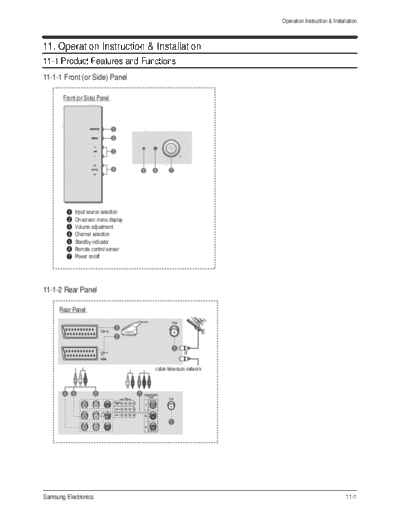
11-1-1 Front (or Side) Panel

       Front (or Side) Panel


            Input source selection
            On-screen menu display
            Volume adjustment
            Channel selection
            Standby indicator
            Remote control sensor
            Power on/off


11-1-2 Rear Panel

      Rear Panel


                                                   or

                                     cable television network


Samsung Electronics                                                                           11-1
Operation Instruction & Installation


11-1-3 Front (or Side) Panel


          Front (or Side) Panel


                                       S-Video input

                                       Video input

                                       Audio input


11-2                                                   Samsung Electronics
                                                         Operation Instruction & Installation


11-1-4 Remote Control

                        POWER                        INFO
                        Used to switch the TV        Used to view the
                        on and off.                  channel information and
                                                     setting status you
                        Numeric buttons              selected.
                        Used to select channels
                        directly.                    PRE-CH
                        -/--                         Used to switch
                        Used to select a channel     repeatedly between the
                        numbered ten or over.        last two channels
                        Press this button, then      displayed.
                        "--" symbol is               P    /
                        displayed. Enter the         Used to display the next
                        two-digit channel            or previous stored
                        number.                      channel.
                               /                     EXIT
                        Used to increase or          Used to exit from any
                        decrease the volume.         display or return to
                                                     normal viewing.
                        MENU
                        Used to display the on-      MUTE
                        screen menu or return to     Used to switch the
                        the previous menu.           sound off temporarily. To
                                                     turn the sound back on,
                          / / /                      press the MUTE, , or
                        Used to control the             button.
                        cursor in the menu.
                                                     ENTER
                        S.MENU                       While using the on-
                        Used to display the          screen menus, press the
                        sound menu.                  ENTER button to
                                                     activate (or change) a
                        TURBO                        particular item.
                        Used to select the turbo
                        sound option.                S.MODE
                                                     Used to select the
                        P.SIZE                       sound effect.
                        Used to change the
                        screen size.                 P.MODE
                                                     Used to select the
                        DUAL I-II                    picture effect.
                        Used to select the
                        sound mode.                  TV
                                                     Used to return to the TV
                        SOURCE                       mode when it is in
                        Used to display all of the   external input mode.
                        available video sources.
                                                     SLEEP
                                                     Used to select a preset
                                                     time interval for
                                                     automatic shut off.


Samsung Electronics                                                                    11-3
       MEMO


11-4          Samsung Electronics
◦ Jabse Service Manual Search 2026 ◦ Jabse Pravopis ◦ onTap.bg ◦ Other service manual resources online : Fixya ◦ eServiceinfo