Service Manuals, User Guides, Schematic Diagrams or docs for : panasonic Plasma TV TX-PR42G20 Firmware UpdateMethodEU
<< Back | HomeMost service manuals and schematics are PDF files, so You will need Adobre Acrobat Reader to view : Acrobat Download Some of the files are DjVu format. Readers and resources available here : DjVu Resources
For the compressed files, most common are zip and rar. Please, extract files with Your favorite compression software ( WinZip, WinRAR ... ) before viewing. If a document has multiple parts, You should download all, before extracting.
Good luck. Repair on Your own risk. Make sure You know what You are doing.
Image preview - the first page of the document
>> Download UpdateMethodEU documenatation <<
Text preview - extract from the document
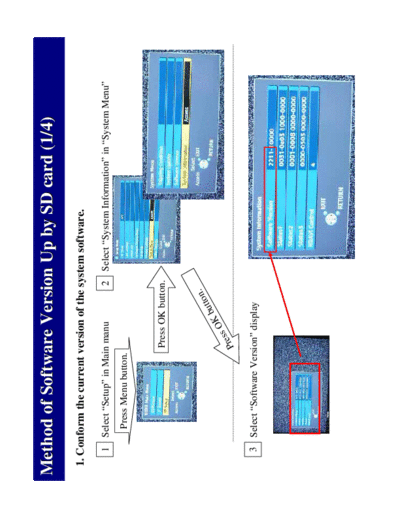
Method of Software Version Up by SD card (1/4)
 1. Conform the current version of the system software.

    1 Select "Setup" in Main manu                 2 Select "System Information" in "System Menu"
         Press Menu button.


                              Press OK button.


                                             n.
                                         utto
                                       Kb
                                 s   sO
                              Pre

    3 Select "Software Version" display
Method of Software Version Up by SD card (2/4)
 2. Power ON TV set. and insert the SD card for the update.

   1
                              Enlarging


                  It takes max 30 seconds.

   2
                              Enlarging


                  Press OK button.


    3
                              Enlarging


          Select "Yes" and press OK button.
Method of Software Version Up by SD card (3/4)

   4
                          Enlarging


            It takes about 5 minutes.


   5
                           Enlarging

                     1. Please remove the SD card from TV set.
                     2. Please turn off the main power of the TV set.
                     3. Please turn on the main power of the TV set.


   6
                         Enlarging
Method of Software Version Up by SD card (4/4)

                   It takes about 5 minute.
   7
                             Black out.

                             It takes about 10 seconds.


   8
                                                     Software successfully updated.
                                                     However, the message does not appear.


   9   Conform the new version of the system software. Refer to page 1/4.
◦ Jabse Service Manual Search 2026 ◦ Jabse Pravopis ◦ onTap.bg ◦ Other service manual resources online : Fixya ◦ eServiceinfo