Service Manuals, User Guides, Schematic Diagrams or docs for : . Car Manuals Acura 3.5RL 1996-2004 Approved srm RL9604D23052A
<< Back | HomeMost service manuals and schematics are PDF files, so You will need Adobre Acrobat Reader to view : Acrobat Download Some of the files are DjVu format. Readers and resources available here : DjVu Resources
For the compressed files, most common are zip and rar. Please, extract files with Your favorite compression software ( WinZip, WinRAR ... ) before viewing. If a document has multiple parts, You should download all, before extracting.
Good luck. Repair on Your own risk. Make sure You know what You are doing.
Image preview - the first page of the document
>> Download RL9604D23052A documenatation <<
Text preview - extract from the document
                Main Menu                  Table of Contents


Navigation System
 Forced Starting of Display                                     DVD-ROM Replacement
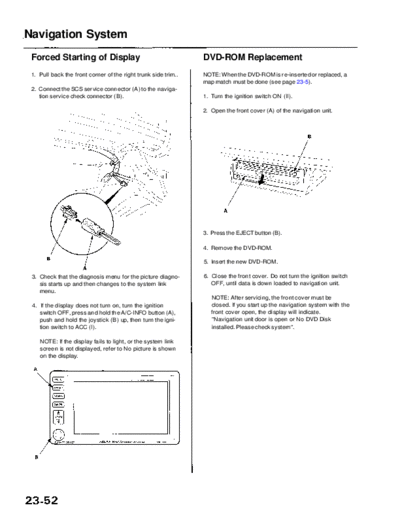
 1. Pull back the front corner of the right trunk side trim..   NOTE: When the DVD-ROM is re-inserted or replaced, a
                                                                map match must be done (see page 23-5).
 2. Connect the SCS service connector (A) to the naviga-
    tion service check connector (B).                           1. Turn the ignition switch ON (II).

                                                                2. Open the front cover (A) of the navigation unit.


                                                                3. Press the EJECT button (B).

                                                                4. Remove the DVD-ROM.

                                                                5. Insert the new DVD-ROM.

 3. Check that the diagnosis menu for the picture diagno-       6. Close the front cover. Do not turn the ignition switch
    sis starts up and then changes to the system link              OFF, until data is down loaded to navigation unit.
    menu.
                                                                   NOTE: After servicing, the front cover must be
 4. If the display does not turn on, turn the ignition             closed. If you start up the navigation system with the
    switch OFF, press and hold the A/C-INFO button (A),            front cover open, the display will indicate.
    push and hold the joystick (B) up, then turn the igni-         "Navigation unit door is open or No DVD Disk
    tion switch to ACC (I).                                        installed. Please check system".

    NOTE: If the display fails to light, or the system link
    screen is not displayed, refer to No picture is shown
    on the display.
◦ Jabse Service Manual Search 2026 ◦ Jabse Pravopis ◦ onTap.bg ◦ Other service manual resources online : Fixya ◦ eServiceinfo