Service Manuals, User Guides, Schematic Diagrams or docs for : . Car Manuals Acura 3.5RL 1996-2004 Approved srm RL9604S22056A
<< Back | HomeMost service manuals and schematics are PDF files, so You will need Adobre Acrobat Reader to view : Acrobat Download Some of the files are DjVu format. Readers and resources available here : DjVu Resources
For the compressed files, most common are zip and rar. Please, extract files with Your favorite compression software ( WinZip, WinRAR ... ) before viewing. If a document has multiple parts, You should download all, before extracting.
Good luck. Repair on Your own risk. Make sure You know what You are doing.
Image preview - the first page of the document
>> Download RL9604S22056A documenatation <<
Text preview - extract from the document
              Main Menu                Table of Contents


Climate Control Unit
 Face Panel/Button Replacement
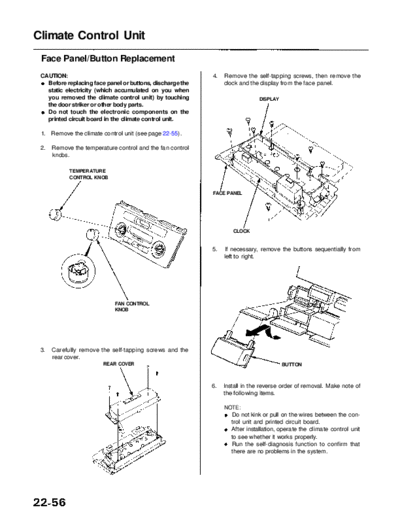
 CAUTION:                                                  4.   Remove the self-tapping screws, then remove the
   Before replacing face panel or buttons, discharge the        clock and the display from the face panel.
   static electricity (which accumulated on you when
   you removed the climate control unit) by touching                         DISPLAY
   the door striker or other body parts.
   Do not touch the electronic components on the
   printed circuit board in the climate control unit.

 1.   Remove the climate control unit (see page 22-55).

 2.   Remove the temperature control and the fan control
      knobs.

            TEMPERATURE
            CONTROL KNOB


                                                           FACE PANEL


                                                                   CLOCK


                                                           5.    If necessary, remove the buttons sequentially from
                                                                left to right.


                             FAN CONTROL
                             KNOB


 3.   Carefully remove the self-tapping screws and the
      rear cover.
                          REAR COVER                                                   BUTTON


                                                           6.   Install in the reverse order of removal. Make note of
                                                                the following items.

                                                                NOTE:
                                                                  Do not kink or pull on the wires between the con-
                                                                  trol unit and printed circuit board.
                                                                  After installation, operate the climate control unit
                                                                  to see whether it works properly.
                                                                  Run the self-diagnosis function to confirm that
                                                                  there are no problems in the system.
◦ Jabse Service Manual Search 2026 ◦ Jabse Pravopis ◦ onTap.bg ◦ Other service manual resources online : Fixya ◦ eServiceinfo