Service Manuals, User Guides, Schematic Diagrams or docs for : . Car Manuals Acura 3.5RL 1996-2004 Approved srm RL9604S23413A
<< Back | HomeMost service manuals and schematics are PDF files, so You will need Adobre Acrobat Reader to view : Acrobat Download Some of the files are DjVu format. Readers and resources available here : DjVu Resources
For the compressed files, most common are zip and rar. Please, extract files with Your favorite compression software ( WinZip, WinRAR ... ) before viewing. If a document has multiple parts, You should download all, before extracting.
Good luck. Repair on Your own risk. Make sure You know what You are doing.
Image preview - the first page of the document
>> Download RL9604S23413A documenatation <<
Text preview - extract from the document
               Main Menu                 Table of Contents
                                                             DVD-ROM ('00 - 01
Hard Disk ('96 - 99 Models)                                  Models)
 Replacement                                                  Replacement
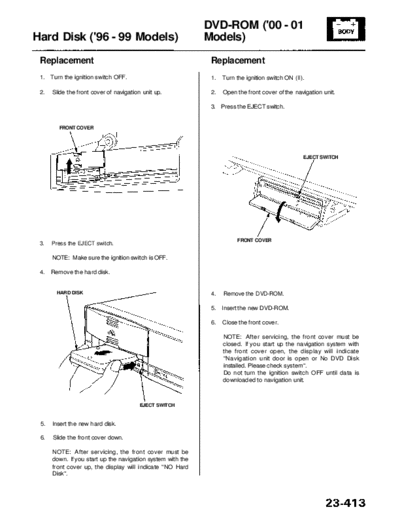
 1.   Turn the ignition switch OFF.                           1.   Turn the ignition switch ON (II).

 2.   Slide the front cover of navigation unit up.            2.   Open the front cover of the navigation unit.

                                                              3. Press the EJECT switch.


         FRONT COVER


                                                                                                   EJECT SWITCH


                                                                         FRONT COVER
 3.   Press the EJECT switch.

      NOTE: Make sure the ignition switch is OFF.

 4.   Remove the hard disk.


        HARD DISK                                             4.   Remove the DVD-ROM.

                                                              5. Insert the new DVD-ROM.

                                                              6.   Close the front cover.

                                                                   NOTE: After servicing, the front cover must be
                                                                   closed. If you start up the navigation system with
                                                                   the front cover open, the display will indicate
                                                                   "Navigation unit door is open or No DVD Disk
                                                                   installed. Please check system".
                                                                   Do not turn the ignition switch OFF until data is
                                                                   downloaded to navigation unit.


                                         EJECT SWITCH


 5.   Insert the new hard disk.

 6.   Slide the front cover down.

      NOTE: After servicing, the front cover must be
      down. If you start up the navigation system with the
      front cover up, the display will indicate "NO Hard
      Disk".
◦ Jabse Service Manual Search 2026 ◦ Jabse Pravopis ◦ onTap.bg ◦ Other service manual resources online : Fixya ◦ eServiceinfo