Service Manuals, User Guides, Schematic Diagrams or docs for : . Car Manuals Subaru Impreza 2001-2002.2004-2007 Approved Subaru Impreza 2004 WRX STi 06. BODY 02. HVAC SYSTEM (AUTO AC) (DIAGNOSTICS) 05. Diagnostics Chart for Self-diagnosis
<< Back | HomeMost service manuals and schematics are PDF files, so You will need Adobre Acrobat Reader to view : Acrobat Download Some of the files are DjVu format. Readers and resources available here : DjVu Resources
For the compressed files, most common are zip and rar. Please, extract files with Your favorite compression software ( WinZip, WinRAR ... ) before viewing. If a document has multiple parts, You should download all, before extracting.
Good luck. Repair on Your own risk. Make sure You know what You are doing.
Image preview - the first page of the document
>> Download 05. Diagnostics Chart for Self-diagnosis documenatation <<
Text preview - extract from the document
                           DIAGNOSTICS CHART FOR SELF-DIAGNOSIS
                                                                                HVAC SYSTEM (AUTO A/C) (DIAGNOSTICS)

5. Diagnostics Chart for Self-diagnosis
A: OPERATION

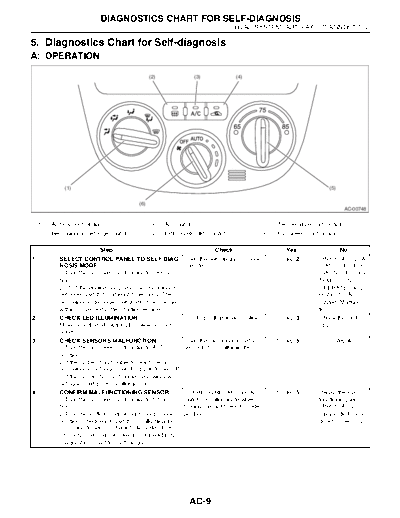
                                                (2)              (3)             (4)


              (1)                                                                                                     (5)


                                          (6)
                                                                                                                              AC-00748


    (1)   Air flow control dial                 (3)   A/C switch                             (5)   Temperature control dial
    (2)   Rear window defogger switch           (4)   FRESH/RECIRC switch                    (6)   Fan speed control dial

                             Step                                       Check                         Yes                  No
1           SELECT CONTROL PANEL TO SELF-DIAG-               Does the self-diagnosis mode      Go to step 2.
2           CHECK LED ILLUMINATION.                          Do all LED illuminate or blink? Go to step 3.        Check the switch
            Make sure that all switch LED blink on control                                                        LED.
            panel.
3           CHECK SENSORS MALFUNCTION.                       Does the rear window defog-       Go to step 5.      Go to step 4.
            1)Turn the fan speed control dial to AUTO        ger switch LED illuminate?
            position.
            2)If the system has trouble for each sensor,
            rear window defogger switch LED is turned off.
            3)If the system has no trouble, rear window
            defogger switch LED is illuminated.
4           CONFIRM MALFUNCTIONING SENSOR.                   Do FRESH/RECIRC and A/C           Go to step 5.      Repair the mal-
            1)Turn the fan speed control dial to 1st posi-   switch LED illuminate when                           functioning sensor.
            tion.                                            turning the dial to each mode
            according to sensor check table.


                                                               AC-9
                      DIAGNOSTICS CHART FOR SELF-DIAGNOSIS
HVAC SYSTEM (AUTO A/C) (DIAGNOSTICS)

                        Step                                         Check                    Yes                     No
5      CHECK MODE DOOR POSITION SIGNAL.                  Does the rear window defog-   Go to step 6.         Check the mode
       1)Turn the fan speed control dial to 2nd posi-    ger switch LED illuminate?                          door actuator cir-
       tion.                                                                                                 cuit.
6      CHECK BLOWER FAN OPERATION.                       Does the blower fan speed     Go to step 7.         Check the blower
       1)Turn the fan speed control dial to 3rd posi-    change?                                             motor circuit.
7      CHECK OPERATION OF EACH ACTUATOR, Does the operation of each                    Push the A/C          Repair the mal-
       BLOWER FAN AND COMPRESSOR                       mode match to operating mode    switch or turn the    function part
       CLUTCH.                                         table?                          ignition switch to    according to each
       1)Turn the fan speed control dial to 4th posi-                                  OFF, and finish       diagnostics chart.
       tion.                                                                           the self-diagnosis.
       2)Select the operating mode by turning air flow
       control dial.
       3)Check the operation of each mode according
       to operating mode table.
◦ Jabse Service Manual Search 2026 ◦ Jabse Pravopis ◦ onTap.bg ◦ Other service manual resources online : Fixya ◦ eServiceinfo