Service Manuals, User Guides, Schematic Diagrams or docs for : . Car Manuals Toyota Camry 1994.2002-2007 Approved Toyota Camry 2007 Hybrid 50 introduc howtouse
<< Back | HomeMost service manuals and schematics are PDF files, so You will need Adobre Acrobat Reader to view : Acrobat Download Some of the files are DjVu format. Readers and resources available here : DjVu Resources
For the compressed files, most common are zip and rar. Please, extract files with Your favorite compression software ( WinZip, WinRAR ... ) before viewing. If a document has multiple parts, You should download all, before extracting.
Good luck. Repair on Your own risk. Make sure You know what You are doing.
Image preview - the first page of the document
>> Download howtouse documenatation <<
Text preview - extract from the document
INTRODUCTION IN-41
HOW TO USE THIS MANUAL
1. BODY PANEL REPLACEMENT THIS MANUAL
BODY PANEL REPLACEMENT BP-34
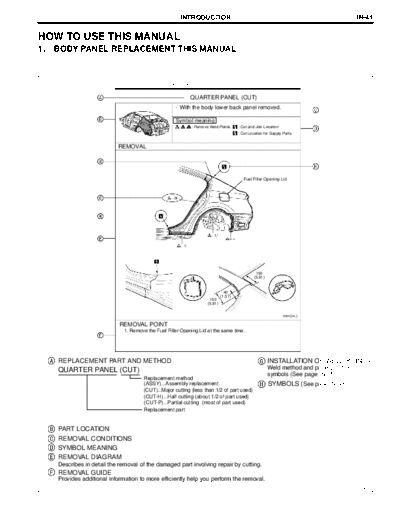
QUARTER PANEL (CUT)
@ With the body lower back panel removed.
Symbol meaning
: Remove Weld Points : Cut and Join Location
: Cut Location for Supply Parts
REMOVAL
Fuel Filler Opening Lid
150
(5.91)
40
(1.57)
150
(5.91)
mm (in.)
REMOVAL POINT
1. Remove the Fuel Filler Opening Lid at the same time.
REPLACEMENT PART AND METHOD INSTALLATION OF WELD POINTS
QUARTER PANEL (CUT) Weld method and panel position
symbols (See page IN-45)
Replacement method
(ASSY)...Assembly replacement SYMBOLS (See page IN-43)
(CUT)...Major cutting (less than 1/2 of part used)
(CUT-H)...Half cutting (about 1/2 of part used)
(CUT-P)...Partial cutting (most of part used)
Replacement part
PART LOCATION
REMOVAL CONDITIONS
SYMBOL MEANING
REMOVAL DIAGRAM
Describes in detail the removal of the damaged part involving repair by cutting.
REMOVAL GUIDE
Provides additional information to more efficiently help you perform the removal.
F33027
IN-42 INTRODUCTION
7
BP-36 BODY PANEL REPLACEMENT
Symbol meaning
: Mig Plug Weld : Spot Weld
: Body Sealer : Butt Weld
INSTALLATION
Fuel Filler Opening Lid
Rivets
5
(0.20)
mm (in.)
POINT
1.Before temporarily installing the new parts, apply body sealer to the wheel arch.
HINT
1) Apply body sealer evenly about 5 mm (0.20 in.) from the flange, avoiding any oozing.
2) Apply sealer evenly, about 3 - 4 mm (0.12 - 0.16 in.) in diameter.
2.Temporarily install the new parts and measure each part of the new parts in accordance with
the body dimension diagram. (See the body dimension diagram)
3.After welding, apply body sealer and undercoating to the corresponding parts.
SYMBOLS
INSTALLATION DIAGRAM
Describes in detail the installation to the new parts involving repair by welding and / or
cutting, but excluding painting.
INSTALLATIOLN GUIDE
Provides additional information to more efficiently help you perform the installation.
SYMBOLS (See page IN-43)
INSTALLATION OF WELD POINTS (See page IN-45)
Weld method and panel position symbols
PART NAME
F33026
INTRODUCTION IN-43
2. SYMBOLS
The following symbols are used in the welding diagrams in section BP of this manual to indicate cutting areas
and the types of weld required.
SYMBOLS MEANING SYMBOLS MEANING ILLUSTRATION
CUT AND JOIN LOCATION
(Saw Cut)
CUT AND JOIN LOCATION
(Cut Location for
Supply Parts)
CUT
CUT LOCATION
CUT WITH DISC
SANDER ETC.
BRAZE
BRAZE (Removal)
BRAZE
BRAZE
(Installation)
WELD -- SPOT WELD OR
POINTS MIG PLUG WELD
CONTINUOUS
MIG WELD
(BUTT WELD)
WELDING
CONTINUOUS
MIG WELD
(TACK WELD)
SEALER BODY SEALER
F33004
IN-44 INTRODUCTION
SYMBOLS MEANING SYMBOLS MEANING ILLUSTRATION
-- Assembly Mark --
BODY SEALER
-- (Flat Finishing)
--
BODY SEALER
-- (Flat Finishing)
F33005
INTRODUCTION IN-45
3. ILLUSTRATION OF WELD POINT SYMBOLS
EXAMPLE:
REMOVAL INSTALLATION
Weld points Weld points
Remove weld point and panel position Remove weld point and panel position
SYMBOLS MEANING ILLUSTRATION SYMBOLS MEANING ILLUSTRATION
Remove
Weld
Points Spot Weld
(Outside)
MIG Plug Weld
(Middle)
Spot MIG Weld
(Inside)
F33006
◦ Jabse Service Manual Search 2026 ◦ Jabse Pravopis ◦ onTap.bg ◦ Other service manual resources online : Fixya ◦ eServiceinfo