Service Manuals, User Guides, Schematic Diagrams or docs for : . Car Manuals Toyota Celica 1988-1989.1993-1994.2000 Approved Toyota Celica 2000 Toyota Celica 2000 Service Manual Electrical ARTICLE_ELECTRICAL_ALTERNATOR_DISASSEMBLY
<< Back | HomeMost service manuals and schematics are PDF files, so You will need Adobre Acrobat Reader to view : Acrobat Download Some of the files are DjVu format. Readers and resources available here : DjVu Resources
For the compressed files, most common are zip and rar. Please, extract files with Your favorite compression software ( WinZip, WinRAR ... ) before viewing. If a document has multiple parts, You should download all, before extracting.
Good luck. Repair on Your own risk. Make sure You know what You are doing.
Image preview - the first page of the document
>> Download ARTICLE_ELECTRICAL_ALTERNATOR_DISASSEMBLY documenatation <<
Text preview - extract from the document
Page 1 of 9

Disassembly and Reassembly

DISASSEMBLY


  ZOOM           SIZED FOR PRINT


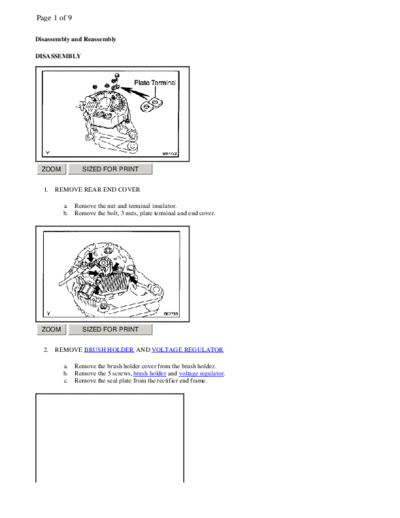
  1.   REMOVE REAR END COVER

         a.   Remove the nut and terminal insulator.
         b.   Remove the bolt, 3 nuts, plate terminal and end cover.


  ZOOM           SIZED FOR PRINT


  2.   REMOVE BRUSH HOLDER AND VOLTAGE REGULATOR

         a.   Remove the brush holder cover from the brush holder.
         b.   Remove the 5 screws, brush holder and voltage regulator.
         c.   Remove the seal plate from the rectifier end frame.
Page 2 of 9


 ZOOM           SIZED FOR PRINT


  3.   REMOVE RECTIFIER HOLDER

         a.   Remove the 4 screws and rectifier holder.
         b.   Remove the 4 rubber insulators.


 ZOOM           SIZED FOR PRINT


  4.   REMOVE PULLEY

         a.   Hold SST (A) with a torque wrench, and tighten SST (B) clockwise to the specified torque. SST 09820-63010
              Torque: 39 Nm (400 kg.cm, 29 ft.lb)
         b.   Check that SST (A) is secured to the rotor shaft.


 ZOOM           SIZED FOR PRINT
Page 3 of 9


        c.    Mount SST (C) in a vise.
        d.    Insert SST (B) into SST (C), and attach the pulley nut to SST (C).


 ZOOM            SIZED FOR PRINT


        e. To loosen the pulley nut, turn SST (A) in the direction shown in the illustration. NOTE: To prevent damage to
           the rotor shaft, do not loosen the pulley nut more than one-half of a turn.
        f. Remove the generator from SST (C).


 ZOOM            SIZED FOR PRINT


        g.    Turn SST (B), and remove SST (A and B).
        h.    Remove the pulley nut and pulley.


 ZOOM            SIZED FOR PRINT
Page 4 of 9


  5.   REMOVE RECTIFIER END FRAME

         a.   Remove the 4 nuts and wire clip.


 ZOOM            SIZED FOR PRINT


         b.   Using SST, remove the rectifier end frame. SST O9286-46011
         c.   Remove the generator washer from the rotor

  6.   REMOVE ROTOR FROM DRIVE END FRAME

REASSEMBLY


 ZOOM            SIZED FOR PRINT


  1.   INSTALL ROTOR TO DRIVE END FRAME

         a.   Place the drive end frame on the pulley.
         b.   Install the rotor to the drive end frame.
Page 5 of 9


 ZOOM            SIZED FOR PRINT


  2.   INSTALL RECTIFIER END FRAME

         a.   Place the generator washer on the rotor.


 ZOOM            SIZED FOR PRINT


         b.   Using a 29 mm socket wrench and press, slowly press in the rectifier end frame.


 ZOOM            SIZED FOR PRINT


         c.   Install the wire clip and 4 nuts. Torque: Nut A 4.5 Nm (46 kg.cm, 40 in.lb) Nut B 5.4 Nm (55 kg.cm, 48
              in.lb)
Page 6 of 9


 ZOOM            SIZED FOR PRINT


  3.   INSTALL PULLEY

         a.   Install the pulley to the rotor shaft by tightening the pulley nut by hand.
         b.   Hold SST (A) with a torque wrench, and tighten SST (B) clockwise to the specified torque. SST O9820-63010
              Torque: 39 Nm (400 kg.cm, 29 ft.lb)
         c.   Check that SST(A) is secured to the pulley shaft.


 ZOOM            SIZED FOR PRINT


         d.   Mount SST (C) in a vise.
         e.   Insert SST (B) into SST (C), and attach the pulley nut to SST (C).


 ZOOM            SIZED FOR PRINT
Page 7 of 9

         f. To torque the pulley nut, turn SST (A) in the direction shown in the illustration. Torque: 111 Nm (1,125
            kg.cm, 81 ft.lb)
         g. Remove the generator from SST (C).


 ZOOM            SIZED FOR PRINT


         h.   Turn SST (B), and remove SST (A and B).


 ZOOM            SIZED FOR PRINT


  4.   INSTALL RECTIFIER HOLDER

         a.   Install the 4 rubber insulators on the lead wires. NOTE: Be careful of the rubber insulators installation
              direction.
Page 8 of 9


 ZOOM            SIZED FOR PRINT


         b.   Install the rectifier holder while pushing it with the 4 screws Torque: 2.9 Nm (30 kg.cm, 26 in.lb)


 ZOOM            SIZED FOR PRINT


  5.   INSTALL VOLTAGE REGULATOR AND BRUSH HOLDER

         a.   Place the seal plate on the rectifier end frame.


 ZOOM            SIZED FOR PRINT


         b.   Place the voltage regulator and brush holder on the rectifier end frame. NOTE: Be careful of the holder
              installation direction.
         c.   Install the 5 screws. Torque: 2.0 Nm (20 kg.cm, 18 in.lb)
Page 9 of 9


  ZOOM             SIZED FOR PRINT


           d.   Place the brush holder cover on the brush holder.


  ZOOM             SIZED FOR PRINT


   6.   INSTALL REAR END COVER


 a Install the end cover and plate terminal with the bolt and 3 nuts.


Torque:
Nut 4.4 Nm (45 kg.cm, 39 in.lb)
Bolt 3.9 Nm (39 kg.cm, 35 in.lb)

   b.   Install the terminal insulator with the nut. Torque: 4.1 Nm (42 kg.cm, 36 in.lb)

           7.   CHECK THAT ROTOR ROTATES SMOOTHLY
◦ Jabse Service Manual Search 2026 ◦ Jabse Pravopis ◦ onTap.bg ◦ Other service manual resources online : Fixya ◦ eServiceinfo