Service Manuals, User Guides, Schematic Diagrams or docs for : . Car Manuals Toyota Celica 1988-1989.1993-1994.2000 Approved Toyota Celica 2000 Toyota Celica 2000 Service Manual Technical Service Bulletins TSB_DRL_REMOVE
<< Back | HomeMost service manuals and schematics are PDF files, so You will need Adobre Acrobat Reader to view : Acrobat Download Some of the files are DjVu format. Readers and resources available here : DjVu Resources
For the compressed files, most common are zip and rar. Please, extract files with Your favorite compression software ( WinZip, WinRAR ... ) before viewing. If a document has multiple parts, You should download all, before extracting.
Good luck. Repair on Your own risk. Make sure You know what You are doing.
Image preview - the first page of the document
>> Download TSB_DRL_REMOVE documenatation <<
Text preview - extract from the document
Page 1 of 4
Daytime Running Light - Disabling Procedure
ELECTRICAL
EL011-00

October 6, 2000

Title:
DAYTIME RUNNING LIGHT DISABLING PROCEDURE

Models:
All Models

Introduction
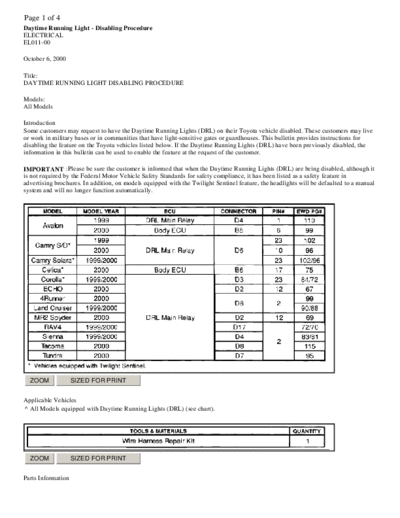
Some customers may request to have the Daytime Running Lights (DRL) on their Toyota vehicle disabled. These customers may live
or work in military bases or in communities that have light-sensitive gates or guardhouses. This bulletin provides instructions for
disabling the feature on the Toyota vehicles listed below. If the Daytime Running Lights (DRL) have been previously disabled, the
information in this bulletin can be used to enable the feature at the request of the customer.

IMPORTANT :Please be sure the customer is informed that when the Daytime Running Lights (DRL) are being disabled, although it
is not required by the Federal Motor Vehicle Safety Standards for safety compliance, it has been listed as a safety feature in
advertising brochures. In addition, on models equipped with the Twilight Sentinel feature, the headlights will be defaulted to a manual
system and will no longer function automatically.


  ZOOM              SIZED FOR PRINT


Applicable Vehicles
^ All Models equipped with Daytime Running Lights (DRL) (see chart).


  ZOOM              SIZED FOR PRINT


Parts Information
Page 2 of 4
NOTE :After referencing the chart, proceed to the repair procedure.


  ZOOM             SIZED FOR PRINT


Warranty Information

Repair Procedure

1. Disconnect the Battery.


  ZOOM             SIZED FOR PRINT


2. Use the locking pick tool from the wire harness repair kit and back out the terminal from the appropriate connector for the DRL
   Relay or Body ECU. See the Reference Chart as shown in this bulletin for pin and connector information.


  ZOOM             SIZED FOR PRINT


3. Insulate the removed terminal using vinyl electrical tape.
Page 3 of 4


  ZOOM           SIZED FOR PRINT


4. Secure the wire and terminal to the outside of the wire harness using vinyl electrical tape.
NOTE :For the 2000 MY Avalon, proceed to Step 5. For all remaining models, proceed to Step 6.

5. For 2000 model year Avalon:


  ZOOM           SIZED FOR PRINT


A. Order a new terminal with lead that is the same size and type as the terminal previously removed from the connector. (PN 82998-
   12690)


  ZOOM           SIZED FOR PRINT


B. Securely attach a 45 cm/ 18 in wire with an outside diameter of 2.0 mm or larger to the tail of the new terminal.


  ZOOM           SIZED FOR PRINT


C. Securely attach an eyelet with a hole size of 7 mm to the end of the new wire.
D. Insert the new terminal with lead into the Body ECU Connector B5, previously vacated by the original terminal.
Page 4 of 4


 ZOOM            SIZED FOR PRINT


E. Properly attach and route the new wire to the exterior of the existing wire harness in a manner that will not allow it to become
   damaged or come into contact with any other circuits.
F. Securely attach the eyelet to the existing ground point located in the left kick panel area. (Ground Point IF)
6. Check that the Daytime Running Light (DRL) operation has been disabled.
7. Reassemble any interior panels that were removed to gain access to components, connectors, etc.
◦ Jabse Service Manual Search 2026 ◦ Jabse Pravopis ◦ onTap.bg ◦ Other service manual resources online : Fixya ◦ eServiceinfo