Service Manuals, User Guides, Schematic Diagrams or docs for : . Car Manuals Toyota Tundra 2000-2006 Approved 04-06 techinfo.toyota.com ileaf 06toyrm 06toypdf 06rmsrc 06tundra di ata750ef dcc
<< Back | HomeMost service manuals and schematics are PDF files, so You will need Adobre Acrobat Reader to view : Acrobat Download Some of the files are DjVu format. Readers and resources available here : DjVu Resources
For the compressed files, most common are zip and rar. Please, extract files with Your favorite compression software ( WinZip, WinRAR ... ) before viewing. If a document has multiple parts, You should download all, before extracting.
Good luck. Repair on Your own risk. Make sure You know what You are doing.
Image preview - the first page of the document
>> Download dcc documenatation <<
Text preview - extract from the document
                                                                                             DI-983
                               DIAGNOSTICS   -   AUTOMATIC TRANSMISSION (A750E for 1GR-FE)
                                                                                              DIDV3-01


                                   DTC CHECK / CLEAR
                                   1.    CHECK DTC
                                   DTCs which are stored in the ECM can be displayed with the
                                   hand-held tester or generic OBD II scan tool.
                                   These scan tools can display pending DTCs and current DTCs.
                                   Some DTC aren't stored if the ECM doesn't detect a malfunc-
                                   tion during consecutive driving. However, the detected mal-
                                   function during once driving is stored as pending DTC.


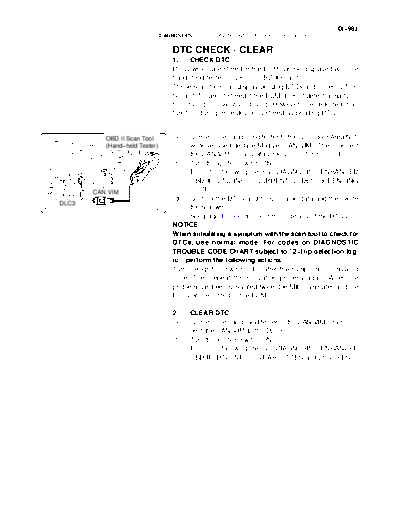
          OBD II Scan Tool         (a)   Connect the hand-held tester to the Controller Area Net-
          (Hand-held Tester)             work Vehicle Interface Module (CAN VIM). Then connect
                                         the CAN VIM to the Data Link Connector 3 (DLC3).
                                   (b) Turn the ignition switch ON.
                                   (c) Enter the following menus: DIAGNOSIS / ENHANCED
                                         OBD II / DTC INFO / CURRENT CODES (or PENDING
       CAN VIM                           CODE).
                                   (d) Confirm the DTCs and freeze frame data and then write
DLC3
                         D13872          them down.
                                   (e) See page DI-991 to confirm the details of the DTCs.
                                   NOTICE:
                                   When simulating a symptom with the scan tool to check for
                                   DTCs, use normal mode. For codes on DIAGNOSTIC
                                   TROUBLE CODE CHART subject to "2-trip detection log-
                                   ic", perform the following actions.
                                   Turn the ignition switch OFF after the symptom is simulated
                                   once. Then repeat the simulation process again. When the
                                   problem has been simulated twice, the MIL illuminates and the
                                   DTCs are recorded in the ECM.

                                   2.    CLEAR DTC
                                   (a)   Connect the hand-held tester to the CAN VIM. Then con-
                                         nect the CAN VIM to the DLC3.
                                   (b)   Turn the ignition switch ON.
                                   (c)   Enter the following menus: DIAGNOSIS / ENHANCED
                                         OBD II / DTC INFO / CLEAR CODES and press YES.
◦ Jabse Service Manual Search 2026 ◦ Jabse Pravopis ◦ onTap.bg ◦ Other service manual resources online : Fixya ◦ eServiceinfo