Service Manuals, User Guides, Schematic Diagrams or docs for : . Rare and Ancient Equipment DELMONICO Audio 4-TR-20-S Delmonico_4-TR-20-S_service_manual

<< Back | Home

Most service manuals and schematics are PDF files, so You will need Adobre Acrobat Reader to view : Acrobat Download Some of the files are DjVu format. Readers and resources available here : DjVu Resources
For the compressed files, most common are zip and rar. Please, extract files with Your favorite compression software ( WinZip, WinRAR ... ) before viewing. If a document has multiple parts, You should download all, before extracting.
Good luck. Repair on Your own risk. Make sure You know what You are doing.


Image preview - the first page of the document
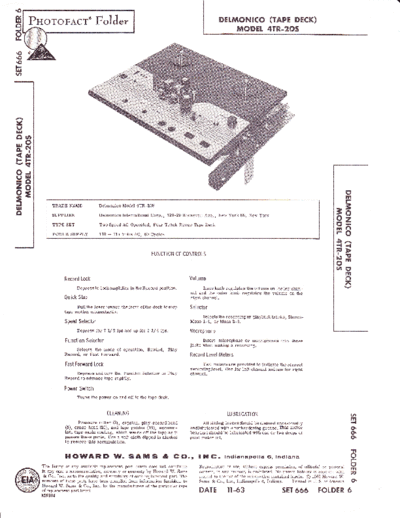
Delmonico_4-TR-20-S_service_manual


>> Download Delmonico_4-TR-20-S_service_manual documenatation <<

Text preview - extract from the document
d,
o PnoTo FAcr'
llr                                             FolJ"t                                                              DETMONTCO (TAPE DECK)
J                                                                                                                       MODET 4TR-2OS
o
t!
      i.i'iiilri:i:fi
      ,iiiii#
      L1.1.r1r..:i{i:


s


l
F
ur
t/t


YI
el
Erl
6 ral
H EI
< dt


gIl                                                                                                                                                                                  I
                                                                                                                                                                                     lr|


I
                                                                                                                                                                                     F


                                                                                                                                                                              ri
                        TRADE    NAME            Delmonico Model 4TR-20S

                        SUPPLIER                 Delmonico International Corp.        ,   120-20 Roosevelt   Ave., New York 68, New York
                        TYPE

                        POWER
                               SET
                                 SUPPLY
                                                 Two Speed AC Operated, Four Track Stereo Tape Deck

                                                 110        11?   Volts AC, 60 Cycles
                                                                                                                                                                              e=
                                                                                                                                                                              Fo
                                                       -
                                                                                                                                                                              Fa
                                                                                                                                                                              -l{
                                                                                                                                                                              p>
                                                                                FUNCTION OF CONTROLS
                                                                                                                                                                             gH
                                                                                                                                                                             latr'
                                                                                                                                                                                trt
                               Record Lock                                                         Volume                                                                       6
                                     Depress to lock amplifier in the Record position.                       Inner knob regulates the volume on the left chan-
                                                                                                                                                                                -
                                                                                                                                                                                2\
                                                                                                    nel and the outer knob regulates the volume on the
                               Quick Stop                                                           right channel.
                                     Pull the lever toward the front ofthe deck to stop             Selector
                               tape motion momentarily.
                                                                                                         Selects the recording or playbaek tracks, Stereo-
                               Speed Selector                                                       Mono 1-4, or Mono 2-3.
                                     Depress for 7     l/   2 ips and up   for 3 3/4 ips.           Microphone
                               Function Selector                                                          Insert microphone or microphones         into   these
                                                                                                    jacks when making a recording.
                                    Selects the mode of operation, Rewind, Play
                               Record, or Fast Forward.                                             Record Level Meters

                               Fast Forward Lock                                                          T\po metersare provided to indicate thecorrect
                                                                                                    recordinglevel. One for left channel andone for right
                                    Depress and turn the Function Selector           to Play        channel.
                               Record to advance tape rapidly.

                               Power Switch
                                     Turns the power on and off to the tape deck.


                                                       CLEANING                                                         LU BR I CATION                                                   vl
                                                                                                                                                                                         m
                                      Pressure   roller (2), capstan, play-record
                               (5), erase head (20), and tape guides (19), accumu-
                                                                                            head          AII sliding levers should be cleaned occasionally
                                                                                                    andlubricated with a nonhardening grease. This motor
                                                                                                                                                                                         -{
                               late tape oxide coating, which wears off the tape as it
                                                                                                                                                                                         o.
                               passes these parts. Use a soft cloth dipped in a"lcohql
                                                                                                    bearings should be lubrlcated with one or two drops of                               o.
                                                                                                    good motor oil.                                                                      o.
                               to remove this accumulation.

                                                                                                                                                                                         TI
                               HCDWARD W. SAlulS & tG(O.,                                               I tf G.        lndianapolis         i, lndiana                                   o
                                                                                                                                                                                         l-
                   The listing of any available replacement part herein does not constitute             Reproduction or use, without express permission, of editorial or pictorial
                                                                                                                                                                                         g
                                                                                                                                                                                         m
                   in any case a recommendation, warranty or guaranty by Howard W. Sams
                    & Co., Inc., as to the quality and suitability of such replacement part. The
                                                                                                        content, in any manner, is prohibited. No patent liability is assumed with
                                                                                                        respect to the use of the information contained herein. O 1963 Howard W.
                                                                                                                                                                                         n
                   numbers of these parts have been compiled from information fwnished to               Sams & Co., Inc., Indianapolis 6, Indiana. Printed in U. S. of America             o\
                   Howard W. Sams & Co., Inc., by the manufacturers of the particular type
                  of replacement part listed.
                  MN304
                                                                                                        DATE             II -63                     sET    666 FOTDER                 6
                                            OPERATI NG I NSTRUCTI ONS


To Record                                                     Qua rter-T rack Recordi ng

   1. Plaee a reel of tape on the supply (feft) spin-               One-fourth of the tape width ls recorded at a
      dle and thread the tape from left to right"
                                                              time, thereby resulting in four-track recording. This
                                                              four-track recording is aceomplished in the following
                                                              manner:
  2.    Select the desired speed.

  3.    Connect the sound source to the tape deck am-
                                                                 1.   Thread the tape.
        plifier.                                                 2.   Turn Selector to Mono. 1-4.
  4.    Select the proper tracks to record onl Stereo
        Mon. l-4, or Mon. 2-3.                                   3.   Proceed as described under "To Record".
  5.    Depress the Record Lock and turn the Function            4. Afterthe flrsttrack isrecorded, andall thetape
        Selector to Play-Record simultaneously.                       wound onto the takeup   reel, return the Function
                                                                      Selector to StoP.
  6. Turn    volume control(s) until the record level
        meter(s) fluctuate in the correct area of the            5.   Remove the reels, turn them over, place t}te full
        meter(s).                                                     reel on the supply (tett) splndle, rethread, the
                                                                      tape and continue the recording.
  7.    To stop recording, return Function Selector to
        the Stop position.                                       6. After this track,   which is track 4, is recorded,
                                                                      return the Function Selector to Stop.
Ravind
                                                                 7.   Turn the Selector to Mono. 2-3.
        Turn Function Selector to Rewind to rewind the
tape onto the supply reel"                                       8.   Remove the    reels, turn them over, place the
                                                                      full reel on the supply (left) spindle,. rethread
Fast Forward                                                          the tape, and continue the recording.
      Depress the Fast Forward Lock and simultan-                9. After this track,     whlch is track   2, ls recorded,
eously turn the Function Seleetor to play-Record po-                  turn the Frietion Selector to Stop.
sition to advance the tape to a desired spot rapidly.
                                                                10. Remove the reels, turn them over, place the
Playing a Recorded Tape                                             full reel on the supply (left) spindle, rethread
                                                                      the tape, and contlnue recording.
   1.   Place the reel of tape on the supply spindle (left)
        and thread the tape from left to right.                 11. The tape may be played back in the same man-
                                                                      ner.
   2.   Select the correct speed.
                                                                                   ADJUSTMENTS
  3.    Turn Selector to the positionwhich corresponds
        to the tape.                                          Play-Record Head
   4.   Turn Function Seleetor toPlay-Record position.              The recording head (5) must be aligned with the
                                                              tape. If it is not, low output, loss of high frequencies,
   5.   Adjust the volume control(s)to desired listening      or track overlap may result. To align the head, ad-
        level.                                                iust as follows:
Eras i ng Recorded Material                                      1.   Thread an alignment tape onto the recorder.

      Any recording is automatically erased before a             2.   Adjust the three spring-Ioaded mounting screws
new recording is put on the tape when  it is in Record                until the top of the tape is aligned evenly with
position. To erase a recording without putting new                    the top edge of the record head lamination.
material on the tape, proceed as follows:
                                                                 3. To adjust for maximum freguency         response,
   1.   Thread the tape.                                              adjust the two front spring-loaded screws.
   2.   Turn Selector to tracks to be erased.                    4.   Recheck the head height.

   3.   Turn the volume control to its minimum counter-       Erase Head
        c,lockwise position.
                                                                 1.   Thread a tape onto the recorder.
   4. Depress the Reeord Lock and simultaneously
        turn Function Selector to Play-Record position.          2" Adjust the three sprtng-loaded screws             until
                                                                      the erase head is parallel with the tape and the
   5. Use same procedure to erase the           remaining             top edge of the tape is aligned evenly with the
      tracks if so desired.                                           top edge of the erase head lamination.


◦ Jabse Service Manual Search 2026 ◦ Jabse PravopisonTap.bg ◦ Other service manual resources online : FixyaeServiceinfo