Service Manuals, User Guides, Schematic Diagrams or docs for : . Various Eeprom Programmer CH341A Mini Programmer (Black Edition) By_NSC 24xxx_usb_manual
<< Back | HomeMost service manuals and schematics are PDF files, so You will need Adobre Acrobat Reader to view : Acrobat Download Some of the files are DjVu format. Readers and resources available here : DjVu Resources
For the compressed files, most common are zip and rar. Please, extract files with Your favorite compression software ( WinZip, WinRAR ... ) before viewing. If a document has multiple parts, You should download all, before extracting.
Good luck. Repair on Your own risk. Make sure You know what You are doing.
Image preview - the first page of the document
>> Download 24xxx_usb_manual documenatation <<
Text preview - extract from the document
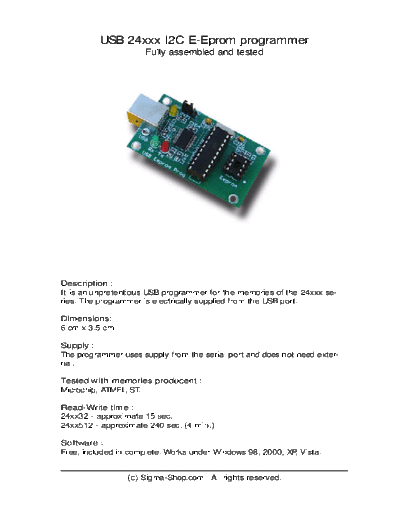
          USB 24xxx I2C E-Eprom programmer
                      Fully assembled and tested


Description :
It is an unpretentious USB programmer for the memories of the 24xxx se-
ries. The programmer is electrically supplied from the USB port.

Dimensions:
6 cm x 3.5 cm

Supply :
The programmer uses supply from the serial port and does not need exter-
nal.

Tested with memories producent :
Microchip, ATMEL, ST.

Read-Write time :
24xx32 - approximate 15 sec.
24xx512 - approximate 240 sec. (4 min.)

Software :
Free, included in complete. Works under Windows 98, 2000, XP, Vista.


                 (c) Sigma-Shop.com    All rights reserved.
Complete includes :
- USB programmer
- Software
- USB cable


               (c) Sigma-Shop.com   All rights reserved.
SMD mounted EEPROM's :
This programmer can be easily adapted to
work with SMD mounted EEPROM using one
8 PIN socket and several finely wires.


Disclaimer :
In no event the author will be liable to you for damages, including any gen-
eral, special, incidental or consequential damages arising out of the use or
inability to use the program (including but not limited to loss of data or data
being rendered inaccurate or losses sustained by you or third parties or a
failure of the program to operate with any other programs), even if such
holder or other party has been advised of the possibility of such damages.


                  (c) Sigma-Shop.com      All rights reserved.
List of devices which programmer supports :

24C00             24C32
24AA00            24LC32A
24LC00            24AA32A
24C01
24C01C            24AA52
24AA01            24LCS52
24LC01B
                  24C64
24AA014           24LC64
24LC014           24AA64
                  24FC64
24C02
24C02C            24C65
24AA02            24LC65
24LC02B           24AA65

24AA024           24C128
24LC024           24AA128
                  24LC128
24AA025           24FC128
24LC025
                  24C256
24C04             24LC256
24AA04            24AA256
24LC04B           24FC256

24C08             24C512
24AA08            24AA512
24LC08B           24LC512
                  24FC512
24C16
24AA16            24AA515
24LC16B           24LC515
                  24FC515
24LC21
24LC21A           24C1024
24LCS21A          24LC1024

24LC22A           24AA1025
24LCS22A          24FC1025
                  24LC1025


               (c) Sigma-Shop.com   All rights reserved.
Drivers and software instalation :

First you have to download the drivers from here:
http://www.ftdichip.com/Drivers/VCP.htm

Unzip it to your own folder ......


When you connect the programmer, the following message appears: FOUND
NEW HARDWARE and drives need to be installed.

When you connect the programmer to the PC the red and green LED flashes
2,3 times and turn off. When the red LED and the green LED flashes means
that there is a communication between the programmer and PC.


1. Drivers' installation:


                    (c) Sigma-Shop.com   All rights reserved.
(c) Sigma-Shop.com   All rights reserved.
After the drivers' installed, an additional COM port appears in the Device
Manager of Windows- usually it is COM3 :


                  (c) Sigma-Shop.com     All rights reserved.
(c) Sigma-Shop.com   All rights reserved.
Windows allow you to change the number of the COM port, where the pro-
grammer is connected.


                (c) Sigma-Shop.com    All rights reserved.
Drivers' installation finishes with those steps.


3. Download the lates version of software KEEProg_24xxx from :
http://www.sigma-shop.com/software/keeprog/

Unzip it to your own folder ......

Then start the software : KEEProg.exe

If everything is ok this message should appear:


                    (c) Sigma-Shop.com     All rights reserved.
If you get this message you see the following error :


that means that you do not have the latest version of Microsoft .NET Frame-
work installed on your computer.

The program has to be installed on your computer in order to use the pro-
grammer.

You can download this from :
http://www.microsoft.com/downloads/
details.aspx?FamilyId=333325FD-AE52-4E35-B531-
508D977D32A6&displaylang=en


When you start the software it automatically recognizes the COM port.


                  (c) Sigma-Shop.com    All rights reserved.
When you click on about the version of the programmer, the followng ap-
pears - KEEProg 24xx 1.0.


If something is wrong with the installation then nothing appears in these
fields.


                  (c) Sigma-Shop.com    All rights reserved.
◦ Jabse Service Manual Search 2026 ◦ Jabse Pravopis ◦ onTap.bg ◦ Other service manual resources online : Fixya ◦ eServiceinfo